Activity
Mon
Wed
Fri
Sun
Jan
Feb
Mar
Apr
May
Jun
Jul
Aug
Sep
Oct
Nov
Dec
What is this?
Less
More
Memberships
Learn Microsoft Fabric
14.3k members • Free
15 contributions to Learn Microsoft Fabric

Aug '24 •
Notebooks in Fabric
I have a notebook that outputs I would like it to be the outputs to go a table that I can leverage in a powerbi model have anyone done that in fabric that can give me some tips ?

2 likes • Aug '24
Hi @Liliana Torres You can use the below syntax in notebook to write to the data lakehouse Delta table. Df.write.saveAsTable(tablename)

🚀
Aug '24 •
BIG NEWS - two security features now available on all Capacity SKUs
Big announcement yesterday: Use Trusted workspace access and Managed Private endpoints in Fabric with any F capacity and enjoy the benefits of secure and optimized data access and connectivity As the name suggested, you can now use Trusted Workspace Access and Private Endpoints on any F-SKU capacity. Previously it was reserved for F64 and above, so it's great that they are now making these features available to everyone. From the article: - Trusted workspace access allows seamless and secure access to firewall enabled Azure storage accounts. It is designed to help you securely and easily access data stored in Storage accounts from Fabric workspaces, without compromising on performance or functionality. This feature extends the power and flexibility of OneLake shortcuts to work with data in protected storage accounts in place without compromising on security. You can also use this capability with Data pipelines and the COPY INTO feature of Fabric warehouses to ingest data securely and easily into Fabric workspaces. To get started with this feature and to learn about limitations, see Trusted workspace access in Microsoft Fabric – Microsoft Fabric | Microsoft Learn. This feature can be used in any F capacity. - Managed private endpoints provide secure connectivity from Fabric to data sources that are behind a firewall or not accessible from the public internet. Managed Private Endpoints enable Fabric Data Engineering items to access data sources securely without exposing them to the public network or requiring complex network configurations. Managed private endpoints are supported for various data sources, such as Azure Storage, Azure SQL Databases, and many others – the most recent addition being Azure Event Hub and Azure IOT Hub. To learn more about Managed Private Endpoints and supported data sources see Overview of managed private endpoints for Microsoft Fabric – Microsoft Fabric | Microsoft Learn. This feature can be used in any F capacity as well as Trial capacity.
0 likes • Aug '24
Thanks for sharing
🚀
Jul '24 •
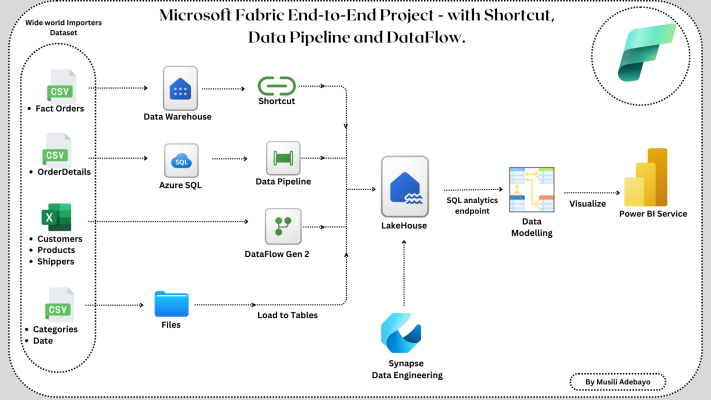
End-to-end Fabric tutorial by Musili
@Musili Adebayo has created a great end-to-end project, check it out here 👉🔗 View on Medium 👉🔗 View on LinkedIn As Musili mentions in the article, the project showcases the following: 1. Create a New Lakehouse. 2. Get data into the Lakehouse using various methods of data ingestion such as Shortcut, Data Pipeline, DataFlow, and File Upload. 3. Perform Data Modelling. 4. Finally, Data Visualization of the ingested table (Optional). Great job Musili!!
1 like • Jul '24
Thanks @Will Needham
Jul '24 •
DB mirroring from an On-Premises SQL Server database to a Fabric:
Hi All, Do you know when Microsoft will release a way to mirror a database from an On-Premises SQL Server database to a Fabric Data Lakehouse? What is the best way (no code way) to load data from an on-premises SQL Server database into a Fabric data lakehouse? Thanks,
0 likes • Jul '24
Thanks Will
🚀
Jul '24 •
Introducing Lakehouse Schemas 👀(public preview)
A new (long awaited) feature has been released, but we are still waiting for a official release blog - but here is a documentation page for the feature. It's the ability to create Schemas in a Lakehouse! Traditionally, it was only the Data Warehouse you could create schemas. But now it's possible in the Lakehouse too. This opens up a lot of different possible architectural patterns! Have a play around and see what you think. When you create a new Lakehouse, you will have the option to select 'Lakehouse Schemas'. Then, when you open your Lakehouse, you will see a few new options: - New schema - New schema shortcut (interesting!)

0 likes • Jul '24
Great Share, Thanks @Will Needham
1-10 of 15

Active 5d ago
Joined Jun 20, 2024
Powered by