Activity
Mon
Wed
Fri
Sun
Jan
Feb
Mar
Apr
May
Jun
Jul
Aug
Sep
Oct
Nov
Dec
What is this?
Less
More
Memberships
8 contributions to Learn Microsoft Fabric

🚀
Apr 28 •
Understanding Direct Lake v2.0
Hey everyone, at FabCon 2025, Microsoft announced some updates/ extensions to the functionality of the Direct Lake semantic model storage mode. Some people are calling this Direct Lake 2.0 (but I think this is not the official terminology). What's the difference? The original Direct Lake connects to the SQL Endpoint, and the new Direct Lake 2.0 connects directly to the Delta Tables. This has a number of benefits: - it allows you create Direct Lake semantic models with more than one source - it by-passes the SQL Endpoint (which can cause problems, with syncing issues etc) - I believe it was an essential step also for security/ access reasons, when they role out OneLake Security - it will allow you to propogate OneLake security definitions into the semantic model layer (without the need to redefine RLS/ CLS permissions etc in the semantic model). You can learn more with this video from Data Mozart: https://www.youtube.com/watch?v=Z0tgA_pYK1s

0 likes • Apr 28
@Lori Keller I can see your point. We have all in apps, stayed also in the MS corner of the ring until now. Have need for Sparks driven by notebooks and run by a pipeline for efficient processing of a new data stream coming in. And the data is complex so switched to do it in Python this time.
0 likes • Apr 30
@Will Needham Already live? Since yesterday I have production code failing which worked before, even simplifying to a regular one (no haversine calculations, no views or old statistics etc.) keeps failing: INSERT INTO #BSPTable ( [SQNR], [DAIS], [TDNR], [TRNN], [ORAC], [DSTC], [CouponPrice], [OracLat_Raw], [OracLon_Raw], [DstcLat_Raw], [DstcLon_Raw] ) SELECT BKI63.[SQNR], BKI63.[DAIS], BKI63.[TDNR], BKI63.[TRNN], BKI63.[ORAC], BKI63.[DSTC], 0, APOrac.Latitude, APOrac.Longitude, APDstc.Latitude, APDstc.Longitude FROM [BSP].ItineraryDataSegment AS BKI63 LEFT JOIN [BSP].OracFlightsAirports AS APOrac ON BKI63.[ORAC] = APOrac.IATA LEFT JOIN [BSP].[DstcFlightsAirports] AS APDstc ON BKI63.[DSTC] = APDstc.IATA -- WHERE clause might be applied here if needed, or later WHERE BKI63.[TRNN] IN ('000010','000035','000068','000114','000140','000141') -- Example filter ; Msg 15816, Level 16, State 7, Line 115The query references an object that is not supported in distributed processing mode. Aware that temp tables can become a culprit when using too much complexity in the following code, but this stuff was working before, that is the annoying part.
Nov '24 •
Autosave Failing
Anyone noticing that when working in Pipelines, maybe other places as well, the autosaves don't work well. Had a couple times now I lost changes and today lost an hour of work. Do I really have to leave the page every couple of minutes to be gentle with autosave. Or does the Fabric portal favor certain browsers? To be clear you save changes in a pipeline with save, but while you are building something and go away from your screen or check another tab for info etc. and then on return the tab has lost the changes you made so you can't save them anymore. So back to old skool habits, save very regularly.

Aug '24 •
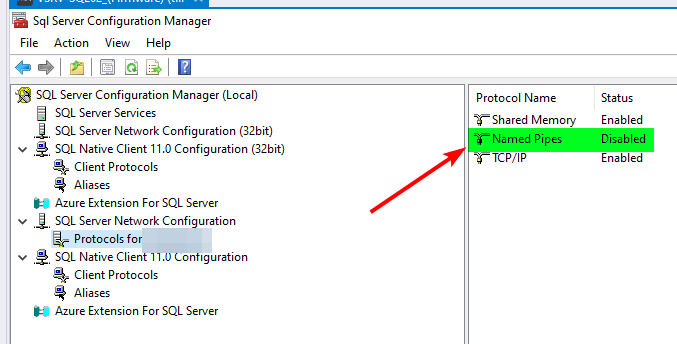
SOLVED : Named pipes <> TCP/IP
Hi all, I'm setting up a 'Dataflow Gen2' from an on prem sql to a WH in fabric. I can get my queries from the local DB, but when I want to configure a data destination, I get this error the moment I want to create the destination table. The error says it wants to connect to the server through named pipes, but named pipes is not enabled on the server. I don't manage the server, so I don't know why it is not enabled and if the managing party want to enable it. Is there a way to use TCP/IP for this? TCP/IP worked in the first step, so why not here....?
2 likes • Nov '24
Be aware that Fabric has multiple URL's to enter, so port 1433 needs to be open on multiple of them, you notice this when running SSMS / ADS on prem sitting behind a corporate firewall instead of working from home. Microsoft has a support page for this.
Nov '24 •
TMDL Editor in Visual Studio Code
And now the fun really begins: https://www.youtube.com/watch?v=eZgoV_FHRmk TMDL, tabular editor, DevOps, project based instead pibx, Visual Studio Code, 2025 will be fun :-)
3 likes • Nov '24
if it is unfinished as current deployment pipelines (DP), I say keep it and cover first your base before moving on, at least take care that automatic binding isn't auto and could be FULLY parameter driven. Lots of folks using DFG2 would then happily also test this to, like me!
1 like • Nov '24
@Will Needham Thx for asking! Having different data streams from separate Service Bus queues for the Dev / Sta / Prd, I need to be able to make sure that pipelines and semantic models have bindings to the proper data sources. Likewise ADF I expected parameters to handle this. I am aware you can go the proxy route or hack beneath the given current gui, but it is ugly and it feels like the auto binding behavior is more a temporary bandage than a given solution. So don't get me wrong I am not bad mouthing here, else I would have waited for a year longer with already moving from ADF to Fabric. Nevertheless now it's just a very simple Bronze/Silver/Gold implementation. In short we are first going to test with hardcoding the source and there use variables which are tied to the parameters we do have available in the dev pipelines and take it from there until we have proven solutions for all our adventures on the road to implement the architecture we have in mind for our needs and wishes ;-)
1-8 of 8

@arjan-van-buijtene-8328
In this way we all here can motivate each other, which is like a winning tactic being played off the board :-)
Active 18d ago
Joined Aug 15, 2024
Powered by