Activity
Mon
Wed
Fri
Sun
Jun
Jul
Aug
Sep
Oct
Nov
Dec
Jan
Feb
Mar
Apr
What is this?
Less
More
Memberships
IA Masters Essentials
6.3k members • Free
IA Masters Academy
868 members • $10,000/month
Emprendedores.com
8.1k members • Free
AIlink Free
9.6k members • Free
AI Automation Society
350.3k members • Free
AndyNoCode
33.1k members • Free
NeuraSolve AI Community
303 members • Free
5minAI
2.9k members • Free
Éxito con IA
1.5k members • Free
2 contributions to AI Automation Society

Jan '25 •
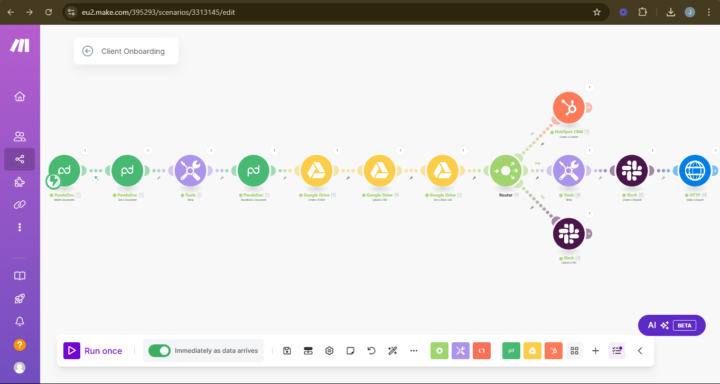
Automated Client Onboarding Flow – What Do You Think?
Hey fam! 👋 Let me know if you'd want something like this or more advanced. I'm here to handle that. OPEN FOR COLLABS. I just wrapped up building this client onboarding automation in Make.com, and I’m stoked to share it with you all. 🙌 This flow is designed to take the hassle out of onboarding and replace it with a smooth, hands-free experience that wows clients from the start. Here’s a quick breakdown of how it works: The Flow 1️⃣ Trigger: Contract Signing : The magic starts when a client signs their contract on PandaDoc. No delays—this kicks off the workflow instantly. 2️⃣ Download the Document : The signed contract is automatically fetched and downloaded. No more digging through emails or file systems! 3️⃣ Create a Google Drive Folder : A new folder (named dynamically for the client) is created in Google Drive, keeping everything organized from the start. 4️⃣ Upload & Share : The signed contract is uploaded to the folder, and a shareable link is generated—ready to be shared with the client or team. 5️⃣ Add the Client to CRM : The client’s details are added directly to HubSpot CRM, ensuring everything is tracked without manual input. 6️⃣ Slack Integration - A dedicated Slack channel is created for the client. - The contract is uploaded to the channel for easy team access. - Notifications go out so everyone’s in the loop. - 7️⃣ Custom Actions via HTTP Requests : This step is a wildcard! It’s where you can plug in extra features like triggering external tools or sending custom notifications. Why This is a Game-Changer - Zero Manual Work: Every step is automated—no need to touch a single file or email. - Impress Clients Instantly: From their perspective, everything feels seamless and professional. - Scalable: Whether you’re onboarding 1 client or 100, this flow can handle it. - Time-Saving for You: Spend less time on admin tasks and more time on high-impact work. Here’s a snapshot of the flow: What Do You Think? I’d love your feedback!

0 likes • Feb '25
Looks very good. I was wondering what it would like in N8N….Iwill give it a thought.. but ideally it would be an AI agent to to do all the work.. Best

💎
⭐
Feb '25 •
🚀New Video: This Trick Helps me Build Agents 3x Faster (as a beginner)
Building AI Agents in n8n can be slow and frustrating—but with the right approach, you can speed up the process 3X faster! In this video, I’m discussing the method I use to streamline agent development, making it quick and effortless to connect tools and get them working seamlessly. We’re diving into how to use the powerful $fromAI function—a game-changer for dynamically handling AI responses and automating workflows with ease. If you’re building AI agents in n8n, mastering $fromAI will save you hours of troubleshooting and make connecting tools to agents feel effortless.
4 likes • Feb '25
That’s great tutorial @Nate Herk , just to be sure I get it right, when you type send an email to Nate, where does the agent get email address from (outlook) and the other one, if anyone from Europe or with different time zone , when you want to setup a calendar tool make sure you location is set correctly in the setting menu, otherwise you will receive and send invite at the time of the setting of your workflow! Thanks
1 like • Feb '25
@Akita Versiontwo 😆 agree, but also you need to do it as fast as the video goes.. 🙃
1-2 of 2

Active 1d ago
Joined Jan 24, 2025
Powered by