Activity
Mon
Wed
Fri
Sun
Jun
Jul
Aug
Sep
Oct
Nov
Dec
Jan
Feb
Mar
Apr
What is this?
Less
More
Owned by Amos
I help co-parenting dads stop taking conflict personally, communicate child‑first, and rediscover joy in fatherhood without getting lost in the chaos.
Memberships
Skool Nerds
14 members • Free
Psychological Flexibility 💫
202 members • Free
The RoboNuggets Network (free)
47.1k members • Free
Skoolers
193.1k members • Free
Skool Dads
88 members • Free
The Engaged Father Project
106 members • Free
Skool Extensions 🧩
425 members • Free
The ADHD Coach
133 members • Free
Skool Friends Live
108 members • Free
1 contribution to Skool Extensions 🧩

🔥
Mar 13 •
Calendar
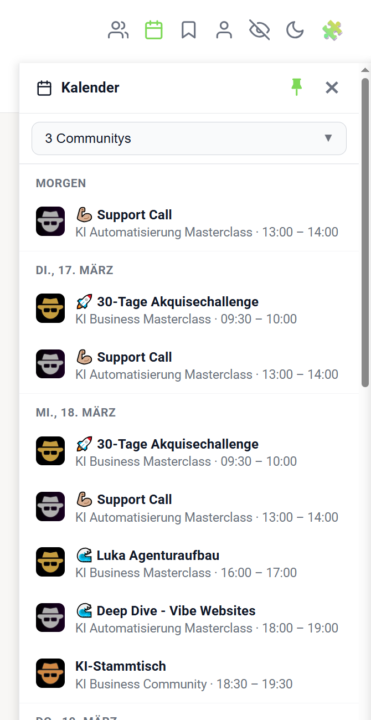
𝗖𝗮𝗹𝗲𝗻𝗱𝗮𝗿 — 𝗔𝗹𝗹 𝗬𝗼𝘂𝗿 𝗖𝗼𝗺𝗺𝘂𝗻𝗶𝘁𝘆 𝗘𝘃𝗲𝗻𝘁𝘀 𝗶𝗻 𝗢𝗻𝗲 𝗣𝗹𝗮𝗰𝗲 Juggling multiple Skool communities and losing track of upcoming events? The Calendar sidebar pulls all your events into a single, chronological view — no more hopping between communities to see what's coming up. Click the calendar icon in your navbar to open the sidebar. Pick which communities you want to see events from (individually or all at once), and the sidebar remembers your selection for next time. Events are sorted by date with clear labels like "Today", "Tomorrow", and specific dates, each showing the title, community logo, and time range. Use the built-in search to quickly find a community in the selector, and pin the sidebar so it stays open while you browse. Right-click any event (or use the Add-to-Calendar menu) to add it directly to Google Calendar, Apple Calendar, Outlook, Outlook.com, or Yahoo. Hit the Attend button to mark yourself as attending in one click, or use the Subscribe button to get a personal iCal URL — your Skool events stay in sync with your external calendar automatically. For speed, all events are cached for 24 hours and persist across page reloads, so the sidebar opens instantly. A manual sync button is right there in the header whenever you want fresh data, and your favorite communities are used as the default filter so the events you care about appear first. The Calendar comes with two tightly integrated sub-features: 𝗖𝗮𝗹𝗲𝗻𝗱𝗮𝗿 𝗦𝘂𝗯𝘀𝗰𝗿𝗶𝗯𝗲 — A personal iCal feed URL that pipes every Skool event from every community you've joined directly into Google Calendar, Apple Calendar or Outlook. One-click setup, automatic background sync, no manual exports. 𝗔𝘁𝘁𝗲𝗻𝗱 𝗕𝘂𝘁𝘁𝗼𝗻 — Mark yourself as attending any event with a single click, right from the sidebar or the native Skool calendar. Your RSVP is sent straight to Skool's API and reflected everywhere instantly. --- 𝗞𝗮𝗹𝗲𝗻𝗱𝗲𝗿 — 𝗔𝗹𝗹𝗲 𝗖𝗼𝗺𝗺𝘂𝗻𝗶𝘁𝘆-𝗘𝘃𝗲𝗻𝘁𝘀 𝗮𝗻 𝗲𝗶𝗻𝗲𝗺 𝗢𝗿𝘁 Mehrere Skool-Communities und den Überblick über anstehende Events verloren? Die Kalender-Sidebar bündelt alle deine Events in einer einzigen, chronologischen Ansicht — kein Hin- und Herwechseln mehr zwischen Communities, um zu sehen, was ansteht.

2 likes • Mar 14
this is really handy for me, now i won't be scrambling to find calendar links. thanks
1-1 of 1

@amos-bradley-3506
I help co-parenting dads stop taking conflict personally, communicate child‑first, and rediscover joy in fatherhood without getting lost in the chaos.
Online now
Joined Mar 14, 2026
INFP
Thunder Bay Ontario Canada
Powered by