Activity
Mon
Wed
Fri
Sun
Jun
Jul
Aug
Sep
Oct
Nov
Dec
Jan
Feb
Mar
Apr
What is this?
Less
More
Owned by Amber
♥ #𝟏 𝐂𝐨𝐦𝐦𝐮𝐧𝐢𝐭𝐲 𝐟𝐨𝐫 𝑪𝒓𝒆𝒂𝒕𝒊𝒗𝒆 𝑬𝒏𝒕𝒓𝒆𝒑𝒓𝒆𝒏𝒆𝒖𝒓𝒔, 𝑭𝒐𝒖𝒏𝒅𝒆𝒓𝒔 & 𝑺𝒎𝒂𝒍𝒍 𝑩𝒖𝒔𝒊𝒏𝒆𝒔𝒔 𝑶𝒘𝒏𝒆𝒓𝒔
Memberships
Gardeners Growing Together
512 members • Free
The Shine Lounge
102 members • $7/month
Soul Spark Sanctuary
27 members • Free
Focus + Flourish Lounge™
51 members • $47/year
Align & Shine Energy Practices
121 members • Free
💞 Connect & Collab 🌠
609 members • Free
4 contributions to Skool Extensions 🧩

🔥
6d •
Skool Finder
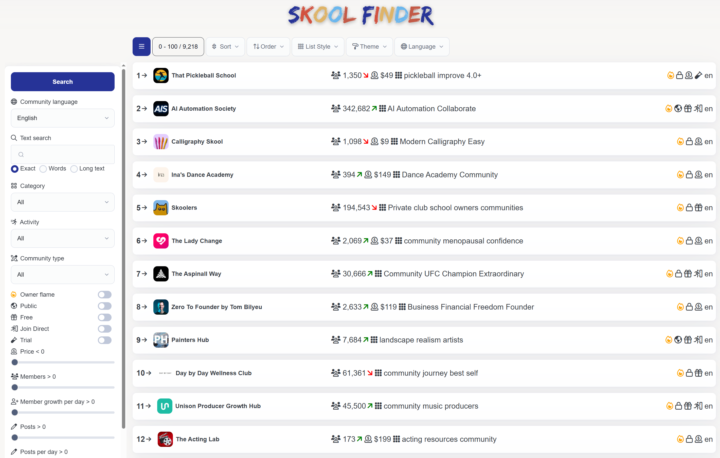
Last year, I developed the Skool Finder, enabling a completely new way of Community Discovery. Now, the site has received a fresh update. Due to the massive growth in the number of communities on Skool, I’ve put a lot of work into performance optimizations. At the same time, the Skool Finder provides the community stats for our local Skool Discovery and the statistics block. So, go ahead and check it out—especially now, just before Skool releases its own brand-new discovery tool. The Skool Finder's sorting functions and specialized filters will likely remain one-of-a-kind. Let me know if you have any ideas for improvement 👇🏼 --- Im letzten Jahr hatte ich bereits den Skool Finder programmiert und damit eine völlig neue Community Discovery ermöglicht. Nun hat die Seite ein kleines Update erhalten. Insbesondere aufgrund der enorm angewachsenen Anzahl an Communities auf Skool war einiges in Sachen Performance zu tun. Gleichzeitig liefert der Skool Finder die Community-Stats für die hiesige Skool Discovery oder den Statistik-Block. Also schau doch mal vorbei – vor allem jetzt, kurz bevor Skool selbst eine völlig neue Discovery liefert. Gerade die Sortierfunktionen oder speziellen Filter des Skool Finders werden vermutlich einzigartig bleiben. Lass mich wieder wissen, falls du Ideen zur Optimierung hast 👇🏼

2 likes • 6d
@Alexander Pite same!
0 likes • 6d
@Marco Berlin I wonder if it is a Canadian IP address thing. Because still the same! Even on incognito.
🔥
6d •
Panel System
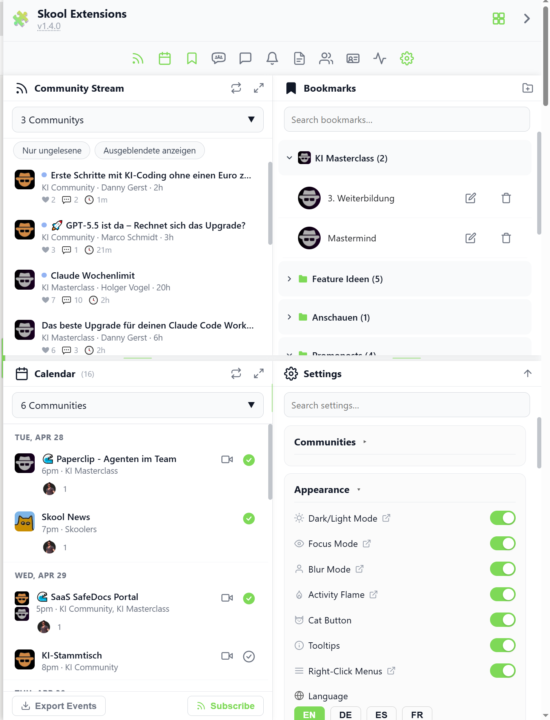
𝗣𝗮𝗻𝗲𝗹 𝗦𝘆𝘀𝘁𝗲𝗺 — 𝗨𝗽 𝘁𝗼 𝟭𝟮 𝗣𝗮𝗻𝗲𝗹𝘀 𝗦𝗶𝗱𝗲 𝗯𝘆 𝗦𝗶𝗱𝗲, 𝗘𝘅𝗮𝗰𝘁𝗹𝘆 𝗪𝗵𝗲𝗿𝗲 𝗬𝗼𝘂 𝗪𝗮𝗻𝘁 𝗧𝗵𝗲𝗺 Skool gives you one column and expects you to live inside it. The Panel System turns the whole right side of your browser into a second workspace — a unified sidebar where every toolkit panel (Bookmarks, Calendar, Stream, Members, Notifications, Chat, Pipeline, Course Overview, Workflows and more) can sit open at the same time, in the exact grid you design. Click any toolbar button to send its panel into the sidebar; click again to close it. The sidebar slides in on first use and stays visible while you browse. Eight grid modes decide how many panels share the space: Single (one full-height panel), Dbl-V (top/bottom split), Dbl-H (two side-by-side columns), Quad (2×2), Quad-H (4 columns), Hexa-H (6 columns), Octo (2 rows × 4 columns) and Hexa2 (2 rows × 6 columns) — up to twelve panels on screen at once on Hexa2. Arranging panels is drag-and-drop. Pick up any toolbar button and drop it into any empty grid cell; Shift-click an open panel to promote or move it; drag the divider between cells to rebalance the split. The layout survives reloads — the last grid you used, the panels you had open, and even the column widths are restored instantly on the next page load, without the slide-in animation (no more waiting for the bar to fly in after every refresh). Custom widths in single-column modes are remembered separately, so resizing in Single or Dbl-V sticks across mode switches. Layouts are named and saveable. Build a "Deep Work" preset with Notifications muted and only Bookmarks + Stream visible, a "Community Day" preset with Members + Pipeline + CRM, a "Fullscreen Dashboard" that stretches the sidebar across the entire viewport flush to both screen edges — then switch between them with a single click. Pin any individual panel with a 3-state pin cycle (unpinned → this tab → all tabs) so it stays put while you move around Skool. A "More" menu automatically groups overflow toolbar buttons when space gets tight, and an "Open panel links in new tab" toggle keeps the sidebar stable while you click through posts.
2 likes • 6d
[attachment]
🔥
Mar 27 •
Community Stream - Game Changer 🚀
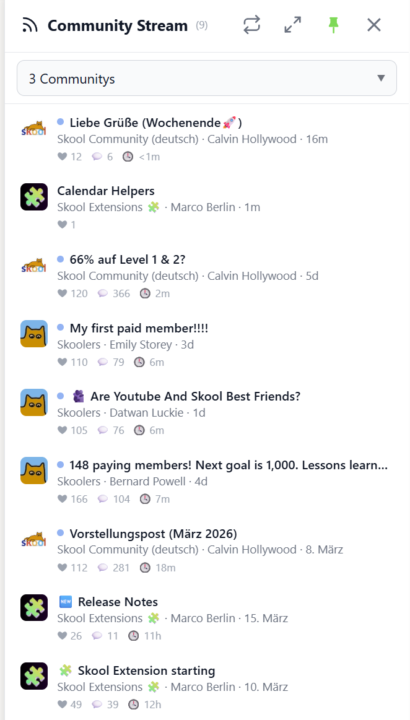
𝗖𝗼𝗺𝗺𝘂𝗻𝗶𝘁𝘆 𝗦𝘁𝗿𝗲𝗮𝗺 — 𝗔 𝗟𝗶𝘃𝗲 𝗙𝗲𝗲𝗱 𝗔𝗰𝗿𝗼𝘀𝘀 𝗔𝗹𝗹 𝗬𝗼𝘂𝗿 𝗖𝗼𝗺𝗺𝘂𝗻𝗶𝘁𝗶𝗲𝘀 Keeping up with multiple Skool communities means jumping between groups and scrolling through separate feeds. Community Stream brings it all together in one sidebar — a live feed of recent posts from your selected communities, right inside Skool. Click the stream icon in your toolbar to open the sidebar. Choose which communities to follow using the selector at the top — pick individual groups or select all at once. The stream shows the three most recent posts from each community, sorted by newest first. Every post displays the community icon, title, author, and a relative timestamp so you can see at a glance what's new and where. Unread posts are marked with a blue dot. Click any post to jump directly to it on Skool, and the dot disappears. The stream auto-refreshes every three minutes, but you can hit the sync button anytime for an instant update. A progress bar shows the refresh status as data loads from each community. Pin the sidebar to keep it open while you browse, or let it close automatically when you click elsewhere. For a bigger view, expand the stream into a full-screen popup. Your community selection and read status are saved across sessions, and cached posts load instantly when you reopen the sidebar. Community Stream can be toggled on or off in the Tools section of the Toolkit Settings. --- 𝗖𝗼𝗺𝗺𝘂𝗻𝗶𝘁𝘆 𝗦𝘁𝗿𝗲𝗮𝗺 — 𝗘𝗶𝗻 𝗟𝗶𝘃𝗲-𝗙𝗲𝗲𝗱 ü𝗯𝗲𝗿 𝗮𝗹𝗹𝗲 𝗱𝗲𝗶𝗻𝗲 𝗖𝗼𝗺𝗺𝘂𝗻𝗶𝘁𝗶𝗲𝘀 Mit mehreren Skool-Communities Schritt zu halten bedeutet, ständig zwischen Gruppen zu wechseln und separate Feeds durchzuscrollen. Der Community Stream bringt alles in einer Sidebar zusammen — ein Live-Feed der neuesten Posts aus deinen ausgewählten Communities, direkt in Skool. Klicke auf das Stream-Icon in deiner Toolbar, um die Sidebar zu öffnen. Wähle über den Selektor oben aus, welchen Communities du folgen möchtest — einzelne Gruppen auswählen oder alle auf einmal. Der Stream zeigt die drei neuesten Posts jeder Community, sortiert nach Aktualität. Jeder Post zeigt das Community-Icon, den Titel, den Autor und einen relativen Zeitstempel — so siehst du auf einen Blick, was neu ist und wo.
5 likes • Mar 27
[attachment]
🔥
Mar 23 •
👑 Skool Extensions Premium - Skool Game Next Level 🚀
The last two weeks have been insane. What started as a small hobby project has turned into a 𝗺𝗮𝘀𝘀𝗶𝘃𝗲 𝗮𝗽𝗽𝗹𝗶𝗰𝗮𝘁𝗶𝗼𝗻. Day by day, I’ve watched Skool Extensions become more and more powerful. Your feedback has been incredibly helpful in this process. I’m currently in a total flow state, pushing development every single day. My goal is for Skool Extensions to become a must-have for every Skooler. Naturally, I’ve been thinking about the business model. A premium version of the extension is the obvious path, but at the same time, I want to ensure a powerful free version remains available forever. On March 31st, just in time for my birthday, I will be launching Skool Extensions Premium. From that date, all 𝗔𝗱𝗺𝗶𝗻 𝗙𝗲𝗮𝘁𝘂𝗿𝗲𝘀 will be exclusive to the paid version for $𝟰𝟳/𝗺𝗼𝗻𝘁𝗵. There will, however, always be a 14-day free trial for these features. In addition to the recently developed Admin Features like member lists, tagging systems, sales pipelines, and CRM profiles, I’m adding extensive Skool Automations with a flexible Workflow Builder on March 31st. This tool alone is going to be massive and will take your Skool game to the next level. You won’t need any other Chrome Extension for Skool ever again. All 𝗠𝗲𝗺𝗯𝗲𝗿 𝗙𝗲𝗮𝘁𝘂𝗿𝗲𝘀, including the community calendar, group chat, voice and video messages, bold text, bookmarks, etc. will remain 𝗳𝗿𝗲𝗲 𝗳𝗼𝗿𝗲𝘃𝗲𝗿. For you and your members. Billing for Premium will be handled automatically through this Freemium community. I’ve already set the 𝗮𝗳𝗳𝗶𝗹𝗶𝗮𝘁𝗲 commission to 𝟮𝟬%, so inviting people to join this community for free will definitely be worth your while! --- Die letzten zwei Wochen waren der Wahnsinn. Aus einem kleinen Hobbyprojekt ist eine 𝗠𝗼𝗻𝘀𝘁𝗲𝗿𝗮𝗻𝘄𝗲𝗻𝗱𝘂𝗻𝗴 geworden. Von Tag zu Tag konnte ich beobachten, wie die Skool Extensions mächtiger und mächtiger geworden sind. Euer Feedback hat dabei wahnsinnig geholfen. Ich bin gerade in einem absoluten Flow und pushe die Entwicklung jeden Tag. Skool Extensions sollen ein Must-have für jeden Skooler werden.

2 likes • Mar 23
[attachment]
1-4 of 4

@amber
♥ 𝗦𝗺𝗮𝗹𝗹-𝘁𝗼𝘄𝗻 𝗠𝗼𝗺 𝗼𝗳 𝟮 & 𝗙𝗼𝘂𝗻𝗱𝗲𝗿 𝗼𝗳 #𝗕𝗶𝘇𝗦𝗶𝘀𝘁𝗲𝗿
𝑺𝒊𝒔𝒕𝒆𝒓𝒉𝒐𝒐𝒅 𝐨𝐟 𝑺𝒎𝒂𝒍𝒍 𝑩𝒖𝒔𝒊𝒏𝒆𝒔𝒔
Active 31m ago
Joined Mar 20, 2026
Saskatchewan, Canada
Powered by