Activity
Mon
Wed
Fri
Sun
Apr
May
Jun
Jul
Aug
Sep
Oct
Nov
Dec
Jan
Feb
Mar
What is this?
Less
More
Memberships
Hey Systems
29 members • $47/m
Automated CEO
13 members • $33/month
10 contributions to Automated CEO

17d •
Custom GPT VS Project with AI
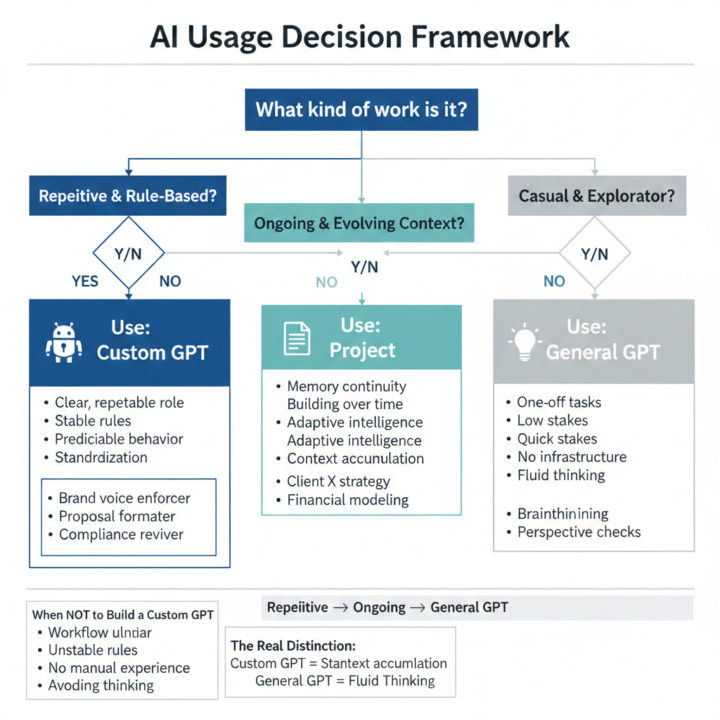
🧠 1️⃣ When a Custom GPT Makes Sense Use a Custom GPT when: - The role is clear and repeatable - The rules don’t change often - You want predictable behavior - You might let someone else use it - You don’t want to re-explain context every time Think of it like hiring a specialist with a job description. Examples of Good Custom GPT Use Cases - Brand voice enforcer - Proposal formatter - Client onboarding checklist guide - Sales page reviewer with fixed criteria - Compliance reviewer - SOP builder following your exact format - Content repurposer with specific output structure These are “same job, over and over” roles. When It’s Worth Programming One Ask yourself: - Will I use this at least 10+ times? - Does it need consistent formatting? - Would mistakes be costly or annoying? - Do I want to remove decision-making from this task? If yes → Custom GPT is usually worth it. What It’s NOT Great For - Open-ended brainstorming - Strategic ambiguity - Situations that change often - Early-stage thinking Because custom GPTs are structured by design. 📁 2️⃣ When Projects Make More Sense Projects are powerful when: - Work is ongoing - Context evolves - You’re building something over time - You need memory continuity Projects are less about roles and more about environment. Think: - A specific client - A specific product launch - A specific research initiative - A book you’re writing - A business model you’re refining Projects let ChatGPT remember: - Documents - Decisions - Preferences - Ongoing threads Without locking it into rigid behavior. Examples of Good Project Use Cases - Client X marketing strategy - Automated CEO content planning - Offer redesign - Course development - Monthly newsletter drafting - Long-term financial modeling These benefit from adaptive intelligence over time. 🌊 3️⃣ When the General GPT Is Actually Enough Sometimes people overcomplicate this. You don’t need a Custom GPT or a Project if:

1 like • 8d
That’s great @Angela Hall thank you so much! I’m starting to experiment with Claude and since it doesn’t support custom bots in the same way, I’m thinking through how I’d use it differently to get the same results I need (if possible).
Jan 25 •
The Difference Between AI That Feels Helpful and AI That Feels Useless
You’ve probably seen both sides. Some people say: “AI saves me hours.” Others say: “I tried it… didn’t really get the hype.” What’s interesting is that the tool is the same. The difference isn’t intelligence, tech skill, or creativity. It’s how AI is positioned in the business. Why AI Feels Useless for So Many People AI tends to disappoint when it’s used like this: ❌ Random & Reactive - Opening it only when stuck - Asking one-off questions - Expecting magic without context ❌ Treated Like Google - Searching instead of conversing - Asking for answers instead of clarity - Skimming outputs instead of refining them ❌ No Continuity - No memory - No patterns - No understanding of why something matters That kind of AI use will always feel shallow. Why AI Feels Genuinely Helpful for Others Helpful AI usually shows up in these ways: ✅ Consistent, Not Constant It’s not used all day - it’s used regularly for the same kinds of thinking. Examples: - Drafting similar responses - Reviewing decisions - Pressure-testing ideas ✅ Context-Rich Helpful AI knows: - What you’re working on - What you’ve already decided - What success looks like to you Not because it’s advanced - but because context was shared over time. ✅ Positioned as Support, Not Savior The most satisfied users don’t ask AI to “do everything.” They ask it to: - Reduce friction - Catch blind spots - Carry repetitive mental load That’s a huge distinction. Common Business Use Cases (No Setup Required) Here are ways people naturally experience AI as helpful - without deep training: 🧩 Clarity & Direction - Talking through messy ideas - Exploring options before committing - Sorting thoughts when everything feels tangled 🔁 Repetition Relief - Rewriting similar explanations - Creating consistency across messages - Reducing “starting from scratch” energy 🔍 Perspective Checks - Asking, “What might I be missing?” - Spotting assumptions - Stress-testing plans before execution
1 like • 18d
Angela, when you talk about assigning AI "roles" it makes me think about custom GPTs vs. Projects. (in ChatGPT particularly). Can you share a resource or a little of your own advice on what types of tasks and work are best for each? When is it worth my time to program a custom GPT for, say, one task or role, vs. working with the general GPT account that learns over time and just organizing via Projects?
20d •
You Don’t Need More AI Tools - You Need Fewer Jobs
Most people approach AI asking: “What can this tool do?” A better question is: “What job am I tired of doing?” AI becomes useful when it has a role, not just access. Why Tools Aren’t the Answer More tools usually mean: - More decisions - More setup - More cognitive load That’s the opposite of leverage. Think in Roles, Not Features AI works best when it’s assigned jobs like: - Drafting - Reviewing - Organizing - Checking consistency - Exploring options Not “everything.” Just specific relief points. Everyday Roles AI Can Quietly Fill - Explaining things once so you don’t have to - Helping you think before you act - Making sure you didn’t forget something important - Reducing “starting from zero” energy These aren’t flashy - they’re freeing. Prompts to Assign Roles (Copy / Paste) 🧑💼 Role-Clarifying Prompts Here are tasks I’m tired of doing repeatedly: [list them] Which of these could AI reasonably support? I don’t want AI to replace me. I want it to support me in this role: [describe role] How could that look? 🧠 Delegation-Style Prompts If AI were my assistant, what would I *not* ask it to do — and why? Help me decide which tasks require my judgment vs support. Key Takeaway AI becomes powerful when it’s delegated responsibly. Not as a replacement. As relief. 💬 Reflection: If AI could take one job off your plate tomorrow, what would you choose?
1 like • 18d
Doing the QA for our deliverables. I'm training an assistant to do it, but it would be even better if we had an AI she could leverage or that I could share with the editors on my team for them to use directly. Hmm.
Dec '25 •
3 Things You Think Require a Human
(But AI Can Do Exceptionally Well) I used to cling to certain tasks like,“Nope, I have to do this or it won’t be done right.” Yeah… turns out that was a lie I told myself to stay overwhelmed. Here are three things AI handles shockingly well: 1️⃣ Drafting Tricky Client Messages Need something firm but kind? Something that sets a boundary without sounding like a jerk? AI can shape the tone, polish the wording, and say what you’re actually trying to say. 2️⃣ Spotting System Gaps Give it your workflow or SOP, and it will point out: - missing steps - unclear instructions - places where clients get stuck Basically, an extra set of eyes that doesn’t get tired or distracted. 3️⃣ Turning Long Videos Into Structured Content Workshops, Zoom calls, Lives, trainings…AI can break them into: - social posts - emails - step-by-step guides - lessons - checklists …so you’re never starting from scratch. The wildest part? These were the tasks I thought needed the most “human touch.” Turns out I just needed to stop trying to be a one-person robot. Which one surprised you the most?
1 like • Jan 6
I never thought about having it audit our SOPs or workflows, that's a great idea! I've used it to help me create SOPs and instructions, etc. but as we revisit some things this year, I'll definitely feed them into my Chat as part of the process.
Jan 4 •
The One-Task-a-Week Automation Challenge
If your business feels like a never-ending to-do list, here’s a little challenge that will actually lighten the load instead of adding to it: 1️⃣ Each week, pick ONE task you repeated manually. Sending the same email… Updating the same spreadsheet… Posting content the same way… You know the ones. 2️⃣ Write it down. Seriously - don’t skip this part. Seeing the pattern is half the breakthrough. 3️⃣ Ask AI to automate it. “What’s the fastest way to automate this task?” You’ll get options. Pick the simplest one. 4️⃣ Report back. Wins, struggles, tiny improvements - all of it counts. That’s it. No perfection. No overhauling your entire business. Just one small system each week that frees up more mental space than you expect. What’s your task for this week?
1 like • Jan 5
I'm biting off a bigger chunk due to necessity LOL. We're about to launch our new website, and there are some automations related to that that I'm working on setting up. Once that's done, though, it'll be time to optimize...
1-10 of 10

Active 15h ago
Joined Dec 4, 2025
Powered by