Activity
Mon
Wed
Fri
Sun
Jan
Feb
Mar
Apr
May
Jun
Jul
Aug
Sep
Oct
Nov
Dec
What is this?
Less
More
Memberships
Learn Microsoft Fabric
14.3k members • Free
10 contributions to Learn Microsoft Fabric

Nov '24 •
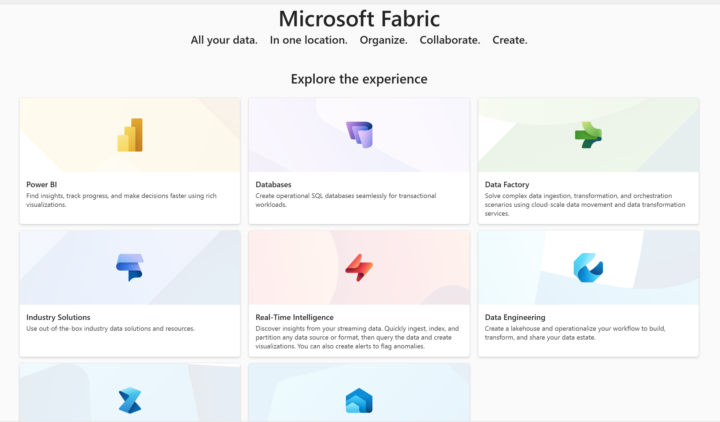
SQL Databases now in Fabric
Microsoft Ignite Day 1 just ended and the new feature coming out of Fabric is the integration of Databases. You can learn more via the link below: https://learn.microsoft.com/en-ca/fabric/database/sql/overview

2 likes • Nov '24
Don't know who else needs to know this but you can copy to the new Azure SQLdb in Fabric using the copy job. When you get to the destination screen in the copy job wizard select Azure SQL db and then fill in the server and database from the connection strings provided under the settings drop down for the SQL database in Fabric.
Aug '24 •
Using Data Flow Gen2 to access Delta Share
I have been tasked with ingesting data that is available from a Delta Share, this is a non fabric related open source data sharing standard. To make matters even more interesting the provider of the data is requiring an IP address for White listing. I have been looking on this forum and elsewhere and it seems that Fabric doesn't have static IP addresses because it is SaaS, however it can be used if they allow a range of addresses, is that a true statement? Also, has anybody used the "Delta Sharing" as a source in Data Flow Gen2, it is listed as one of the possible sources? I just haven't found anywhere that someone has commented about it.
0
0
Jul '24 •
What is needed for notebook permissions for shortcut tables between workspaces
I have two workspaces each with a lakehouse in it. I have my master data in edw workspace edw lakehouse. In the second workspace called analytics I have a lakehouse called analytics. The analytics lakehouse tables are all shortcuts to the tables in the edw lakehouse. I am an admin in both workspaces. I can reference tables in notebooks like this: df = spark.sql("SELECT * FROM dwp_Account LIMIT 1000") Recently we rolled out access to the analytics workspace to Data Analyst and Scientist. Currently the group they belong to is Contributor in analytics and viewer in edw. We keep getting the following error message when they try to run the same code in analytics "An operation with ADLS Gen2 has failed. This is typically due to a permissions issue. 1. Please ensure that for all ADLS Gen2 resources referenced in the Spark job, that the user running the code has RBAC roles "Storage Blob Data Contributor" on storage accounts the job is expected to read and write from. 2. Check the logs for this Spark application. Inspect the logs for the ADLS Gen2 storage account name that is experiencing this issue." I have given the group my user is a member of "Storage Blob Data Contributor" roles for both storage accounts in our Azure Tenant. Still doesn't work. Anybody have any ideas? Also, I looked at the logs but was unable to tell what storage account it was trying to use, does anybody know where I can find this out? Thanks.
0 likes • Jul '24
Will and Mohammad, thank you for your replies. I guess I misunderstood the way permissions worked at a work space level. The people in my organization running notebooks have data science skills so they need to access data from python/R for their workflow. What I am hearing is that we would need to grant them contributor on the source workspace of the data not just the analytics workspace. The way I am reading this is that I will need a physical copy of the data in my analytics workspace, not a shortcut. With the data actually within analytics they should be able to reference it from spark notebooks with contributor level permissions, is that a valid assumption? Thanks

Apr '24 •
Automatically resume and suspend capacity
Hey all! I was searching how to automatically suspend and resume fabric capacities and leave it running only on week days in order to save money or to scale up wihout exceeding the budget. So, I found this tutorial from Chris and Kevin where they show step by step how to do it. Since it's really useful and I haven't seen this posted here yet I thought of sharing it with you. https://www.youtube.com/watch?v=OHw-RJPW9SQ This is the link for the article they are using: https://richmintzbi.wordpress.com/2023/11/23/microsoft-fabric-capicity-automation/ In the article there is also the code for automatically resizing the capacity which can also be very useful, if you know the time you'll need more compute you can schedule when to scale up and scale down after a period of time.
1 like • Jun '24
We have been using Synapse studio for the synapse workspace/resource group your fabric capacity belongs to. Go to the Manage icon on the left hand task bar and under integration click triggers. You can setup a trigger to pause and start your fabric capacity there. It will also show you the list of all triggers on that page and allow you to suspend the pause or resume trigger.
May '24 •
Link from notebook markdown cell to another
We are writing some documentation for users of our fabric data warehouse. We would like to include hyperlinks from one notebook to another. Sort of if you need to create graphs use this notebook, if you need to import data with pyspark use this notebook. Does any body know how to reference one notebook from another in markdown cells? I tried the following, and many variations of it. "Link to [another notebook](Load_spark_Dealer.ipynb)"
1 like • Jun '24
All, thank you for all the ideas and code. I will try them and see what works for me. Sorry I am late to reply got pulled to other things. Been learning everything I never wanted to know about power shell.
0 likes • Jun '24
@Paramasivam J I tried the code in Paul's response and it still doesn't work. You mention absolute paths. I can't seem to find the absolute path of the notebooks. Is there a specific place that shows that? Tried googling it and no luck.
1-10 of 10

@adam-ruthford-4840
20 year Data Engineer and recent Masters degree in Data Science.
Started a new job in March and diving headfirst into Fabric with no prior experience
Active 277d ago
Joined Apr 3, 2024
DFW Texas USA
Powered by