Activity
Mon
Wed
Fri
Sun
May
Jun
Jul
Aug
Sep
Oct
Nov
Dec
Jan
Feb
Mar
Apr
What is this?
Less
More
Memberships
AI Academy
501 members • $79/m
AI Community
2.6k members • Free
7 contributions to AI Community

🚀
🔥
Feb 19 •
🚀 This Dashboard Could Change How You Deliver Advisory
Let me ask you something… What if you could build an interactive financial dashboard for your business, or a client in minutes… not hours? I’ve just recorded a short video showing what this looks like in practice… and why it matters for accountants and bookkeepers who want to deliver better advisory. Here’s what I cover in the video: • What an interactive client dashboard can look like (with real financial insight, not just pretty charts) • How you can turn financial statements into something clients actually understand • Why this kind of output can lead to better client meetings and better decisions If you want to stay ahead of where advisory is heading… watch this now. 👉 Click the link here to book your place on the webinar (where I’ll go into the full step by step). And comment below: 💬 If you could wave a magic wand… what would you want your perfect client dashboard to show?


1 like • Feb 23
Looking forward to this one Mark! Love a dashboard
🚀
🔥
Dec '25 •
Want an easier way to organise your ChatGPT chats and projects?
If you’ve ever found yourself endlessly scrolling through ChatGPT, trying to remember which chat had that brilliant idea, this one’s for you... I've just uploaded a new video (below 👇) with a super simple trick to stay organised using nothing more than... emojis! 😊 In this video, you’ll discover: ✅ Why naming and organising chats properly saves hours of frustration ✅ How to create your own emoji "key" to label different types of projects (personal, work, demos, etc.) ✅ The system I use to instantly spot my favourites, work-in-progress, and client chats I’ll also share an emoji chart to get you started. 💬 Once you’ve watched, let’s hear your best tips :How do you organise your chats and projects inside ChatGPT? Drop your ideas in the comments below!

1 like • Dec '25
Brilliant that Mark, will get on this right now and be super organised with my chats! 😀
🚀
🔥
Aug '25 •
🧠 New Feature: Project-Only Memory
There’s a powerful update to Projects—you can now enable project-only memory. With this on, ChatGPT will: - Remember context only within that project - Ignore your other saved memories - Keep everything self-contained so nothing carries over to future chats Perfect for long-running or sensitive work where you want ChatGPT to stay focused on one project. 👉 Note: You’ll need to have Personal Memory turned on (Settings → Personalization → Memory). Available now on the web and Windows app—mobile and macOS coming soon. 🎥 Video with full details is below.

1 like • Aug '25
That's really useful thanks Mark. Handy to have for sure
🚀
🔥
Aug '25 •
❓ Not happy with GPT-5? Here’s how to get the old models back
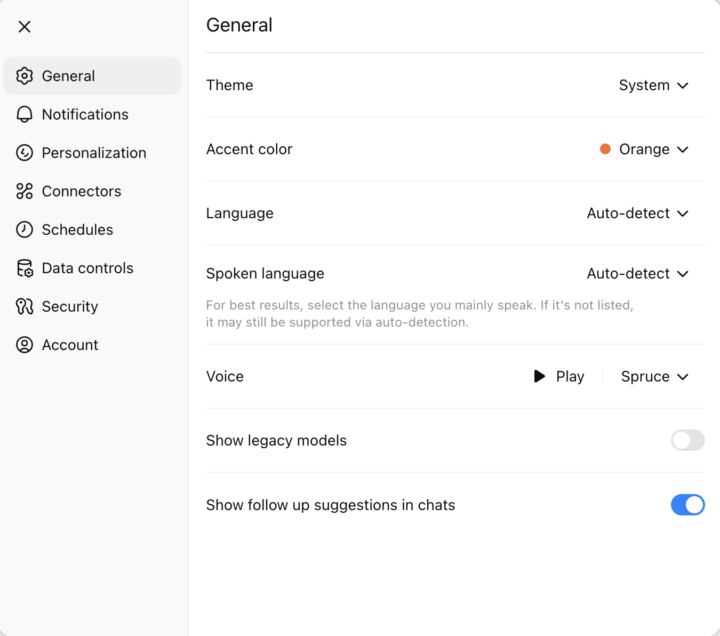
If you’ve tried GPT-5 and it’s not quite clicking for you, there’s good news… you can still access the older models. OpenAI has kept them available for Plus, Pro, Team, and Enterprise users—you just have to switch them on. How to do it: 1. Go to your ChatGPT settings (on web) 2. Find General > Show legacy models 3. Toggle it on You’ll then see the older models available again in your model selector. 📸 (I’ll add a screenshot below so you know exactly what to look for) Have you tried GPT-5 yet? Do you prefer it… or are you switching back to one of the older models?
1 like • Aug '25
It's not quite as 'human' with responses so I'll stick with 4 for my personal Plus account and 5 for our Teams account. Anyone else got 2 accounts? 🤭
1 like • Aug '25
@Mark Wickersham Trumped me then 🤩
🚀
🔥
Aug '25 •
⚖️ The EU AI Act Is Now Law — What It Means for Accounting Firms
From 2 August 2025, new rules under the EU AI Act will directly affect how accountants use tools like ChatGPT, Claude, and Gemini—especially if you operate in the EU or serve EU-based clients. Here’s what small firm owners need to know (wherever you’re based): ✅ What You Need to Do 1. Be Transparent with Clients If you use AI to generate insights, draft reports, or summarise accounts, you must let clients know—either in the final deliverable or engagement letter. 2. Avoid Prohibited Uses The following are banned, even for internal use: - Emotional profiling - Behavioural manipulation - Biometric surveillance (e.g. emotion detection or facial recognition) 3. Complete a Risk Assessment Each use of AI needs to be classified: - Minimal risk (e.g. summarising public info): little action needed - Limited risk (e.g. AI-assisted report drafting): requires documentation and transparency - High risk (e.g. credit scoring, fraud detection): needs human oversight and strict controls Most AI use in small firms will fall into the limited risk category. 4. Apply the Same Logic as GDPR Treat AI tools like you treat personal data: - Record what you use, when, and why - Note who reviews AI outputs - Add disclaimers or checks where needed 5. Choose Compliant Tools Use AI platforms that: - Offer enterprise-grade security - Allow opt-outs from training - Ideally use EU-based data processing Good options: ChatGPT Team or Enterprise, Claude via Amazon Bedrock, or a local model via Ollama. 🌍 Regional Differences EU Firms: Full compliance required. Treat it like GDPR—document, assess, disclose. UK Firms : If you serve EU clients, the Act applies. If not, you’re exempt—but similar UK guidelines may still apply. Canada / US: You’re only affected if you serve EU clients or use EU-based tools—but similar laws are coming. 🧭 Practical Example A firm in Ireland must fully comply. A firm in the UK must comply only if it serves EU clients. A firm in Canada is exempt—unless it processes EU data or uses EU tools.
1 like • Aug '25
Great summary thanks very much Mark!
1-7 of 7

@helen-parker-9644
Commercial Director and Chartered Marketer
Active 2d ago
Joined Apr 30, 2025
Powered by