Activity
Mon
Wed
Fri
Sun
Aug
Sep
Oct
Nov
Dec
Jan
Feb
Mar
Apr
May
Jun
Jul
What is this?
Less
More
Memberships
Activity Book Creator Lab
199 members • Free
BookVillage - Amazon Reviews
361 members • Free
Driven Publishers
4.4k members • Free
Amazon KDP Ads with Matt
720 members • Free
Royalty Guild. Amazon KDP
417 members • Free
Profitable Publisher 3.0
365 members • Free
113 contributions to Royalty Guild. Amazon KDP

15d •
Book cover testing
Finally got to creating my book cover. My first attempts where shot down dramatically, by my own daughter (designer) and my stepdaughter (artist). 😆 Of course I didn’t believe them at first, but then I found out that the critics' report from https://www.diybookcovers.com/ completely agreed with their opinions. Learnt a lesson (or two). ☺️ The picture is mine (Wat Arun temple in Bangkok). I have created it in Canva. Dimensions are as stipulated by Amazon KDP: 1600 width and 2560 height. I've run it through the website above several times and refined it with Gemini; this is version 9.b. 😗 Second pic shows the progression from really bad to where it is now. Feedback welcome.🙏


1 like • 12d
I agree with the rest regarding the fonts. I see you are already taking care of this, and I agree with your idea of highlighting some kwds in the title (help, Thailand). This is something that will help raise attention to those, and when done nicely it also makes covers stand out.

19d •
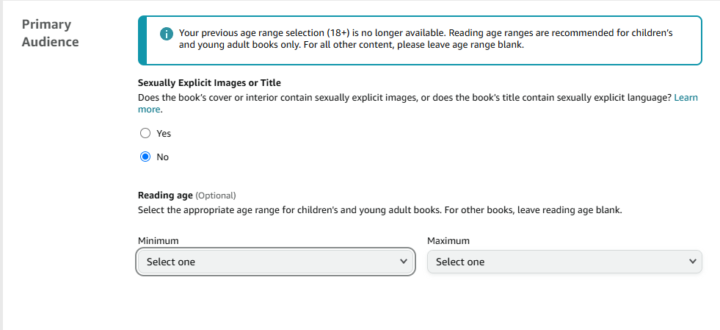
KDP age range issues
At some point Amazon did away with 18+ age range category. So now, by default, if you leave the age range blank, the listing shows 16-18 as the recommended age range for all adult fiction. I'm concerned that many shoppers may interpret this as "Young Adult" content rather than adult. Amazon has many reasons, I'm sure, for making this change but it has the potential to mis-categorize many books and cause potential readers to pass on the purchase. Especially because there previously was an 18+ category and there's very little chance that shoppers are widely aware of this internal change. Has anyone else noticed the change to their Adult titles being displayed as 16-18?
0 likes • 16d
Sorry, I'm trying to get my head around this. So, Amazon recommends this age range based on the content of the book, and it does this "automatically" for you? Is that what you are saying? Can you not overwrite it?

24d •
KDP Suspension for Review Manipulation, Timeline and Outcome
A few days ago, my KDP account was suspended for alleged review manipulation. Since I spent a lot of time searching for similar experiences while going through it, I thought I'd share what happened and how the situation was eventually resolved. On June 13, I received an email from Amazon stating that my KDP account had been suspended because they had detected attempts to manipulate customer reviews. The email asked for detailed information about any methods used to obtain reviews, third parties involved, customer accounts, documentation, and corrective actions. At that point, Amazon did not mention any specific book. The suspension was account-wide. Naturally, I panicked. Like many people would, I started looking for answers everywhere. I analyzed sales patterns, review history, previous account alerts, and every possible explanation I could think of. The more I searched, the more confused I became. During this process, @Adriano Ferrigno helped me in every step of the way. He reviewed the case, analyzed Amazon's responses, and drafted each appeal that was submitted. I provided the underlying information and documentation, while he helped organize everything into clear responses and guided me through the process as the case evolved. I submitted my first appeal along with supporting screenshots and explanations of the promotional methods I had used. A couple of days later, Amazon replied. They still did not provide much detail, but they finally identified a specific ASIN that was under review. I then sent additional information related to that title, including documentation and a more detailed explanation of the promotional activities connected to it. Amazon responded again with what was essentially the same request for information. At that point, I provided an even more structured response, answered every question as clearly as possible, attached supporting documents again, and explained the steps I would take going forward. On June 21, Amazon reinstated my KDP account.
1 like • 23d
@Shivam Sharma That's great. But did you ever figure out what could have been the trigger for that specific title?
0 likes • 17d
@Shivam Sharma Those are the things that puzzle me... In any case, congratulations for getting the rest of the titles back. That's huge!

Jun 15 •
The Days of a Quick 100 Amazon Reviews are Over
The days of getting 100 amazon reviews in a short period of time (unless you're selling hundreds of books a day) are gone. I just watched this video (it was posted back in January). I know this is from months ago but what an eye-opening video. Even just the idea of clustering should make anyone who uses any service where a relatively small group of people review from a relatively small group of authors never use these services again. Even if a service has 1000 books and 2000 reviewers the algorithm will be able to notice how unnatural that review would be. It doesn't matter whether I buy the occasional physical product (to try and trick the system). It wouldn't take away the fact that there is a connection and cluster of groups of people giving and receiving reviews. As I see it there are only a few ways to get reviews-: 1. a genuine arc service. 2. Facebook ads where you give away your book for free (and ask for honest opinion from pools of millions of random possible people who may or may not leave a feedback-, let alone a review). 3. Organic reviews. I can't think of any other way. Even the services claiming to be Amazon compliant are not really. If I have to pay to get the book (in order to get a review), it's a no go. I'd love to hear of other ways though (if they exist).
0 likes • 24d
Gray area, but I still think some platforms are safe. Just use with caution.

Jun 15 •
Video ad
I have a seasonal book on Amazon and I am thinking to give it more push by adding a video ad, I am wondering if anyone in the group tried video ad, and did it work for you
1 like • 24d
Ok, so to do this: do you need to have a brand? I was offered to add videos on my regular ad campaigns, which I did, but it’s had minimal impact on anything, really. It barely get views and to be honest, I’ve never seen the video ads show up in several tests I’ve done looking for my kwds.
1-10 of 113

Active 1d ago
Joined Nov 6, 2025
Powered by