Activity
Mon
Wed
Fri
Sun
Sep
Oct
Nov
Dec
Jan
Feb
Mar
Apr
May
Jun
Jul
Aug
What is this?
Less
More
Memberships
Activity Book Creator Lab
295 members • Free
BookVillage - Amazon Reviews
398 members • Free
Driven Publishers
4.5k members • Free
Amazon KDP Ads with Matt
785 members • Free
Royalty Guild. Amazon KDP
455 members • Free
Profitable Publisher 3.0
448 members • Free
116 contributions to Royalty Guild. Amazon KDP

5d •
Something I'm Grateful to Celebrate Today
I wanted to share a small milestone I'm genuinely grateful for—I recently reached Top Rated on Upwork. Looking back, it wasn't one big breakthrough that got me here. It was a lot of small improvements repeated over time: writing better proposals, communicating clearly, meeting deadlines, listening to client feedback, and always trying to leave every project a little better than I found it. One lesson that surprised me is that clients rarely hire the person who talks the most about themselves. They hire the person who understands their problem and explains how they'll solve it. That mindset changed the way I approach both my work and my proposals. I'm grateful to every client who trusted me with their publishing projects and to communities like this one where I've continued learning from others. Still learning. Still improving. On to the next milestone. 🚀 Thank you @Laura Diaz @Meggy Halfon @Igor O for trusting me with your projects


2 likes • 5d
Many congratulations!
1 like • 3d
@Temmy Ay Thanks so much!

14d •
Review page
I uploaded my book and book cover. Where can I look for reviews? And where can I see other members' books?
2 likes • 5d
Jelena - I think you should look into review platforms. I think that might be exactly what you are looking for. However, make sure to do due diligence researching which one to pick: some are definitely better than others. Direct review swaps or paying for reviews are no-nos on Amazon KDP.

21d •
Audiobooks: Human vs. AI-narrated
Surprising but predictable results: in blind tests, customers prefer AI-narrated books, yet prefer to purchase human-made ones. This is a great example of the current state of the industry: the quality of generative tools' production has leveled up with or exceeded average human levels. Yet, most customers still prefer to read or listen to a fellow human. Experience and taste - these two elements are necessary to produce a valuable product, and no tool can substitute them.
4 likes • 20d
Quality is the most important factor, no matter how you achieve it. People will always tell you they don’t want AI, but what they don’t want is the robotic, poorly-made content they have in their minds for AI. And I agree, I don’t like that either… the “unedited” version of AI.

Jul 2 •
Book cover testing
Finally got to creating my book cover. My first attempts where shot down dramatically, by my own daughter (designer) and my stepdaughter (artist). 😆 Of course I didn’t believe them at first, but then I found out that the critics' report from https://www.diybookcovers.com/ completely agreed with their opinions. Learnt a lesson (or two). ☺️ The picture is mine (Wat Arun temple in Bangkok). I have created it in Canva. Dimensions are as stipulated by Amazon KDP: 1600 width and 2560 height. I've run it through the website above several times and refined it with Gemini; this is version 9.b. 😗 Second pic shows the progression from really bad to where it is now. Feedback welcome.🙏

1 like • Jul 5
I agree with the rest regarding the fonts. I see you are already taking care of this, and I agree with your idea of highlighting some kwds in the title (help, Thailand). This is something that will help raise attention to those, and when done nicely it also makes covers stand out.

Jun 27 •
KDP age range issues
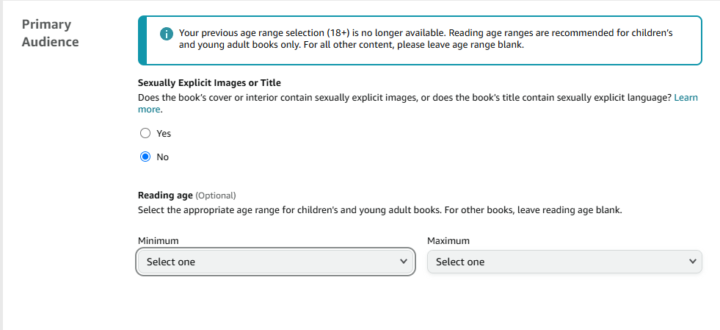
At some point Amazon did away with 18+ age range category. So now, by default, if you leave the age range blank, the listing shows 16-18 as the recommended age range for all adult fiction. I'm concerned that many shoppers may interpret this as "Young Adult" content rather than adult. Amazon has many reasons, I'm sure, for making this change but it has the potential to mis-categorize many books and cause potential readers to pass on the purchase. Especially because there previously was an 18+ category and there's very little chance that shoppers are widely aware of this internal change. Has anyone else noticed the change to their Adult titles being displayed as 16-18?
0 likes • Jul 1
Sorry, I'm trying to get my head around this. So, Amazon recommends this age range based on the content of the book, and it does this "automatically" for you? Is that what you are saying? Can you not overwrite it?
1-10 of 116
Active 3d ago
Joined Nov 6, 2025
Powered by