Activity
Mon
Wed
Fri
Sun
Jun
Jul
Aug
Sep
Oct
Nov
Dec
Jan
Feb
Mar
Apr
What is this?
Less
More
Memberships
Chase AI Community
60.2k members • Free
AI Launchpad
25.2k members • Free
AI Money Lab
71.8k members • Free
AI Workshop Lite
21.3k members • Free
AndyNoCode
33.1k members • Free
AI Automation First Client
1.6k members • Free
AI Automation Mastery
28.7k members • Free
AI Automation Agency Hub
314.6k members • Free
AI Automation (A-Z)
153.6k members • Free
84 contributions to AI Automation First Client

4d •
My Teenager Had 6 Syllabi and Zero Idea What Was Due When 😲
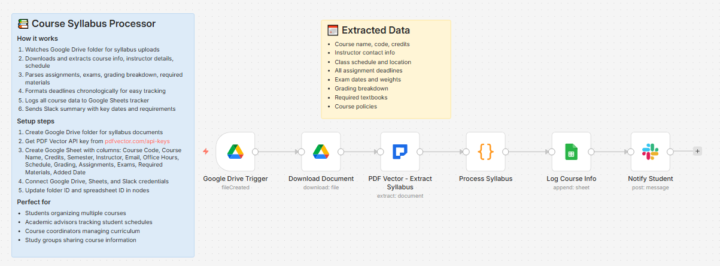
Start of semester. Kid comes home with 6 syllabi. Some printed, some digital, some "on the class website somewhere." Three weeks in: "I didn't know that was due." Missed assignment. Grade dropped. THE TEENAGER TIME MANAGEMENT CRISIS Each class has different format. Some teachers list due dates clearly. Some bury them in paragraphs. Some just say "weekly quizzes" with no specific dates. Asking "do you have homework?" gets a shrug. Checking the syllabi requires actually reading them. Nobody reads them after day one. Teachers assume students track their own deadlines. Students assume they'll remember. Nobody remembers. THE SYLLABUS ORGANIZER I BUILT Start of each semester, syllabi go into folder. Workflow processes each one. Extracts course name, teacher info, grading breakdown, office hours. Most importantly: every single assignment, project, exam with due dates and point values. Sorts everything chronologically. Not by class, by DATE. What's due soonest at the top regardless of which class. Generates a master calendar. Every deadline visible in one place. Weekly summary: "This week: History essay (50 pts), Math quiz (20 pts), Science lab report (30 pts)." THE GRADE PROTECTION Before: Missed assignments, "I didn't know," scrambling at last minute, stress for everyone. After: Deadlines visible, no surprises, actually can plan ahead. First semester with this system: No missed assignments. First time ever. Kid still complains about the weekly summary notifications. "I know, mom." But hasn't missed anything since. The extraction struggles with syllabi that are images instead of real PDFs. Some teachers scan handwritten documents. Those need manual entry. Worth the effort. Fighting over missed homework was exhausting for everyone. This is the workflow here i want to share How do you help students actually track what's due?

🔥
4d •
The Zapier Expert Directory - Another Free Inbound Lead Source 🔥
Two free certifications. Two directories sending me leads. Here is how to set up both. THE OPPORTUNITY: Zapier has an Expert Directory similar to Make.com. People searching for "Zapier help" find certified experts and reach out directly. Combined with Make.com partnership: Two inbound lead channels, both free. HOW TO GET CERTIFIED: 1. Go to zapier.com/experts 2. Complete the certification process 3. Build your expert profile 4. Get listed in the directory THE CERTIFICATION: Covers: - Zap building best practices - Multi-step workflows - Error handling - Paths and filters - Common integrations If you have built 20+ Zaps, you can pass. THE PROFILE OPTIMIZATION: Same principles as Make.com: - Specific industries (not "all businesses") - Clear problems you solve - Results with numbers - Fast response time commitment THE REFERRAL BONUS: Zapier pays referral commission when you onboard new paying customers. Even if they start on free tier and later upgrade, you get credited. THE COMBINATION STRATEGY: Profile on Make.com Partner Directory ✓ Profile on Zapier Expert Directory ✓ When leads come in: - Assess which tool fits their needs - Build with whichever works best - You are not locked to one platform THE NUMBERS: Month 1: 0-1 lead from each Month 6: 2-3 leads from each monthly Combined: 4-6 inbound leads monthly All free. Both directories compound over time. Are you on both Make.com and Zapier expert directories?
3 likes • 4d
Wait, this is smart🙏. I didn't even know these directories existed. Quick question though - I've been learning n8n (self-hosted). Is there something similar for n8n or should I learn Make/Zapier specifically to get on these directories? Or does it make more sense to just stick with n8n and find clients the regular way? Trying to figure out where to focus honestly.
6d •
Our Dishwasher Warranty Expired 3 Weeks Before It Broke 💥
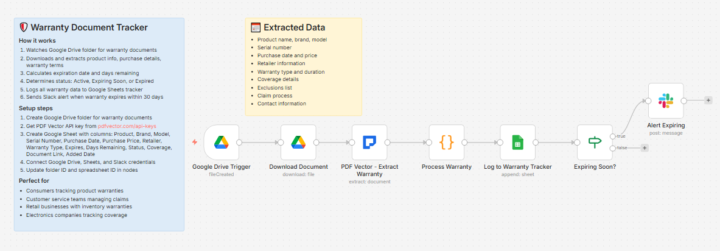
$1,200 dishwasher. Extended warranty purchased. Felt responsible. Dishwasher died. Motor or something. Repair would be $600+. Went to file warranty claim. Warranty expired 3 weeks earlier. Nobody told me. Didn't track it. THE EXPENSIVE LESSON Dug through email. Found the warranty certificate. Buried in a folder from 2 years ago. Clear expiration date. I just never looked. Started auditing other warranties in the house. Refrigerator. Washer. Dryer. HVAC. Laptops. Phones. Mixed results. Some expired. Some expiring soon. Some I couldn't even find paperwork for. We'd thrown away hundreds of dollars in potential claims by not tracking this. THE WARRANTY TRACKER I BUILT Every warranty document goes into a folder. Workflow extracts product, brand, model, serial number, purchase date, warranty type, duration, coverage details. Calculates expiration date. Calculates days remaining. Anything expiring within 30 days triggers an alert. "Laptop warranty expiring in 22 days. Review for any issues." Running list shows everything we own with warranty status. Active, expiring soon, or expired. When something starts acting weird, quick check shows if warranty claim is even possible. THE TRACKING DIFFERENCE Before: Warranties forgotten, discovered after expiration, hundreds lost in potential claims. After: 30-day warnings, proactive claims filed, money saved. Filed 2 warranty claims in the past year that I would have missed before. Combined value: around $340 in repairs we didn't pay for. The hardest part was finding all our existing warranties to enter into the system. Took an entire weekend going through files, emails, filing cabinets. Now any new purchase, warranty goes straight into the tracker. This is the workflow i want to share What warranties are quietly expiring that you don't know about?
3
0
11d •
My Neighbor Hired Her First Employee and Almost Missed the I-9 Deadline 🥰
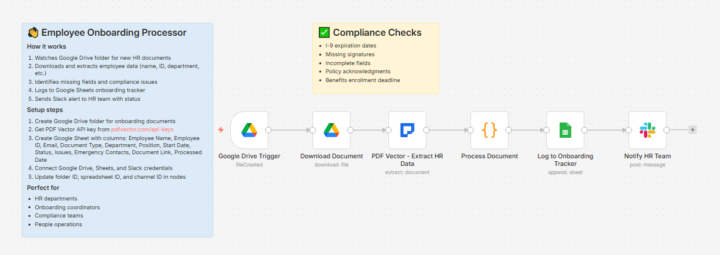
Neighbor runs a small bookkeeping practice. Just her for years. Finally hired an assistant. Never dealt with employment paperwork before. I-9, W-4, direct deposit forms, offer letter. Completely new territory. THE OVERWHELM Downloaded forms from government websites. Printed them. Had new employee fill them out. Collected them. Then what? Some forms have deadlines. I-9 must be completed within 3 days of start date. She didn't know that until I mentioned it casually 2 days in. Scrambled to verify the documents. Almost missed the deadline. Would have faced potential fines for something she didn't even know was required. THE ONBOARDING TRACKER I HELPED CREATE New employee documents get uploaded to folder. Workflow extracts all the information and checks completeness. I-9: Both sections filled? Documents listed? Signatures present? Deadline date calculated. W-4: Withholding selections captured for payroll setup. Direct deposit: Bank routing and account numbers extracted for payroll. Any missing fields flagged specifically. "Section 2 signature missing." "Bank account number incomplete." Deadline alerts for time-sensitive items. "I-9 verification due in 2 days." THE COMPLIANCE COMFORT Before: Paper pile, missed deadlines, didn't know what was required, potential fines. After: Checklists tracked, deadlines visible, missing items flagged before they become problems. She's hired two more people since. Says the system makes her feel like she actually knows what she's doing with HR stuff. The extraction struggles with poor handwriting. New employees who scribble sometimes need manual review. But catches most completeness issues automatically. My legal admin background helped here. Knew what compliance issues to watch for even if she didn't. This is the workflow i want to share for who want this What compliance deadlines are you not tracking that could bite you?
2
0
14d •
My Husband Didn't Know His Competitor Dropped Prices Until He Lost 3 Jobs 😲
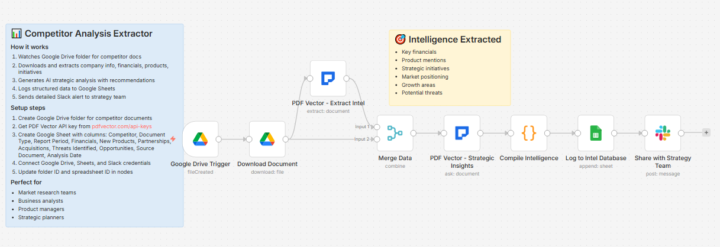
Landscaping business. Competitive market. Husband quotes jobs, sometimes wins, sometimes doesn't. Lost 3 bids in a row. Unusual for him. Good reputation, fair prices. Something changed. THE BLIND SPOT Ran into a competitor at the supply yard. Casual conversation. Mentioned their new pricing structure. Lower base rates, added premium services separately. Homeowners were seeing lower initial quotes. My husband's all-inclusive pricing looked expensive by comparison. He had no idea this happened. Didn't even know the competitor had a website with pricing listed now. Spent two weeks scrambling to understand what competitors were doing. Manual research. Painful. THE COMPETITOR TRACKER I BUILT Watches for any public documents competitors post. Service guides, pricing sheets, capability brochures. Some competitors email these out. Some post to their websites. When new document appears, workflow extracts the relevant information. Services offered, pricing if visible, new capabilities announced, coverage areas. Compiles into a summary. What changed from last time we looked at this competitor. My husband gets a notification when something meaningful changes. Not every little thing, but pricing changes, new services, expanded territory. THE AWARENESS NOW Before: Learning about competitor changes from losing jobs or accidental conversations. After: Sees pricing shifts and service changes within days of announcement. Adjusted his quoting approach. Base price for core work, line items for premium additions. Matches how customers are now comparing quotes. Won the next 4 bids after adjusting. Not perfect. Only catches competitors who publish things publicly. Word of mouth competitors still invisible. But better than nothing. This is the workflow i want to share How do you keep track of what competitors are doing?
1-10 of 84

@sarah-martinez-5730
Former legal admin → mom → n8n learner. Self-hosting to avoid Zapier costs. Building document automation workflows. Let's learn together! Phoenix, AZ
Active 4d ago
Joined Nov 15, 2025
Phoenix, AZ