
Write something

6d •
FREE YouTube Training this Tuesday July 7th
Hey NewTubers! This Tuesday July 7th at 8:00PM EST / 7:00PM CST I’ll be giving a YouTube Training presentation to @Christine Howatt‘s community, the Retirement Pocket Cash Club. During this training we will cover: - How to find your YouTube niche - The most common YouTube video formats and how to pick the right one for your personality and content style - A simple repeatable process for taking a video from idea all the way to published - How to use AI to speed up your workflow without losing the human touch that actually makes people watch - Getting into the YouTube Partner Program to earn ad revenue, how long it actually takes, and what the numbers mean - How to make money through YouTube before you ever qualify for ad revenue through the YPP - The key analytics that tell you what is working and what to fix - And more! If you aren’t already a part of Christine’s community, you can join for free using this link (FYI This is my affiliate link so I may earn a commission if you decide to upgrade to her Premium plan) The training is completely free for all her community members. We hope to see you there this Tuesday night!! —Woody


3d •
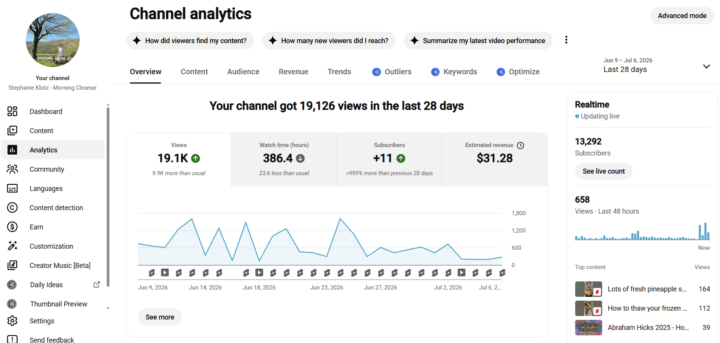
Posting 30 Days Straight
I'm starting to get good at having content come out every day. I have been doing a lot of shorts, think I will add more long form content in the next few weeks. I started doing this almost 30 days ago to see if this will boost my channel. Not sure I am seeing anything yet. I will update you in 30 more days! 😀
3d •
Tonight! Live YouTube Training
I’ll be giving a YouTube training class to @Christine Howatt’s community at 8PM EST / 7PM CST. You can join Retirement Pocket Cash Club for free by clicking here, and then the training will be free to attend!
4
0


1-30 of 174
powered by
skool.com/woodys-creator-lab-7885
Join a community of YouTubers turning small channels into real income, together, with proven strategies that work! 💪
Suggested communities
Powered by