

Feb 20 •
🚀 The Chatbot Era is Officially Dead. Welcome to the Agentic Era.
I’ve been watching the absolute madness unfold in the AI space over the last few weeks, and I want to drop some harsh but exciting truth on you: If you are still just building thin wrappers around text-generation APIs, it is time to pivot. We are officially transitioning from "Prompt Engineering" to "Agentic Orchestration." Here is the reality check on where the tech is at right now and how we need to adapt: 1. Models Are Taking the Wheel With the recent drops of models like Claude 4.6 and GPT-5.3-Codex, the focus has shifted entirely to "computer use" and autonomy. These models aren't just giving you Python snippets anymore; they are capable of navigating desktop environments, opening IDEs, and executing multi-step plans. The new meta is building sandboxes and guardrails for AI to act within, not just chat interfaces. 2. Open-Source is Destroying the Cost Barrier Models from DeepSeek, Qwen, and Zhipu (GLM-5) are currently dominating the open-source benchmarks. What does this mean for us? Intelligence is basically free now. Your competitive advantage is no longer the LLM you choose—it’s how efficiently you chain them together and the custom data you feed them. 3. The New Developer "Moat" So, where is the value for us as builders? - Tool Calling & API Integration: Building the bridges that let agents interact with the real world (Stripe, GitHub, AWS). - Multi-Agent Systems: Structuring workflows where a "Researcher Agent" feeds data to a "Coder Agent," which gets reviewed by a "QA Agent." - Eval & Reliability: Agents hallucinate and get stuck in loops. The engineers who figure out how to build reliable error-recovery systems are going to win this cycle. Let’s get a pulse check in the comments: Are you actively building agentic workflows yet? If so, what frameworks are you vibing with right now (LangGraph, CrewAI, AutoGen, or building from scratch)? Let’s build the future, not just chat with it.
Jan 29 •
Pick ONE: Cursor vs Claude Code vs Codex vs Copilot (agent mode) - and defend it.
I'll go first: Claude Code. Why (my POV): - It feels like the most reliable coding partner when you use it correctly: clear task framing, tight scopes, and constraints. - I’m treating my dev work like a product: versioned releases on Git, plus a personal learning.md for decisions + "memory context". - I started this product as vibe coding, but now it’s turning into a production product - and Claude Code helps me keep structure while still shipping fast. Tradeoff / reality check: Even with good hygiene, I’m seeing 50K context usage out of a 200K window just for it to scan and understand files sometimes. Worth it for speed, but the context budget is real. My take: Claude Code wins when you don’t treat it like magic—you treat it like an engineer: - give it a mini-PRD, - curate context (learning.md, changelog, release notes), - force small, testable steps. Now your turn 👇Pick ONE tool and defend it. If nothing comes to your mind just pick from these: what's your bottleneck - context budget, accuracy, refactors, tests, or review quality?

Jan 13 •
3 Ways to Install Claude Code Workflow Studio
This video wound up being longer than I thought it would. 🤷♂️ 1. Most of you will be able to use the very first installation method and be done in 90 seconds. 2. If you don't see the extension available in your VS Code extension marketplace, use method two. 3. If you like doing things the hard way, stay with me to the end and use method three.

Feb 15 •
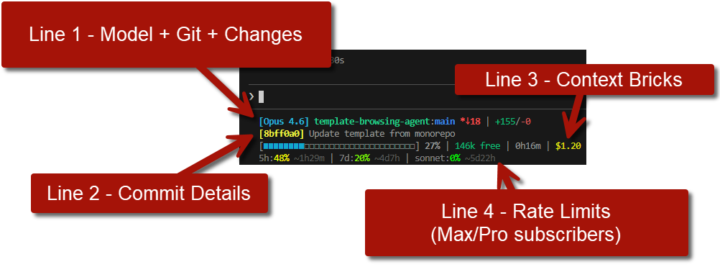
Claude Code Users: See your daily/weekly usage in the terminal
This little gem goes the extra mile showing daily & weekly rate limits for Claude Code Max/Pro subscribers. This particular fork works in Windows native and WSL, too. https://github.com/thebtf/contextbricks-universal
Jan 29 •
Are you also facing a ban issue - or got your Claude account banned?
People are reporting Anthropic warnings/bans when using Claude OAuth (Pro/Max) through third-party tools like Clawdbot (instead of API access). I'm dropping the few links below - anyone here hit by this, and what workaround are you using (API key / different model / different tool)? https://x.com/elijahsystems/status/2016201425273958453
1-30 of 52

skool.com/vibe-coders
Master Vibe Coding in our supportive developer community. Learn AI-assisted coding with fellow coders, from beginners to experts. Level up together!🚀
Leaderboard (30-day)
1

+1
2

+1
3
+1
4

+1
Powered by