

Jun 10 •
Skill of the Week- Claude can now WATCH & ANALYZE Videos
Claude Code can read files, write code, browse the web, and process documents. It cannot watch a video. I kept running into this. I would find a video I wanted to study, copy the URL, paste it in, and hit a wall. Claude had no way to see what was actually in it. So I built a skill that fixes this entirely. /video-analyze takes any video URL, downloads it, extracts frames at the correct timestamps, pulls the transcript, and passes everything to Claude for analysis. It works with TikTok, Instagram, YouTube, Reddit, X, etc. But the part that changed how I work is what Claude does after. It does not just describe the video. It reverse-engineers it. You get: - The hook broken down (spoken line, visual, category, plus a fill-in-the-blank template to swipe with your own wordings) - A timestamped table of every beat in the video, from open to CTA - The exact engagement mechanic the creator used and when they placed it - A replication playbook with 3-5 specific things you can copy into your own content Here is the GitHub repo. Just download the entire folder and run it in Claude (VS Code/Cowork) to install it globally. https://github.com/Mharis-code/videoanalyzer One command. The installer handles everything. If you study content for your own strategy, this saves hours every week. Drop a comment below and tell me what you analyzed. Curious what you find.

18d •
OBSIDIAN + CLUADE- FUll SETUP (My 2nd Brain and Board of Advisors)
Happy Monday People. Finally the much awaited Full Setup guide for Obsidian and Claude is up now. Claude starts fresh every time you open it. Every decision, every breakthrough, every session you built something in — gone the moment you close the tab. This video shows you the fix. I built a second brain in Obsidian that Claude reads from and writes to on every session. The result is a knowledge system that compounds instead of resets. You can use it for: 1- External Knowledge: Knowledge from others that works as your own 2nd brain or as your BOARD OF ADVISORS 2- Internal Knowledge: Auto-log every Key Decision and Lesson from your own Claude Sessions. This helps you build context and turn Claude into a True Executive Assistant that know everything about you. What you will learn: - How Obsidian works as a persistent memory layer for Claude - The LLM Wiki Manager: turns raw notes into an organized, self-updating wiki automatically - How to build a Board of Advisors so you can consult Hormozi, Brunson, or anyone else on demand - The Compress Skill: saves the key lessons from every Claude session directly into your vault - Full walkthrough from empty folder to working second brain Resources mentioned: LLM Wiki Manager (Free): https://github.com/sametbrr/llm-wiki-manager Obsidian Vault Setup Skill (Free): https://github.com/Mharis-code/obsidianvault Let me know what you think and if you will be using it for External Knowledge / Internal Knowledge.

16d •
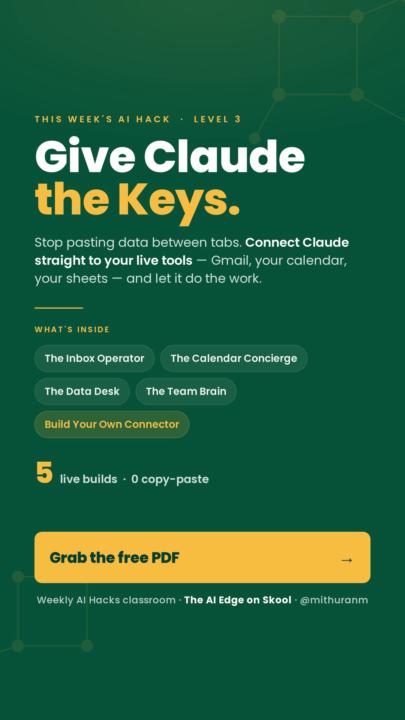
New AI Hack: Give Claude the Keys: Wire AI Into Your Live Business
Last week Claude wrote the scripts. This week it stops waiting for you to feed them. Every build you've made still needs you in the middle: exporting a CSV, pasting an email, moving data between tabs before anything runs. This hack removes that step. You connect Claude straight to your live tools: Gmail, your calendar, your sheet, Notion and it reads and acts on the real thing itself. The standard that makes it work is called MCP. Inside the PDF, five live builds with copy-paste instructions: - The Inbox Operator — reads, sorts, and drafts replies on your real mail - The Calendar Concierge — finds your open slots and drafts the booking - The Data Desk — asks your client sheet a question, flags the follow-ups - The Team Brain — answers from your Notion or docs, with the source named - Build Your Own Connector — Claude Code writes a custom MCP server for any tool One rule before you start: connect read-only first. Let Claude look before it touches, then grant write access once you've watched it work. Grab the PDF in the Weekly AI Hacks classroom and build one this week. Drop a comment with which tool you're connecting first.
11d •
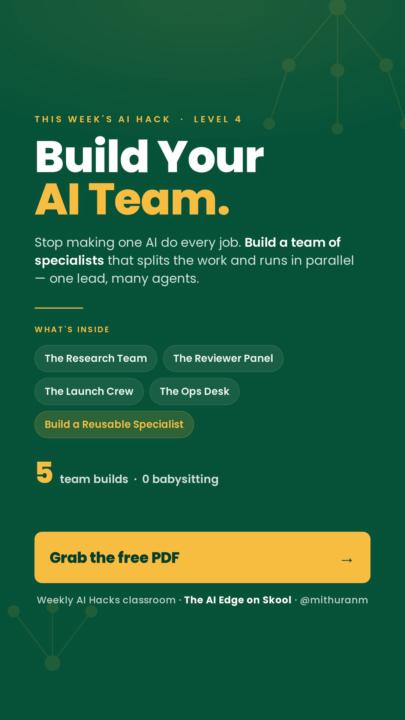
Why one AI doing everything keeps giving you average work
Most of us run the whole business through one chat. Research it, write it, check it, format it, all in the same thread. It works. But that agent is a generalist. The research stays shallow because it's also trying to write. The draft comes out rushed because it's also busy proofreading. This week, build a team instead. Claude Code can run a lead agent that splits the job and hands each piece to a specialist. One that only researches. One that only writes. One that only catches mistakes. The pieces that don't depend on each other run at the same time, so four agents finish in about the time of one. You give one instruction. The team hands you the finished thing. I dropped 5 builds you can copy straight into Claude Code: A research team that profiles any prospect and gives you one brief A reviewer panel that tears your work apart before it goes out A launch crew that turns one offer into a full campaign An ops desk that preps your entire day in five minutes And how to build your own specialist once and reuse it forever The PDF is free and it's in the classroom. Comment below and tell me the first job you'd hand off to a team. I read every one. And if you want the teams I build for clients, the ones that run proposals, content and ops without you in the loop, the AI Edge Pro waitlist is open. https://tally.so/r/rjvgdX Stop being the solo. Start running the team.
29d •
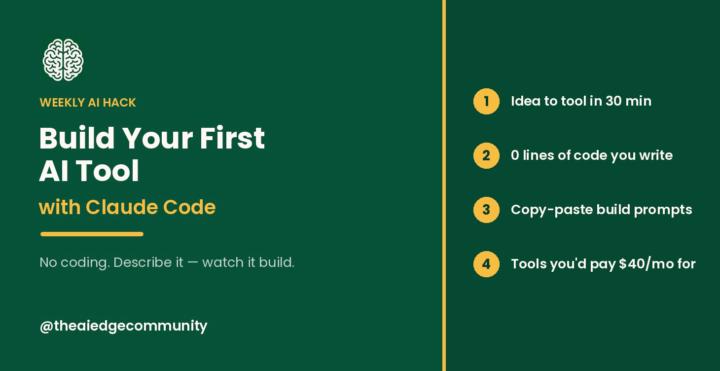
Build Your First AI Tool with Claude Code (no coding)
Quick question. How many subscriptions are you paying for right now that only kind of do what you need? I counted mine a while back and it was embarrassing. A tool for this, a tool for that, forty bucks here, twenty-five there. Half of them I barely used, and none of them actually talked to each other. I was basically renting software that almost fit. Then I started building my own with Claude Code, and it changed how I think about all of it. Here's the part most people don't realize: you don't need to know how to code. You just describe the tool you want in plain English, and Claude Code builds it for you. The thing that used to need a developer now just needs you to explain what you want clearly. Today's hack walks you through building your first one in about 30 minutes. Here's what's inside: The 30-minute build. Pick a simple tool, describe it, test it, use it. Start to finish in one sitting, and you don't write a single line of code. The exact prompts. One to build it, one to tweak it in plain English when something's not right, and one to package it up so you could even hand it to a client. The real skill. This isn't about becoming technical. It's about learning to describe what you want. That's genuinely the whole game now. The tool stack. Claude Code plus a Claude plan you probably already have. That's it. Nothing new to buy. Honestly, once this clicks you'll never look at a monthly subscription the same way again. Where to get the PDF: It's in the Classroom under Weekly AI Hacks, and it unlocks at Level 2. If you're not there yet, it only takes a few minutes. You level up by engaging, so the fastest way is to comment on this post, leave a few comments on other posts around the community, and like a few things while you're in there. That's enough to get you to Level 2, and then the Claude Code PDF plus every past hack is yours. Drop a comment and tell me. What's the first tool you'd build if you could make anything? And if you want to go further than the manual version, I'm putting together my full Claude Code playbook for The AI Edge Pro, the exact builds I use for client work plus live sessions where we build real tools together. Join the waitlist and send me a message here on SKOOL.
1-20 of 20

skool.com/theaiedge
Free community for solopreneurs who want to save 20+ hrs/week with AI. Weekly live call, plug-and-play prompts & templates, real wins. Join free.
Leaderboard (30-day)
1
+16
2

+5
3

+4
4

+3
5

+2
Powered by