Write something

Apr 26 •
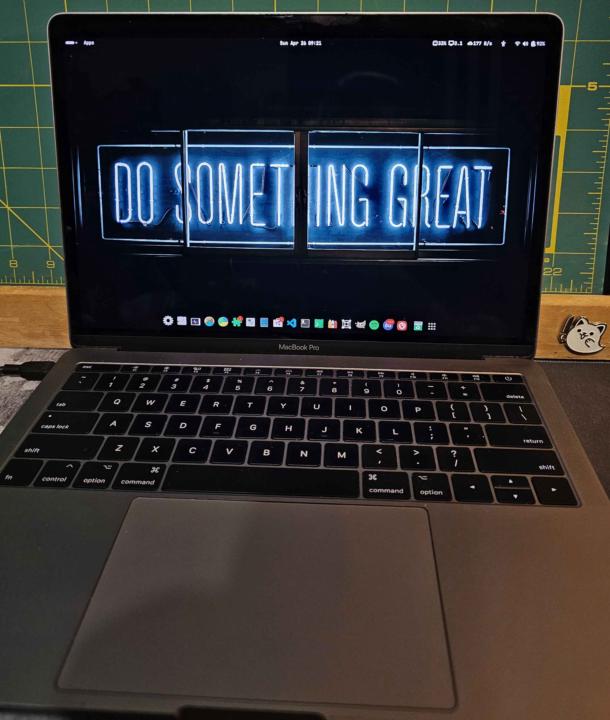
Introducing My Linuxbook Pro!
A friend of mine recently gave me a 2017 Macbook Pro that Apple no longer supports for tech shenanigans. So, I decided to wipe it and reimage the device with Linux Fedora Workstation 43. But why? Because after ~ 5 years Apple chooses to no longer support the device. They refuse to give it any operating system or security updates which effectively kills the device and forces the user's hand to purchase another. Planned obsolescence at its finest. However, that provided me with the opportunity to upcycle the device into a Linux laptop. And it worked well! - Who: Michael Roby II :) - Device: A 2017 Apple Macbook Pro - What: Switching a Mac's OS to Linux - Operating System: Fedora Workstation 43 - Firmware Version: 529.140.2.0.0 - Kernel: Linux 6.17.12-300.fc43x86_64 - OS Architecture: x86_64 - GNOME Version: 49 - Windowing System: Wayland - When (finished): 2026.04.25 - Where: IL, US Status: As of 2026.04.26 07:47, the device is functioning correctly and at the expected speed. Everything appears good. Other fun things: - I installed Ptyxis to be my primary terminal emulator because of the many improvements and customization options over the already awesome GNOME Terminal. - I installed Foot to be my secondary lightweight terminal emulator for quick changes and viewing. - Installed GNOME Tweaks, Thermald, Thermald-monitor, and a few other utility programs for better insight and control of the device. - I installed Impression to make bootable flash drives easily, and then made one for Arch Linux and Kali Purple that I'll mess around with soon--more to come! - I installed the Google Antigravity AI IDE from the terminal. So I'll be exploring that as well! - I installed Bottles to run Windows programs in their own bottles on my Linux machine. - I installed VSCode--my preferred IDE, and synced it with my laptop to have another, independent, instance of it that won't impact the performance of the one on my laptop.
Apr 5 •
My Perfected File Naming Format
Today I wanted to share my perfected file naming format and explain why it looks the way it does on all the files you've seen so far and will see in the future. First, l'll introduce it to you, then I'll break it down. I've also included a .pdf for easy reading and a .txt file for using as a reference in your terminal. ====== THE NAMING FORMAT: title_descriptor_YYYYMMDDtHHMM_m####.ext title_descriptor_YYYYMMDDtHHMM_p####.ext For this post it would be: theforge_my_perfected_file_naming_format_20260405t0714_m0500.txt ====== THE COMPONENTS: - title_descriptor — To represent the contents, the name should be all lowercase words, separated by underscores; no capital letters, spaces, dashes, or special characters. - YYYYMMDD — To represent the date, I use an ISO 8601 adjacent format with a 4 digit year, a 2 digit month, and a 2 digit day (the date of creation or export). - tHHMM — To represent the time, I also use an ISO 8601 adjacent format with a lowercase letter ‘t’ to indicate the start of the documented time, followed by 24-hour time, then the hour and minutes. For the UTC time offset, I use two different indicators depending on if the timezone is ahead, or behind, UTC. - m#### — To represent a time behind UTC the offset indicating character is an "m" for minus # of hours (e.g., m0500 = UTC-5). - p#### — To represent UTC or a time ahead of UTC, the offset indicating character is a "p" for plus # of hours, and standard UTC is simply “0000” (e.g., p0200 = UTC+2 and p0000 = UTC). - .ext — To represent the file type I use the corresponding file extension (e.g., .txt, .md, .pdf, .csv, etc.) at the end. If I don't know the file type, or the file’s contents will be switching file types, I just use ".ext" as a placeholder. EXAMPLES: ai_assistant_summary_20251005t1140_m0500.txt guardian_druid_builds_20251102t1745_p0200.pdf unix_cli_reference_20251001t0930_p0000.txt ====== THE MANDATORY RULES: 1. Use only lowercase letters, numbers, periods and underscores.
Feb 25 •
Linux CLI Resources #1
Hey guys, While my Linux CLI content is still currently a work in progress, I wanted to share some of the best PDF resources I've found helpful to me. Here are 10 of my favorite resources for efficient learning and troubleshooting of the Linux Command Line.
2
0
1-3 of 3