

14d •
Free n8n Crash Course
I just created a 1-hour crash course where I introduced all the different concepts and nodes that you need to get started with n8n. This would be a great preparation for our future cohorts, so you enter them ready to actually learn and deliver Real-World n8n projects. Make sure to check it out; I would love the support, so leave a like & comment on YouTube if you found this video useful.
17d •
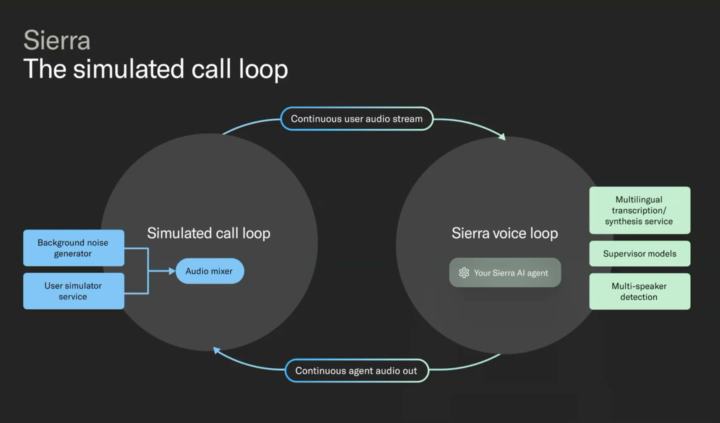
Simmulating Calls For voice Agents
Some companies are evaluating their voice AI agents by running a voice chat simulation (while changing voice speed, background noise, etc) to test their customer service agents.
17d •
Free Online Conference For Building Agents
I'm joining today's conference for building reliable AI agents in production. Feel free to join. https://home.mlops.community/public/events/agentsinproduction2025-mlops-prosus?agenda_day=68adc754616baff77f687bbb&agenda_track=68adc754616baff77f687bd0&agenda_stage=68adc754616baff77f687bc1&agenda_filter_view=stage&agenda_view=list
30d •
n8n Crash Course (week 1)
As a thank you for joining our community and amazing support, here is a little gift from me and Nadia for those who are beginners in n8n. Enjoy & feel free to ask questions. Best Serop & Nadia

Oct 29 •
Set Up Your n8n Environment (Do This Before Week 1)
Hi everyone! As you know, our upcoming cohort will focus on n8n. Before we begin, please make sure you've set it up using one of the following options: 1. Use n8n Cloud at https://n8n.io/ – The easiest, beginner-friendly option. You can simply purchase it there (14-day free trial available). The Starter plan is enough for our course and basic usage. Benefits: No need to worry about memory limits or downtimes. You can invite others to your project. We frequently use this option with clients - they invite us as editors. You can connect most tools to n8n in a few clicks (Gmail, Drive, Slack). Downsides: It's pricier than self-hosting. There are some limitations on how many times your workflows can run. 2. Self-host it on a cloud provider – A more affordable option that requires a bit of technical setup. For example, you can use Hostinger or Railway. Here's a video guide: → Hostinger: https://www.youtube.com/watch?v=etk8qpNA_Aw → Railway: https://www.youtube.com/watch?v=WbG0CYN7JiY Benefits: It can be as cheap as $6/month. You have no limits on how many operations your n8n can process (as long as your server is powerful enough). Downsides: You will not have an option to invite others by email, only by sharing your login/password. You'll need to keep an eye on server resource usage if you deal with big files. You'll also need additional setup for connecting Gmail, Slack, and other services (this happens because you need to add your n8n website to the list of trusted connections for each of them). 3. Install it locally – Free, but requires more setup and may have some connectivity issues. Here's a tutorial: → How to install locally: https://www.youtube.com/watch?v=EHfY748TD2E Benefits: Free, no limitations on the amount of operations. You can make n8n work with your local files or your browser. Downsides: More technical setup, plus the other downsides of self-hosting mentioned above.
4
0
1-5 of 5

skool.com/real-world-n8n-builders
Learn from n8n experts with 40+ successful automations under their belt. Master how to design and scale workflows that deliver real business value.
Leaderboard (30-day)
1

+8
2

🔥
+5
3

+5
4

+4
5

+4
Powered by