
Write something

2h •
Body Doubling
Has any here heard of body doubling? I am not that familiar with it. But if I understand it correctly, it is where 2 or more people work "next" to each other, although not neccessarily on the same task. Here is what google says on the topic: ADHD body doubling is a productivity strategy where another person is present—in-person or virtually—while an individual with ADHD works on tasks. This technique helps anchor attention, increase accountability, and reduce distraction, making it easier to start and complete boring or overwhelming tasks. It acts as a form of "grown-up parallel play" to help manage focus. (There was more to the response but if I posted it, you may not get far into reading, TLDR). Although I don't have ADHD, I often lack motivation and/or discipline to work like I should or need to grow my business that is much needed. This is all to say, does anyone want to be my accountability buddy? I did this 25 yrs ago before I ever heard that term to work with people all over country to get housework done. It was wonderful.
0
0


5d •
A slight change in direction
If you've got a minute, check out some of the changes in our Community. I've updated the About page to reflect a broader focus. Previously, I was focusing mostly on a teen/young adult audience, but I'm finding that adults of all ages are expressing interest in the planned content for the community, so I'm responding to that. We're ALL in this together, and this content is for all of us. In the near future, you'll see some content on Sourdough Bread baking. This may not be "flagship" adulting, career management, financial literacy content, but it's one of my most frequents asks. So you can watch for some courses, posts, videos... whatever I can get out there. I hope to schedule some live events as well! I've moved Financial Literacy and Career Management content into the "Total Cost of Adulting" course, but we'll still have separate discussion channels for those topics. And finally - I've got a web page up! Skool is still the primary site where all of the community happens, but you can share prpljennifer.com with friends and family to help them learn more about what PrplJennifer is all about, and bring them to the community. Let me know what you think! And don't forget to login, introduce yourself, and start earning XP so that you can reach level 3 and access the Home Maintenance Checklist!
0
0

10d •
Beware of the Windows Defender Phishing Attempt
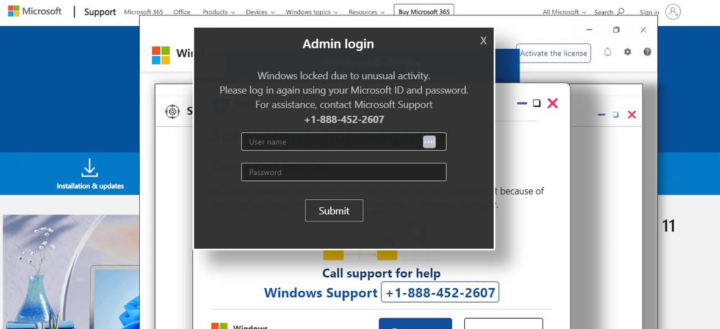
A Windows Defender malware is making the rounds (again) recently, and if you're not prepared it can be rather alarming. Here's what happens. You're minding your own business, browsing the internet on your computer. Suddenly, the screen changes and a large message pops up, informing you that Windows Defender has locked your computer for your own protection because of malware. In order to unlock your computer, you must either provide login credentials or call the number listed multiple times on the screen. Some of these attacks also manage to lock your mouse so that it truly looks like you're locked out. This is actually a website using a full-screen pop-up "ad." Here's what you do if you see this: 1) Check to see if your keyboard works. If it does, press Ctrl + Alt + Delete and choose Task Manager 2) When Task Manager opens, find the process for your browser (mine is Chrome). Right click and choose END TASK. 3) Your browser will close and you'll have full control of your computer. 4) When you relaunch your browser, it may ask if you want to restore your session. DO NOT RESTORE YOUR SESSION! Just close that window without accepting the option. 5) Once you return to your browser, CLEAR YOUR COOKIES AND CACHE. If you've got a timeframe allowable, choose at least the last hour, if not the last 24-hours. If your keyboard is not working and you can't get to the Task Manager, press and hold your power button until the computer shuts down. Then you can restart and start at step 4, above. Stay ever vigilant! NEVER enter login credentials for something like this. NEVER call the number presented to you on the screen. If you are unsure, go to your phone or another browser resource and look up the number (in this case, you'd Google Microsoft Support) and use THAT number. Good luck!
1
0
Apr 7 •
Your First Reward Unlocks at Level 3
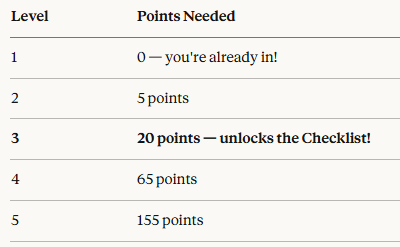
Introducing: the Home Maintenance Checklist 🏠✨ This is the first locked reward in our community, and it unlocks automatically when you hit Level 3. No waiting, no applying — just level up and it's yours. So how do you get there? Level 3 requires 20 points — and points are simple: 👉 Every like you receive on a post, comment, or reply = 1 point. That means the fastest path to Level 3 is to show up and contribute. Introduce yourself. Ask a question. Share something useful. When your fellow Travelers find it valuable, they'll like it — and your points add up fast. You can help your fellow Travelers level up by liking their content as well. Where are you right now? You can check your current level right next to your name in the community, or hop over to the Leaderboard to see how you're progressing. Drop a comment below to tell us where you are right now. Who's getting close to unlocking the first reward?
Apr 2 •
Every Day is a Learning Opportunity
It’s Day 8 of our RV trip, and Mr. Wayfinder woke up this morning with a twinge in his lower back. Rather than risk more discomfort, I stepped in and wouldn’t allow him to bend over or lift anything heavy (we’ve got a long driving day ahead of us). So I learned how to hook up our car 🚗 to be towed, and helped remove the hookups.these are important things for me to know how to do! On this Thoughtful Thursday, drop a comment and let us know something you learned this week! ✏️👇
1-19 of 19

skool.com/purple-jennifer-4304
The adulting class you wish you'd had. Real skills for money, home, career, self-care & AI tools, taught by a 30-year instructional designer. No hype.
Leaderboard (30-day)
1
+1
2

+1
Powered by