
Write something

3d •
How to Set Up a Gemini Gem
Let’s talk Gemini Gems, since most people have never touched one. A Gem is Gemini’s version of a custom assistant. Instead of starting from a blank chat every time, you build one with a specific job and specific instructions baked in. Here’s the setup part, not the content that goes inside it: - Open Gemini - Look for Gems in the side menu - Create a new one - Give it a name - Add instructions that tell it exactly what role it’s playing For job search work, that could be a Gem whose only job is decoding job descriptions, or one whose only job is helping you prep for behavioral interview questions. The instructions are the part that matters most. Be specific about: - the role it’s playing - the tone you want - what you want it to ask before it gives an answer A Gem with vague instructions behaves like a generic chat. A Gem with sharp instructions behaves like a specialist. Build one this week with a single, narrow job. Don’t try to make it do everything. Tell me what you built it for.
0
0
21d •
How to research a company in under 20 minutes (or Cowork placeholder)
How to use AI to research a company in under 20 minutes Most people spend way too long on company research before an interview, or not nearly enough. Here’s the approach that worked for me: treat the research like a briefing, not a deep dive. You want four things before any interview or application: - What the company actually does and who they serve - Their recent news (leadership changes, funding, layoffs, expansions) - What the role signals about where the team is headed - What questions this raises that you should be ready to answer or ask Use Perplexity to pull current news and public statements with sources. Then bring what you find into Claude and ask it to help you connect the dots to the role you’re applying for. You’re not trying to memorize the annual report. You’re trying to walk in with three sharp observations that show you did the work. Twenty minutes, done right, beats two hours of unfocused browsing. What’s your current company research process before interviews?
1
0
Jun 8 •
Which AI tool is actually better for job research?
I get this question a lot, so here’s my honest breakdown based on using all of them during my own search. I get this question a lot, so here’s my honest breakdown based on using all of them during my own search. For researching a company before an interview: Perplexity wins. It pulls current information with sources. You can see what the company has said publicly, recent news, and leadership changes. Claude and ChatGPT can give you a solid summary, but their training data has a cutoff. For understanding a job description and what it’s actually asking for: Claude is my pick. It handles nuance well, spots the difference between what a JD says and what the role probably needs, and gives you something you can actually use to tailor your materials. For drafting and editing your own content: Most are capable, but Claude tends to match tone better with fewer corrections. Gemini is solid if you’re already deep in the Google ecosystem. For building a target company list: Perplexity again, combined with a follow-up in Claude to help you prioritize. The tool isn’t the strategy. But knowing which one to reach for and when saves you time you don’t have, along with having a good prompt. Don’t forget I have a prompt guide for sale in the classroom. What tool have you been using most in your search right now?
0
0
Jun 2 •
🔑 LinkedIn is hiding the freshest jobs from you. Here's how to fix it.
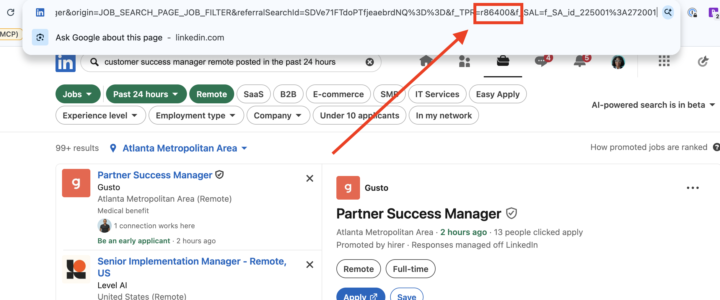
Most people filter by "Past 24 hours" and think they're seeing recent postings. You're not. You're seeing jobs that could be 23 hours old with hundreds of applicants already in the pile. Here's the trick: LinkedIn builds its time filter directly into the URL. When you search with the 24-hour filter, you'll see a parameter in the address bar that looks like this: r=86400 That number is seconds. 86,400 seconds = 24 hours. Change it to r=14400 and you're now seeing jobs posted in the last 4 hours. Change it to r=28800 for the last 8 hours. You can type those numbers directly into the URL and hit enter. I'd recommend starting at 8 hours and dropping to 4 when you want to go even fresher. But here's the second part: once you find a role you want, don't hit Easy Apply. Go find that company's careers page and apply directly there. You'll stand out more, your application is less likely to get lost in a LinkedIn bulk pile, and it signals actual intent. The only exception is if the company has no careers page and LinkedIn is the only option. Then Easy Apply is fine. Fresh role plus direct application is the combination. That's how you get to "Be an early applicant" before it means anything. Try it tonight and drop what you find below.
1
0
May 31 •
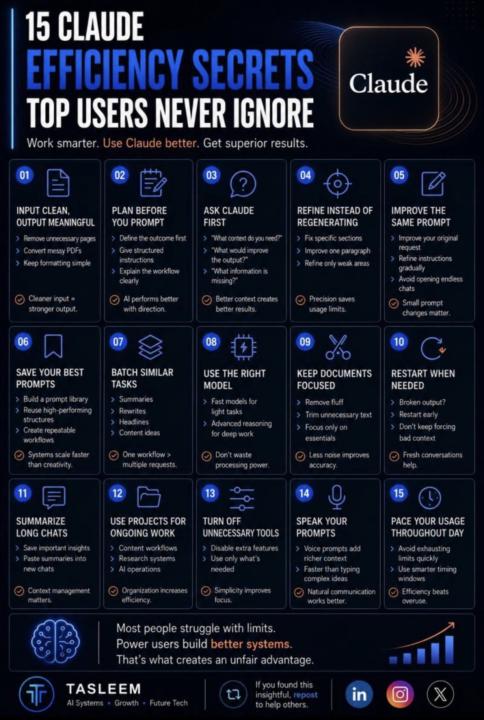
These are some great tips, for not just Claude but any GPT really
I saw them in this LinkedIn post. Gotta give credit where it’s due. Skills seat should be coming later today!
0
0
1-12 of 12

Suggested communities
Powered by