

29d •
Your Bot Just Got a Teammate! (Hint: HERMES)
Hey guys! Did you know that one of the new skills in the Skills Library is Hermes! Bot Squad — meet Hermes. We just added something cool to the Skills Library. Hermes AI is now available to download — and if you haven't heard of it, here's the short version: it's a second AI agent that runs alongside your ProductiveBot. Think of it like this — your ProductiveBot handles your main work. Hermes jumps in as a sidecar teammate. You can hand tasks back and forth between them, run them on separate projects at the same time, or use Hermes to think through something while your bot keeps working. Two AIs. Working together. On your machine. Getting started is simple — just double-click Start Hermes Agent on your Desktop and the setup wizard walks you through everything. Want to use it on Telegram or Slack too? Run the gateway setup and you're good to go. Head to your Skills Library (support.productivebot.ai) search Hermes, and download it in minutes. That's it. Go play.


May 15 •
Keep your passwords out of prompts: 1Password + ProductiveBot
We just published a guide on setting up a dedicated 1Password vault for your AI agents: https://productivebot.ai/blogs/resources/1password-vault-for-ai-agents Why this matters for security: Most AI workflows eventually need credentials: API keys, OAuth tokens, email logins, billing tools, private docs, etc. The risky way is copying those secrets into prompts, notes, config files, or chat history. The safer way is to keep secrets inside 1Password and let your agent access only the vault/items you approve. Good news: 1Password support is already built into ProductiveBot through the OpenClaw skills system, so your assistant can securely access approved secrets without you copying passwords around. You can give this article to your ProductiveBot and ask it to help you set this up. A few places you still need to be involved: - You choose which 1Password vault the bot can access - You approve or create the service account/token - You decide whether the bot gets read-only or write access - You should review any commands before secrets are connected - You can revoke the token later if needed In short: let your ProductiveBot do the tedious setup work, but keep yourself in the loop for the security decisions.
0
0
May 15 •
Update: OpenClaw 5.12 breaks branding - Scout will fix it if it breaks
Quick heads up: the latest ProductiveBot engine update may cause some units to temporarily show OpenClaw/lobster branding in the web console or terminal. This is a visual branding issue only. Your assistant and data are not affected. Good news: we found the cause and the fix is ready. We also updated Scout so it knows how to identify and resolve this if anyone runs into it. If you update and notice OpenClaw branding, lobster icons, or red lobster colors anywhere, email support@productivebot.ai and we will help get it cleaned up.
0
0

May 13 •
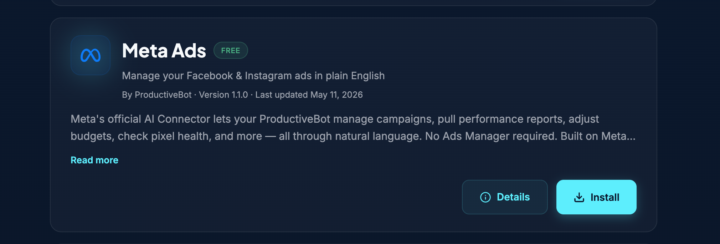
NEW SKILL: Manage your Meta Ads with your ProductiveBot
You can now easily manage your Meta Ads and get reports or ask your your ProductiveBot about performance. Visit our Skill Store to see the new Meta Ads skill. You can click on the "Details" button to learn more including sample prompts that are possible. P.S. Reminder - we have our weekly webinar tomorrow at 4pm CST! See you there.
2
0
1-4 of 4
skool.com/productivebot
Official home for ProductiveBot users! Get updates, share experiences, and connect with others who are optimizing their life with AI Assistants.
Leaderboard (30-day)
1

+8
2

+7
3

+2
4
+2
Powered by