
Write something
Pinned

May 26 •
How to Access the Tutorials and Upgrade Your Membership Plan
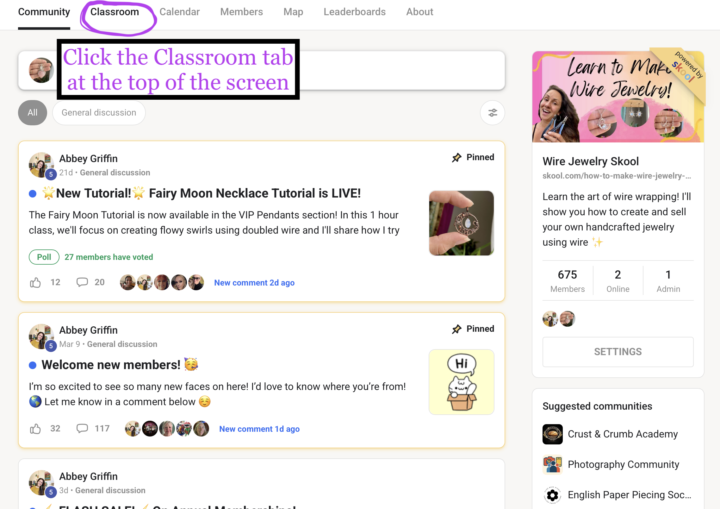
I've been getting a few questions on how to access the locked tutorials so I made a quick screenshot guide and later this week I'll try and film a guided video tour. Here's a step by step guide: 1. Click the Classroom tab at the top of your screen 2. You will see the available Free courses and the Locked courses. The Tutorial Index will show you photos of what's inside the courses. (This may not be up to date with every single lesson but I try ☺️) 3. Click on a locked course and click Unlock to access the membership pricing page 4. You will see monthly prices and when you click "Join" you will see the corresponding Annual Prices. Monthly plans can be changed back to the Free plan at anytime by going to Settings 5. To manage your membership, go to Settings (this is available in the app by clicking the ... at the top righthand corner of your screen) As always, you can message me if you have any questions!
16h •
Fur Baby Friday! 🐶🐱
The days are getting shorter over here so let's help boost everyone's spirits with some fur baby love! Feel free to share pics of your precious fur babies to help brighten up everyone's day! 🥰

16h •
🌟NEW TUTORIAL!🌟
You can now learn how to make this sleek, twisted square wire pendant in the newest VIP pendants tutorial! 🥳 In this video, I'll show you guys how to twist square wire without any special tools! I'm dying to know, who's going to try this one?!
Poll
3 members have voted
2
0

8d •
Show me something you made in October!
Share anything creative that you made in October! I love seeing what you guys are doing when you’re not wire wrapping 😁🧡🍁
12d •
November's Tutorial Challenge is Up!
Calling all tea and coffee lovers! This one's for you! Since it's that time of the season to curl up on the sofa with your favorite coffee cup, I thought it would be perfect for us to make our own tiny mug out of wire! This tutorial is available to everyone through the end of November -- don't forget to share your finished project on the community board! 🥰 Happy November everyone!

1-30 of 123
powered by
Suggested communities
Powered by