
Write something
Pinned

May 5 •
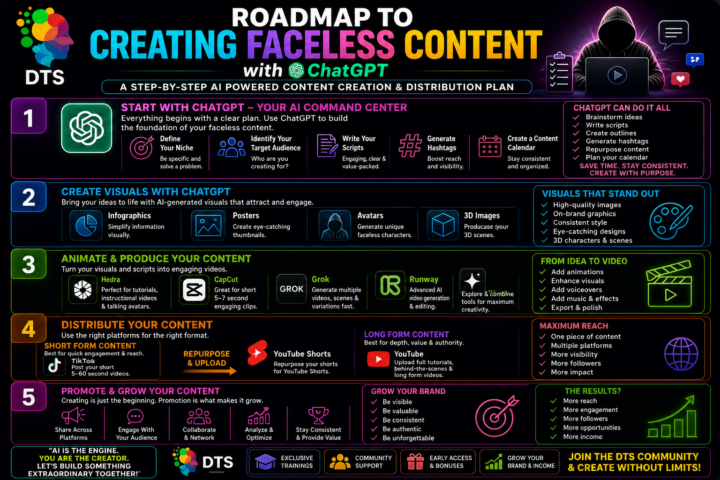
Learn how to create faceless content using AI ( Tiktok live @ 6am Mondays to Wednesday)
Learn how to create faceless content using AI. Plan with ChatGPT, design visuals, animate videos, and publish across platforms. Build a consistent system to grow your audience and income.
Pinned
Feb 12 •
Welcome to the DTS Techfit animation community
Welcome to the community. You are officially in the right place. If you have ever looked at a 3D animation and thought, I wish I could make that, this is where it starts. If you have ever wondered whether you could turn creativity into income, you are in good company. Here we learn how to create 3D animations not just as a hobby, but as a serious skill that can open doors. And if you choose, you can turn that skill into a profitable side hustle. This space is built for people who are curious, creative and ready to take action. We will explore AI tools, animation workflows and practical ways to package your work properly. No fluff. No confusion. Just clear guidance, strong foundations and modern methods that actually work. You can experiment, build characters, design scenes and bring stories to life for fun. Or you can go further and learn how to monetise your animations through digital products, social media content and client work. The choice is yours. The opportunity is real. Ask questions. Share your progress. Try things out. Make mistakes. Improve. That is how real growth happens. I am glad you are here. Let us create something powerful together.
Pinned
Mar 4 •
FREE PROMPT
Cinematic 10 second action sequence of an athletic Afro Caribbean female running along a massive tree branch suspended high above a lush forest canopy, dramatic lighting, ultra realistic, high detail, cinematic motion blur, shallow depth of field. 0 to 2 seconds. Extreme close up tracking shot of her feet sprinting rapidly along the rough tree branch, bark texture detailed, fast paced movement, camera tracking beside her feet, strong impact and energy. 2 to 4 seconds. Smooth crane shot rising behind her into a back tracking shot, revealing her full body running forward on the long endless tree branch, forest far below, sense of height and scale, wind moving her hair and clothing. 4 to 6 seconds. Intense close up of her eyes as she runs towards the camera, sharp focus, determined expression, dramatic lighting across her face, background motion blur emphasising speed. 6 to 10 seconds. Wide cinematic side view tracking shot of her sprinting powerfully along the branch, full athletic motion visible, dynamic camera movement, epic cinematic atmosphere, high realism, 4K quality, cinematic colour grading.

Sep 2 •
Create an AI Avatar That Actually Looks Like You Using Pinterest, ChatGPT and Google Flow
Create an AI Avatar That Actually Looks Like You Creating an AI avatar is easy, but creating one that consistently looks like you takes a little more planning. In this tutorial, I share my workflow using Pinterest, ChatGPT and Google Flow to create a realistic and consistent AI avatar. I use Pinterest to gather inspiration for hairstyles, outfits, poses and character styling. I then use ChatGPT to develop the character, refine the likeness and create prompts that help maintain the same facial features and overall appearance. One of my favourite tips is to upload your finished character image to ChatGPT and ask: “Write a JSON prompt to generate different character angles while keeping this image consistent.” This helps you build a stronger character reference before moving into video creation. I then use Google Flow to bring the character to life and create AI video content while maintaining the original look. If you are a content creator, educator or small business owner experimenting with AI avatars, this workflow can help you build a recognisable digital character that becomes part of your online brand. Follow DTS TechFit for more practical AI tutorials, content creation workflows and tips for building your brand with AI. #DTSTechFit #AIAvatar #AIAvatars #ChatGPT #GoogleFlow #Pinterest #AIContentCreation #AITutorial #AIVideo #ContentCreator #DigitalAvatar #CharacterConsistency #AIPrompts #JSONPrompt #PersonalBranding #DigitalCreator #GenerativeAI
1
0

Aug 18 •
Claude Code unlocked #claude
Most people are not getting poor results from Claude because Claude is weak. The real problem is the way they are prompting it. If your instruction is vague, your result will probably be vague too. Stop asking AI to simply “make this better”. Give it a clear job and tell it exactly what you need. Use /hook when you need an opening that grabs attention. Use /closer when you need copy that encourages people to take action. Use /repurpose when you want to turn one idea into multiple pieces of content. Use /bold when your writing has too much fluff and needs to be clearer and stronger. Use /elevate when your draft is already good, but you want it to sound more polished and professional. These are the types of simple AI commands that can completely change the quality of your results. I’ve put together 13 Claude Secret Codes in one quick reference guide. You can use the same approach in Claude and adapt the codes for other AI chats too. Comment CLAUDE and follow DTS TechFit to get the guide. Save this post so you can come back to these commands when you need them. #ClaudeAI #AIPrompts #AITips #ContentCreators #DTSTechFit
1
0

1-30 of 41
powered by
skool.com/dts-techfit-9994
IT Lecturer and AI specialist teaching 3D animation and how to monetise digital creations with practical, future focused strategies.
Suggested communities
Powered by