
Write something
Pinned

19d •
How to prompt like a pro
The AI gave you exactly what you asked for. That was the problem. The AI output is messy because the task was messy first. Most people skip the step between "I want to automate this" and opening the tool. That step is writing down how you actually do the task right now. Including the inconsistent parts. The judgment calls. The things you quietly fix before anyone else sees the result. If you cannot write that down in four or five steps, the model cannot do it either. You are just moving the mess into a prompt. Before you touch any AI tool, do this with one repeated task: - Write one example of good output. A real one you have produced before, not a description of what it should look like. - Write one example of bad output. The version you would fix before sending. - Write the steps you actually follow. The real process, not the ideal one. Now you have something the model can work with. The prompt is the last thing you write. The brief is the work.
Pinned
18d •
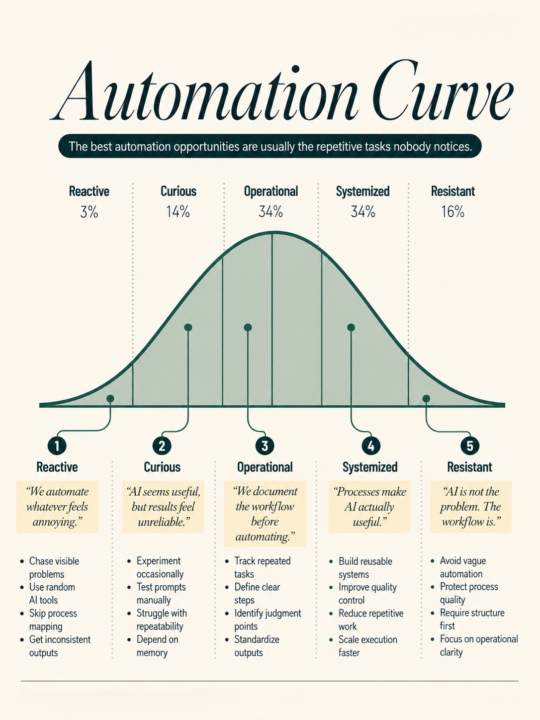
You are probably automating the wrong task.
The one you picked is visible, annoying, and feels like a good candidate for AI. But it is the quiet tasks that eat your week. - Drafting the same response for the third time this month. - Reformatting the same report. - Writing a brief from scratch when you already wrote a similar one in January. You do not notice those because they do not feel dramatic enough to fix. Here is a better way to find what to automate: For one week, write down every task that takes you longer than 20 minutes. Just the name and the rough time. Nothing else. At the end of the week, look at the list and find the most repeated task that follows roughly the same steps each time. That is the task worth mapping before you touch any tool. Map it first. Write the steps in plain language. Include what a good output looks like. Include what a bad output looks like. Note the one decision that requires your actual judgment. Now you have something AI can actually help with. Most people skip the map. They drop a vague task into a prompt, get a vague result, and walk away thinking AI is not ready for their work. A clear process is what makes AI useful. The tool just runs it faster. Which task did you automate this week?
Pinned

🔥
Dec '25 •
Introduction
Welcome! Introduce yourself + share a career goal you have 🎉 Let's get to know each other! Comment below sharing where you are in the world, a career goal you have, and something you like to do for fun. 😊
19d •
Every time you use AI, you start from zero.
You use AI every week and still feel behind. Because you restart from zero every time. Different tab. Different instructions. Different output. So you keep “trying AI” and you never feel ahead. Do this instead: build one repeatable AI run for one recurring operator job. Here’s a clean one that fixes the weekly status update (the one you rewrite three times and still hate sending). Step 1: Create your “Update Pack” format once. Keep it boring. Same headings every week: - Wins (shipped, closed, launched) - Numbers (the 3 metrics you actually track) - Blockers (what’s stuck, who you need) - Decisions (what you need leadership to decide) - Next week (top priorities) Step 2: Spend 10 minutes filling the pack with messy bullets. No sentences. No polish. Just facts. Step 3: Give the pack to your AI and ask for one output: a status update that matches your usual tone and length. Tell it the channel too (email vs Slack) so it doesn’t write a novel. Step 4: Run a 60-second review checklist before you send: - Did it invent anything? - Did it hide the real blocker behind “in progress” language? - Did it bury the decision request? - Is every paragraph skimmable in one pass? Step 5: Send it. Then reuse the same pack next week. Same format. Same steps. Faster every time. You don’t need five AI tools for this. You need one loop you can run on a Tuesday when you’re tired. If a process doesn’t survive the second attempt, it’s a demo.
21d •
Your Claude session has a slow leak. Every extra message drains it faster.
Most founders open one thread, dump everything in, go back and forth ten times, and wonder why the output falls apart by message eight. The session design is the leak. 13 hacks to fix it. 1. One job per conversation. Research, drafting, and editing each get their own thread. Keep them separate. 2. Front-load everything. Give Claude the goal, audience, format, and one example in your first message. Everything it needs before the first response comes back. 3. Use Projects. Claude retains context across conversations inside a Project. Start every repeated workflow there. 4. Write your system prompt once. Who you are. Your audience. Your tone. Store it. Paste it at the top of every new thread. 5. Set the output format upfront. "Respond in bullets, max 80 words each." Fewer revision loops. Less wasted context. 6. Give examples instead of long explanations. A 50-word example tells Claude more than a 200-word description of what you want. 7. Upload files. Cleaner input produces cleaner output. 8. Use Claude to compress your own context first. Before starting a task, ask: "Summarize this document into the 10 facts I actually need." Use that summary, not the original. 9. Split big jobs into stages. Research in one conversation. Outline in another. Draft in another. Review in another. 10. Stop editing inside the same thread. Every correction round uses context. Edit the output yourself. Open a fresh prompt if you need another pass. 11. Keep a prompt library. Store your best instructions somewhere simple. Paste them in clean each session. 12. End every session with a handoff note. Before closing, ask: "Summarize what we decided and what I should tell you next time to pick up from here." Paste that note into your next conversation opener. 13. Close short threads on purpose. When in doubt, close and start fresh. A clean session costs nothing. A wasted one costs you the whole workflow. The session design is always where it breaks. Most founders never check there.
1-30 of 148

skool.com/digitalempireacademie
Where ambition meets success. Learn, earn, and grow your digital empire. Empower. Educate. Elevate. 👑
Leaderboard (30-day)
1

+14
2

+9
3

+1
4

+1
5

+1
Powered by