
Write something

23h •
Jotform vs. Google Forms…
Okay, business owners and freelancers… I have a question. Jotform or Google Forms? I’ve used both, but personally… I think my money is on Jotform Don’t get me wrong, Google Forms definitely has its benefits. I recently learned from @Deiondra Chalwell that you can view individual responses, see response summaries with charts, and connect everything to Google Sheets, which can be really useful depending on what you’re collecting. Google does officially support individual response viewing, response summaries/charts, and exporting responses to Sheets. But from my personal experience… 👇🏽 For DDJ & Associates – Dream Vacations, I use Jotform for my Cruise Vacation Inquiry Forms, and I just find it so much easier to manage my leads. When someone fills out my form, I can go directly into the app, pull up their individual submission, see all of their answers, and keep track of where they are in the process. I can create tags like: ✈️ Booked ⏳ Waiting on Response ❌ Canceled …and organize my submissions based on what’s happening with each potential client. For me as a travel advisor, that makes a HUGE difference because I’m not just collecting information. I’m actually using the form as part of my client process. I also personally find Jotform more visually appealing and user-friendly. The free plan currently gives you up to 5 active forms and 100 monthly submissions across the account, which honestly may be enough for a small business just getting started. Now, I can definitely see Google Forms being useful if your main goal is collecting responses and looking at the data, summaries, or charts. But for managing my travel inquiries? Yeah… my money is still on Jotform! But I’m curious to hear everyone else’s thoughts 👀 Anyone want to come in here and defend Google Forms? 😂 Or tell me what type of business or freelance work you do and which one you think would benefit you more based on the tools and features each one offers. Even if you use one, both, or haven’t used either yet, I’d still love to hear your thoughts!

8d •
🧠 Funny but Hard Riddle 👀
Let’s see who can guess this one… Some people believe in me and others don’t. The more people talk about me… the more powerful I seem to become. Who am I? 👀 👇🏽 Drop your guesses below!

3d •
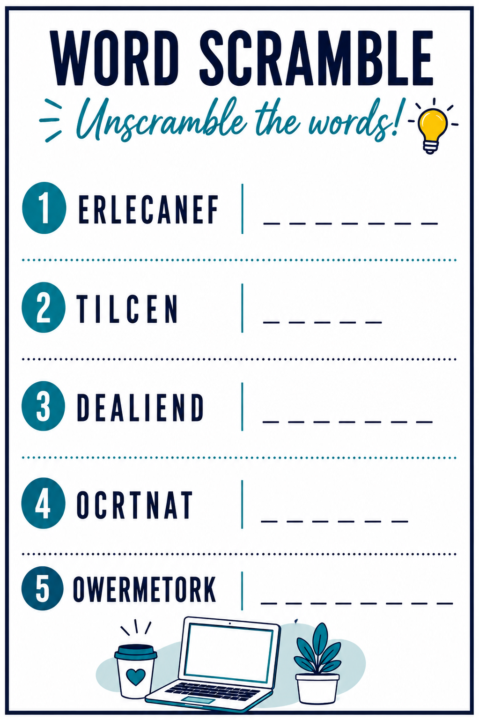
Think You Can Unscramble All 5?
Alrightttt… let’s see who’s good with words 🧠 I’ve scrambled 5 words related to freelancing and remote work 👀 Some might be easier than others… 👇🏽 How many can you figure out? Drop your answers below! Freelancers need all kinds of skills… apparently word-solving might be one of them too! 😅 Let’s see who has it!
23h •
🔥 Wednesday Debate
In freelancing and remote work…Which matters MORE? 👀 And yes… ideally you should have ALL THREE But if you absolutely had to choose ONE, which person do you think clients or employers are more likely to keep around long-term? 👇🏽 Pick a side and tell us why.
Poll
2 members have voted
1
0
29d •
🔥 Wednesday Debate 👀
When it comes to working with clients, which is better? Letting clients send a message explaining everything in their own words OR Having clients fill out a form so all the information is organized from the start ━━━━━━━━━━━━━━━ Some people prefer messages because: 💬 it feels more personal 💬 allows for conversation 💬 gives flexibility Others prefer forms because: 📋 everything is organized 📋 fewer back-and-forth messages 📋 saves time 👇🏽 Which side are you on and why?
1-30 of 55
powered by

skool.com/d-freelancervi-remote-work-hub-3025
Your local remote help—teaching simple online skills so you can learn, grow, and earn from anywhere.
Suggested communities
Powered by