
Pinned

Mar 15 •
Welcome to Clief Notes. Here's where to start.
1. Watch the intro video and introduce yourself in the intro post here 2. Start with The Foundation (free course). Concepts, folder architecture, prompting framework. Everything else builds on this. 3. Check in at the bottom of each lesson. Polls, discussion posts, other members working through the same stuff. Use them. 4. When you're ready to build real things, move to Implementation Playbooks (Level 2). When you're ready to build your own tools, Building Your Stack (Level 3). 5. Post your work. Ask questions. Help others when you can. What are you here to build?
Poll
6486 members have voted
Pinned
7d •
🚨 You've been asking when the Lyceum opens. The waitlist is live. 🚨
The waitlist is up and seats are limited, so this is your nudge to go lock yours in. 👇 New here? Quick context. 👀 The Lyceum is Jake's live cohort program built on ICM, the methodology 35,000 people in this community are already using to get real results with AI. The short version: folders over agents. You learn the layer underneath the tools, the one that keeps working when the next model drops. Full breakdown is on the site. Here's what's inside: 🎯 Three cohorts, Technical, Business, and Creator. Same methodology, built around what you actually do. 🎥 Live sessions with Jake and a full team of instructors. ♾️ Lifetime recordings, written curriculum, and a private cohort Discord. 📜 An Eduba ICM certification you can put on your resume. And a guarantee no course makes: ✅ You leave with a working product, or the team finishes it with you. ⏳ Seats are limited and this community moves fast, so the math is not in your favor if you wait. 💡 Pricing and start dates aren't public yet. The waitlist sees them first, gives feedback on timing, and gets in before the program opens. Everything you want to know is on the page. If you already know this is for you, get on it. 🔥 👉 https://lyceum.eduba.io

2h •
🔍 How I use /insights to improve my interactions with Claude Code
Claude Code is my daily driver for coding, and since it dropped back in Feb, I have been using /insights. If you've never run it: it's one command. 🧑💻You type /insights, wait a few minutes, and it reads your last 30 days of sessions, your prompts and Claude's responses, and saves an interactive report (In HTML) in your global .claude folder. On PC : C:\Users\YOUR_USERNAME\.claude\usage-data (Local Dir) On Mac : ~/.claude/usage-data (Hidden Home Dir) 🔍Find it, 🖱️click it, 📖read it. (It will open in you defaulted browser.) It only reads the chat history, not your code. Here's what it did for me. ✅ /Insights tells you what you're doing right, the report doesn't only hunt for friction. It leads with what's working, the habits I built that were worth keeping. Mine pointed to my session handoffs and my scan-before-deploy discipline as things I had right, and that landed as much as the fixes did. It's easy to only notice what's broken. Having your good patterns named back to you tells you what you should protect while you change the rest. 🎁 And it hands you the recommended solutions, not just problems. (This was the part I didn't see coming.) It doesn't stop at naming a rough spot. It writes a solution for you. Ready-to-paste in CLAUDE.md rules, suggested skills with the file already drafted, even hook setups and fresh workflows to try. So, the moment it surfaces a pattern, the next step is sitting right there. By the time I finished reading, half the work of improving my setup was already done. (With a little iteration of course😅) ==============Now for the lessons====👇============ The first thing it taught me was how I really work. (I will admit, at first, I was in a bit of denial, and that's not a river in Egypt as my grandma would say❤️🔥.) 💡The first time I ran /insights It showed me I edited far more than I wrote from scratch, which fit, I was refining and verifying way more than I was generating at the time. (I was doing a lot manually)
Poll
5 members have voted


1d •
The lesson I'd give a builder who's stuck
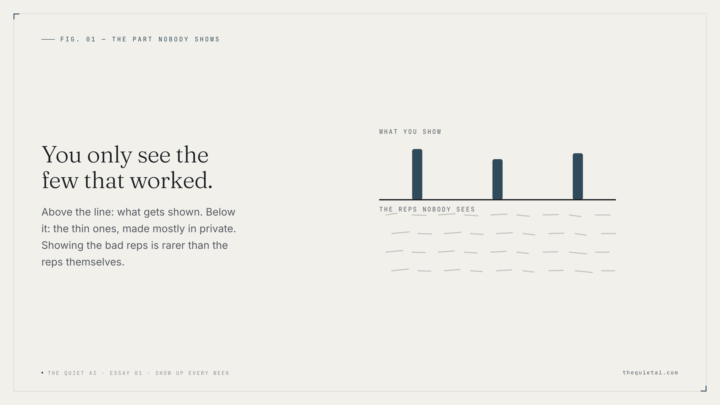
You're not stuck because you don't know enough. You're stuck because you're waiting for a real client before you'll do the real work. So you study, you plan, and you never ship the bad first version. Fix: invent the client. Do the actual work for someone who doesn't exist — this week. Here's what I actually run: - A standing weekly block. Same time, every week. The calendar decides, not my mood. - One fake client per rep. A made-up person with a real-enough problem that I can finish something for them. - The whole loop, every time: decide → make → finish → look at it honestly. Not a plan. A finished thing. - Ship it somewhere mildly uncomfortable so "finished" actually means finished. - Next week, new fake client. Repeat. Why a fake client and not a "project": a project has no edges, so it never ends and never ships. A client gives you a brief, a person, and a finish line. It makes the rep real without a real person absorbing your worst version. The part most builders won't say out loud: the work is thin for a long time. Mine still is some weeks. That's not failure, that's the rep. The people who look mysteriously productive are just not showing you their thin weeks. I'll show you mine. No redemption story here. I'm not going to tell you it gets good and then you stop. The reps don't stop — you just earn the right to run them on better things. Keeping going while you're still bad is the skill. It's not the thing you do until you have the skill. This week: one fake client, one finished piece, one uncomfortable place to put it. Then put next week's block on the calendar before you close the tab. More of this — slow, no hype, the part nobody shows — at https://medium.com/@gabeyoga/show-up-weekly-even-for-fake-clients-35de9257b674?sk=752066d5ae79844624036b3087a054d1

2d •
4 Team ICM & Growing
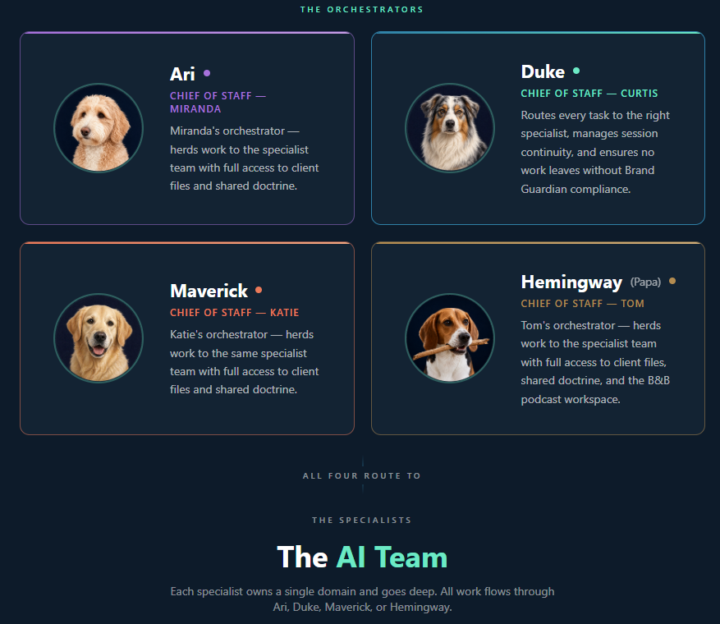
Big update! I brought 2 new team members into our shared workspace today. There are 4 of us all with our own private ICMs with a forked repo for shared files which includes client folders, agents, skills, and doctrine. 2 more team members made the training but skipped setting up their ICMs today. We recorded the session for 3 others that couldn't make it. From start to finish (download of vs-code to fully trained and functioning) completed in 2 hours. By end of June we should have 6-10 team members all in our org using their own personal ICM connected to a shared repo that runs the entire organization. I can't wait to see what these team members start to build for themselves when they start to realize the power they have at their fingertips.
1-30 of 1,598

skool.com/cliefnotes
Jake Van Clief, giving you the Cliff notes on the new AI age.
Leaderboard (30-day)
1

+1408
2
+1276
3

+648
4

+647
5
+641
Powered by