
Write something

Jan 3 •
🔥Auto Scrape + 🔥Download Viral YouTube Shorts🔥
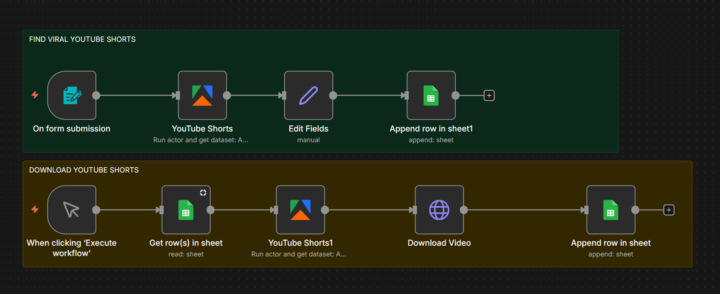
# Quick & Easy Guide: Auto Scrape + Download Viral YouTube Shorts in n8n 🚀🔥 Super simple workflow to find hot YouTube Shorts and download your favorites! 😎 ### What It Does 🛠️ - Enter a keyword → Scrapes top Shorts (title, views, likes, URL) → Saves everything to Google Sheets 📊 - Mark “Download?” as Yes → Run the workflow → Videos get downloaded automatically 💾 Great for content ideas, repurposing or just collecting bangers! 🎥 ————————————————————————————- ### Super Easy Setup (5 Steps) 👇 1. Import the Workflow 📥 Download the JSON file from the n8n community (or copy it). In n8n: Workflows → Click “+” → Import from Clipboard or File → Paste/import it. 2. Set Up Credentials 🔑 - Add your Apify API key (get a free account at apify.com) in the two Apify nodes. (They use the YouTube Scraper and Downloader actors) - Add Google Sheets OAuth for the sheet nodes. 3. Update Google Sheet Links 📈 Replace the hardcoded Sheet IDs in the Google Sheets nodes with your own sheet. Make sure your sheet has columns like: title, youtube_url, views, likes, Download? 4. Test the Scraper 🧪 Open the form link n8n created → Enter a keyword + number of Shorts → Submit. Check your Google Sheet for the new rows. 5. Download Videos ↓ In your sheet: Set “Download?” to “Yes” for the Shorts you want. In n8n: Click “Execute Workflow” on the download branch. Done! Downloaded video links appear in the sheet. That’s it – start finding viral Shorts in minutes! ⏰✨ Quick tip: Start with small numbers (10–20) to test. Important: Use responsibly – respect YouTube’s Terms of Service and copyrights ⚠️ Happy automating! Youtube Scraper Actor: https://console.apify.com/actors/h7sDV53CddomktSi5/input
Youtube Downloader Actor: https://console.apify.com/actors/wA096F27Xs0ss1XcE/input
Click File make a copy: Google Sheet: https://docs.google.com/spreadsheets/d/1GNkWXv1qUvyMh6y-U12Og7wKfADz-BtuIOYMPTJuE7k/edit?usp=sharing
0
0
Dec '25 •
🔥🚨 NEW SECTION JUST DROPPED IN THE CLASSROOM 🚨🔥
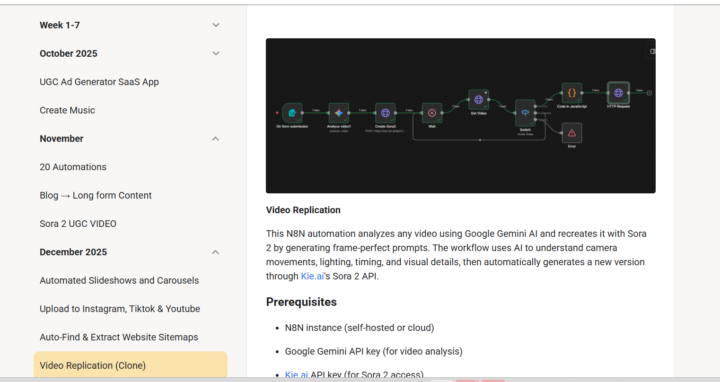
We just unlocked a Premium Workflows Vault—and this is not average automation. This is elite, best-of-the-best systems built for people who want results without burnout. ⚙️👑 ✨ What’s Inside: 💥 4,000+ paid automation templates 💥 High-level workflows used by top creators, agencies, and operators 💥 Plug-and-play systems designed to save time, scale output, and increase revenue 💥 Step-by-step guidance so you’re not guessing what to click or how to set it up 😮💨 Why This Matters Most people are tired of: ❌ Doing everything manually ❌ Repeating the same tasks every day ❌ Spending hours on content, ads, and follow-ups ❌ Knowing automation exists but not knowing how to build it ❌ Hiring help when a system could do it better These workflows replace hours of work with minutes of setup. That’s leverage. 📈 🎯 Who This Is For: 👩🏽💻 Entrepreneurs who want systems, not stress 📦 Business owners scaling operations 📣 Agencies managing multiple clients 🚀 Creators who want automation behind their content 🤖 Anyone who wants AI working for them—not the other way around ⚡ Want Us To Install It For You? If you don’t want to touch the tech at all, we’ll handle the setup. Just comment “Workflow” and we’ll plug it directly into your system for you. 🔌🔥 This isn’t just learning. This is execution + automation + leverage. Welcome to the next level. 👑🚀
Dec '25 •
Generate Viral UGC Ads💰🔥
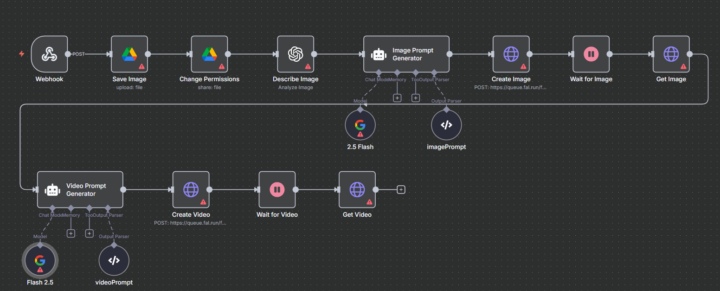
Automate content creation 🔥🤑 Just finished a Workflow that will Generate UGC ads for you on Autopilot Want us to build out workflows for you Comment "work flow" without hiring creators, filming content, or managing chaos. This system runs in the background and produces ads designed to convert. ⚙️💰 Most brands are stuck because: - UGC creators are expensive and inconsistent - Content takes too long to produce - Ads burn money because creatives go stale fast - Teams waste hours briefing, revising, and chasing deliverables - Founders are tired of being the face AND the editor AND the marketer You need speed, volume, and consistency—not more busy work. 💎 Why This Is Valuable This workflow: - Generates UGC-style ads automatically 🤖 - Turns product info into ad-ready content fast ⚡ - Helps you test more creatives without extra labor 📈 - Reduces ad fatigue by producing fresh variations - Scales your marketing without scaling your team Think: system > people dependency. 🎯 Who This Is For This is perfect for: - 🧑💼 Business owners running ads who need better creatives - 📦 E-commerce brands scaling paid traffic - 📣 Agencies managing multiple clients - 🚀 Startups that want speed without overhead - 👩🏽💻 Solo founders who don’t want to film content daily If you run ads—or plan to—this saves you time, money, and energy.

Dec '25 •
Is AI Automation your new "Silent Partner"?
Hello community! I’m Danish, and I’m here to help you bridge the gap between human creativity and AI efficiency. We hear the word "AI" everywhere, but for most of us, the big question is: What does it actually DO for my business? Think of AI Automation as a "Silent Partner" that handles the repetitive, "boring" stuff so you can focus on the creative, high-value work. It’s not about replacing you; it's about giving you your time back. I want to help you find your first "win." Let’s start in the comments: What is one repetitive task in your daily routine that you wish a "robot" could just take off your plate? If you had a "magic button" to automate ONE part of your work today, what would it be? I’m looking forward to helping you all work smarter, not harder! 👇
1-4 of 4
powered by

skool.com/better-funded-community-3136
💳 Legal credit repair ⚖️ | 💰 Bank funding strategies | 🤖 AI & automation | 💻 Monetization plays | 📊 Real execution
Suggested communities
Powered by