
Write something

2d •
A practical framework for building MVPs with Lovable
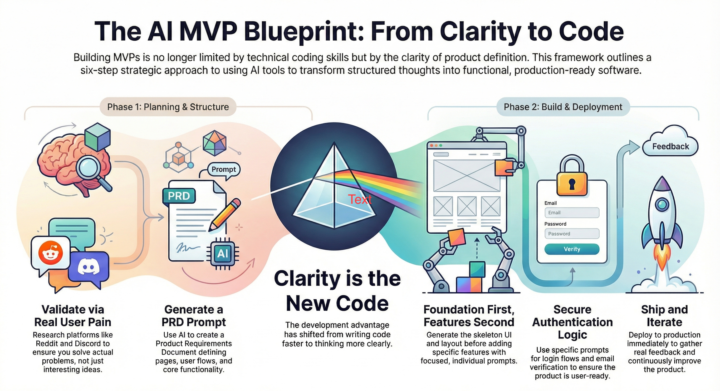
After building multiple MVPs with Lovable, I realized something important: Building MVPs is no longer limited by coding skills. It’s limited by how clearly you define the product. AI can build almost anything. But only if you give it the right structure. Here’s the exact framework I follow: 1. Start with real problems I don’t start with ideas. I start with problems. I explore Reddit, Discord, and YouTube comments to see what people are struggling with. This helps ensure I’m building something useful and relevant, not just something interesting to me. When the problem is clear, everything else becomes easier. 2. Create a clear blueprint using a PRD prompt Before building, I use Lovable to generate a PRD (Product Requirements Document). This helps define: - Pages and routes - User flow - Core features - Product structure This step is critical. It acts like a roadmap and removes confusion during development. Without structure, AI produces inconsistent results. With structure, it produces production-ready output. 3. Build the skeleton first Next, I generate the basic UI structure: - Layout - Navigation - Pages I don’t worry about features yet. The goal is to create a clean foundation that can be extended easily. 4. Add features incrementally I add one feature at a time using focused prompts. This keeps the system stable and easier to debug. It also helps Lovable produce more accurate results. Trying to build everything at once usually creates messy output. Incremental building works much better. 5. Add authentication Once the core product works, I add authentication using Supabase. This includes: - Login and registration - Password reset - Email verification - Protected routes This makes the product ready for real users. 6. Deploy and iterate Finally, I deploy the product. You can deploy directly from Lovable or connect GitHub and deploy via Vercel or Netlify. Once live, I improve the product based on real usage and feedback.

17d •
🤖 The Personal AI Assistant Era Just Got Real
Just dove deep into Claudebot, and honestly? This feels like a turning point. Here's what makes it different: Instead of being stuck in a terminal or specific app, you can message your AI assistant through Telegram, WhatsApp, Discord, or whatever you actually use. It's like having Claude Code's power in your pocket. The game-changer? It's proactive. Tell it to monitor your competitors, research trends, or handle tasks while you sleep—and it actually does it. No more babysitting workflows. What caught my attention: 1. Connects to any messaging platform you already use 2. Works with local models or cloud APIs (your choice) 3. Creates custom "skills" that extend its capabilities 4. Can manage its own workspace and files 5. Integrates with tools like 11 Labs, Apify, and more The opportunities are wild: Setting this up as a service for busy founders and executives who need a genuine AI assistant (not just another chatbot). Or building custom skills that others can plug into their setups. It's like the App Store moment, but for AI workflows. Fair warning: there are security considerations if you're running this. Separate your work environment, scope your API keys properly, and don't give it access to everything. Sandbox mode is your friend. We've gone from manually building complex automation workflows to just... asking for what we need. That's the shift. Anyone else experimenting with this? Would love to hear what you're building. #AI #Automation #aiautomation #n8n #n8nworkflow #personalassistant #assistant #personalai #personalaiagent #Productivity #AIAgents #clawdbot #moltbot #bot #TheAIthatactuallydoesthings#n8nworkflows

Dec '25 •
Automating Customer Feedback Collection After Every Purchase
Most businesses want feedback but they rarely get it because asking manually is time-consuming. So I built an automation that collects feedback automatically without the team lifting a finger. Here’s how it works: When a customer makes a purchase through Shopify, WooCommerce, Stripe, or PayPal The automation waits a set amount of time usually 24 to 48 hours It sends a friendly feedback request using email, WhatsApp, or SMS The customer fills a short form or selects a rating The response automatically updates the client’s CRM or Google Sheet If the feedback is negative, it triggers a follow-up workflow for customer support If the feedback is positive, it saves it for testimonials or marketing This solves a big problem. Businesses want feedback but they forget to ask or don’t have time to sort and store the responses. With automation, every review is collected, organized, and acted on instantly without manual effort. If you want another fresh automation topic, just tell me.
Nov '25 •
How I Helped a Client Automate Their Notion Database
Today I want to share a small but powerful win from a recent project. A client came to me frustrated because they were updating their Notion database manually every single day. New entries, status changes, follow-ups… everything had to be typed in by hand. You already know how stressful that gets — mistakes, delays, and things slipping through the cracks. So I built them an automation that connects their Notion workspace with the other tools they use (Google Sheets, forms, email, CRM, etc). Now, whenever new data comes in, the workflow automatically updates the right record, changes the status, logs the activity and keeps everything synced without touching a single button. No more manual copying. No more late updates. No more “I forgot to enter this.” Just a clean, organized Notion database that updates itself in the background while they focus on their actual work. It feels good seeing clients breathe easier when the system takes over the boring parts. If you ever want something like this done for your workspace, I’m always here.

Nov '25 •
Niche Alert
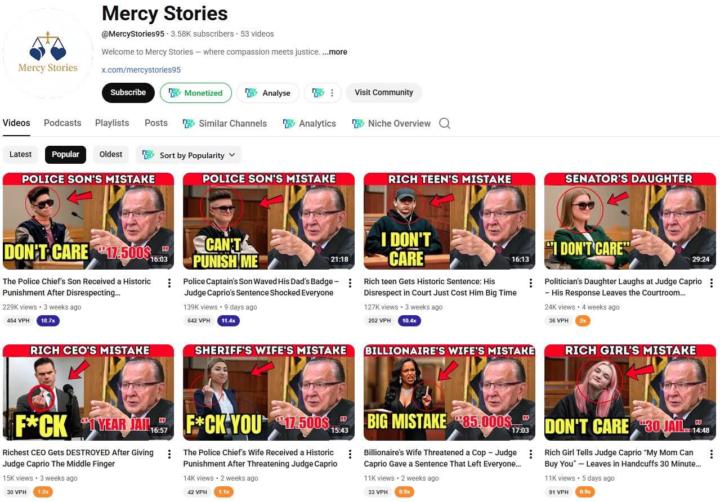
Look at this interesting niche pulling insane numbers. Are you still stuck in creating a faceless channel or you don't have any ideas . I do help entrepreneurs,brands or client create a profitable channel that will earn you passive income,comment below if you need help.
1-30 of 47
skool.com/automation-tribe-free
Learn to build smart automations with n8n, Make.com, and AI. Free tutorials, workflows, and a community that helps you automate everything.
Leaderboard (30-day)
1

+26
2

+22
3

+21
4
+20
5

🔥
+13
Powered by