
Write something

Nov '25 •
How to setup MCP in 5 minutes, no technical setup
Go to composio (it’s free!) Choose the tools, and authorize using OAuth. Youtube Scraper, Google Sheets, Reddit, Slack, Asana, etc. Explore now
0
0

Sep '25 •
How to install Google Sheets MCP for Claude (in 10 secs)
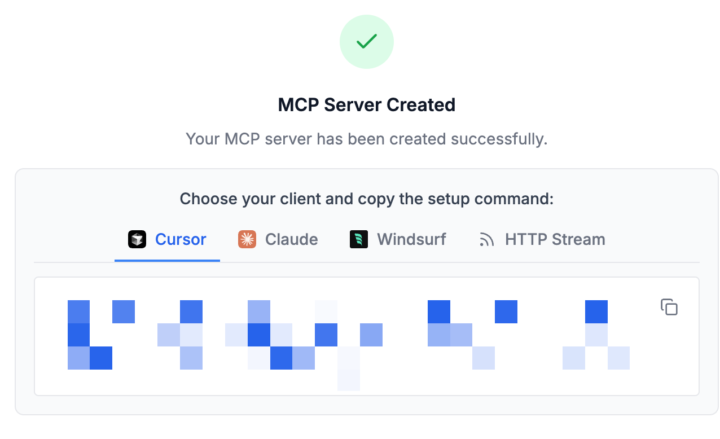
I couldn't believe it! It's Sep 2025, there still isn't an easy way to install Google Sheets MCP for Claude. Here is the easiest way to install to install it for Cursor and Claude. Only took 10 seconds, works pretty easy. Will show you below👇 1. Go to https://mcp.composio.dev 2. Find google sheets and connect account using OAuth 3. Create a new server, and copy the command 4. Paste the command in your terminal and press enter.
0
0
Sep '25 •
What is MCP? (Explained for non-developers)
Introduction Hey everyone! Today we're breaking down Model Context Protocol (MCP) in the simplest way possible. I want to show you how MCP makes AI agents more intelligent and why this matters for anyone working with AI automation. The Basics: How AI Works Today Let's start with the fundamentals. Think about ChatGPT - it's pretty straightforward: - Input: You ask a question ("Help me write this email" or "Tell me a joke") - Processing: The LLM thinks about your request - Output: You get an answer This works great for basic conversations, but it's limited. The Evolution: AI Agents with Tools The next big leap was giving LLMs tools - that's when we got AI agents. But here's where things get interesting, and also where we hit some limitations. How Current Tools Work (And Their Limitations) Each tool has a very specific function, and here's the problem - they're not super flexible. Why? Because within each tool configuration, we basically have to hardcode: - The operation (what am I doing?) - The resource (what am I working with?) - Dynamic parameters (like message IDs or label IDs) For example: - Operation: "Get" | Resource: "Message" (this never changes) - Operation: "Send" | Resource: "Message" (this never changes) You can see how rigid this becomes. Enter MCP Servers: The Game Changer Now, here's where MCP servers come in and completely transform the game. What is an MCP Server? Think of an MCP server as a universal translator that sits between your AI agent and the tools you want to use. How It Works When your agent sends a request to an MCP server (let's say Notion), it gets back much more than just "here are your available tools." The MCP server provides: - Available tools and their functionality - Resource information (what can I access?) - Schemas (how should I format requests?) - Prompts (how should I interact?) The MCP server takes all this information and helps the agent understand exactly how to take the action you requested in your original input.
0
0
Sep '25 •
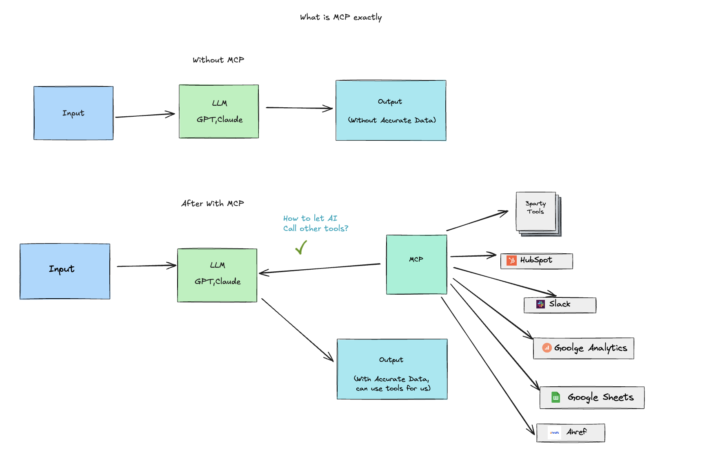
One image shows what is MCP, for non techies!
MCP is a plug that can help you wire up all tools with AI. With MCP + Cursor, my setup has become a super terminal. No need to build complex workflows—just plain language + MCP, and everything runs smoothly.
0
0
Sep '25 •
Spin Up Better n8n Workflows with Cursor + MCP (Even If AI Assist Feels Clunky)
Even if n8n’s built-in AI Assist feels clunky, you’re not stuck. Pair Cursor with an n8n MCP Server and you’ll spin up workflows way faster. Here’s one prompt I built as an example—try it yourself in Cursor. The Workflow You’ll Build The user uploads a product image and a product description text. (Use Cloudinary for image/video uploads). Call fal.ai with kontextmax to generate a 9:16 segmented human photo. Call fal-ai/nano-banana/edit on fal.ai to merge the person + product into a styled photo, using one option from a predefined style list. Generate a voiceover script from the product description text, supporting custom accent and voice tone. Use fal.ai’s google veo3 or veo3-fast to create a video with the generated content. Provide the user with a downloadable link. When the generation is complete, send me a Slack DM with the result URL. For any AI calls, use OpenRouter instead of OpenAI or Claude. Create an n8n workflow with these nodes and connections, and fill in credentials via env vars. Use only OpenRouter for LLM calls. Ready-to-Paste Prompt for Cursor Paste this into Cursor and let it orchestrate via your n8n MCP server: MCP Server Install Snippet Use this in your MCP settings (Cursor mcp.json or your host’s config): "n8n-mcp": { "command": "npx", "args": [ "n8n-mcp" ], "env": { "MCP_MODE": "stdio", "LOG_LEVEL": "error", "DISABLE_CONSOLE_OUTPUT": "true", "N8N_API_URL": "https://xxxx.app.n8n.cloud", "N8N_API_KEY": "xxxx" } } Why This Beats Built-in AI Assist Deterministic control over nodes and credentials Faster iteration in Cursor with a single, reusable prompt If you want the full exported workflow or a prebuilt template, reply and I’ll share one you can import into your n8n instance.
0
0
1-8 of 8
powered by

skool.com/ai-mcp-automation-club-8567
Master AI Automation and turn hours of manual work into automation flows. From content creation to marketing, JOIN & SAVE time.
Suggested communities
Powered by