

🔥
May 28 •
The Mobile AI Coding Era Starts Now - Codex Mobile Wow!
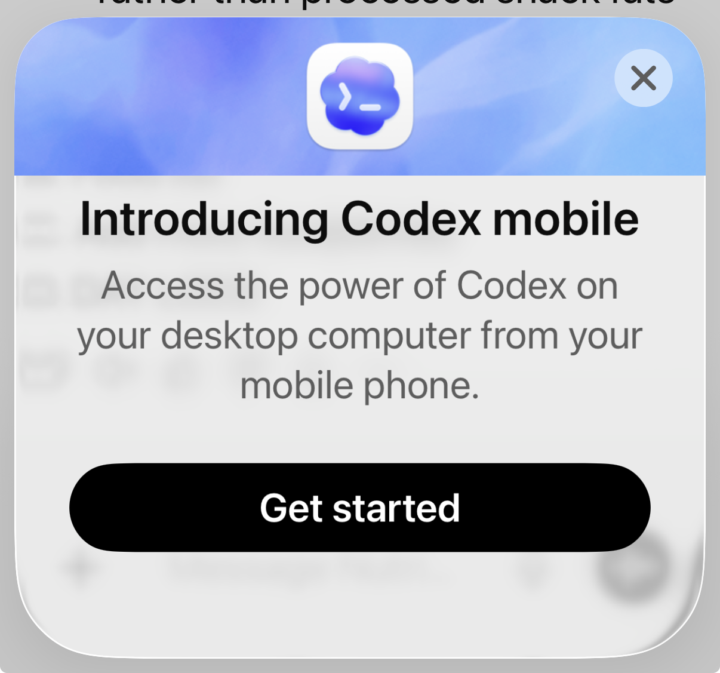
This message just popped up on my ChatGPT mobile app. Introducing Codex Mobile! This is the one I’ve been waiting for on Claude Code… but OpenAI beat them to the punch. And honestly, I think this is a bigger shift than most people realize. Not because people are going to build full enterprise apps from an iPhone. But because AI development is becoming continuous. You can review agent output, fix issues, direct workflows, capture ideas, and keep projects moving from anywhere. The gap between: “I have an idea” and “It exists” keeps collapsing. Software development is starting to feel less like programming……and more like continuously directing intelligent systems.
🔥
May 13 •
Amazon launches Claude Platform integration across AWS
AWS on Monday launched Claude Platform on AWS, the first cloud service offering Anthropic's native platform experience through existing AWS accounts. Full article: https://www.perplexity.ai/page/amazon-launches-claude-platfor-a9q7VY9BREeEn9HhW298jQ
9
0
🔥
Apr 19 •
📦 Out of the Box in 30: Claude Design vs Lovable
Today I tested Claude Design using Sonnet 4.6 for the first time with no research, no training, and no prep as part of my Out of the Box in 30 series. 🎯The challenge was simple. Could I build a classic car tribute site for a green 1972 Mustang in 30 minutes… and how would it compare to Lovable? A few quick takeaways: - Claude Design felt intuitive and guided the process well - Lovable moved fast and gave me a stronger first pass visually - Claude Design showed promise, but missed the mark on some of the car imagery - Lovable felt more dialed in right away for this specific use case This series is to show you that sometimes the best way to learn a new AI tool is to just open it up and try it. Just get in there and start learning by doing. No overthinking. No expectation to be perfect. No waiting until I “know enough". That’s what Out of the Box in 30 is all about. Click here to see the video: https://youtu.be/RwyBMyaelXY Have you tried either one yet? #ClaudeDesign #Lovable #AIWebsiteBuilder #AIBeginners #AIBitsAndPieces #NoCodeAI #AIInRealLife
🔥
Apr 16 •
🆕 Quick Tips for Claude Opus 4.7
My Take: Claude Opus 4.7 Anthropic's latest model is claiming to be noticeably better at complex, multi-step tasks — and a few changes are worth knowing about before you dive in. What's different: - Smarter on hard problems and better at staying on track in long sessions - Less chatty by default — answers match the complexity of your question - Thinks adaptively now, meaning it decides when to reason deeply vs. respond fast How to get the most out of it: - Put all your context in the first message — the more you front-load, the less back-and-forth you need - Batch your questions rather than sending one at a time Quick Tips: One tip worth saving: Want deeper reasoning? Add: "Think carefully — this is harder than it looks." Want faster replies? Add: "Prioritize speed over deep thinking." Some things are better from the source itself. Here is the latest blog post from Anthropic. https://claude.com/blog/best-practices-for-using-claude-opus-4-7-with-claude-code
🔥
Apr 10 •
🚀 Session 2: Watch Me Build a Full App with Claude Code using Natural Language (Recording)
We just wrapped Session 2 of our live build series and it was a great one! Starting from absolute scratch, we built a fully functional Task List app in under 10 minutes of total “cook time” using nothing but natural language prompts in Claude Code. No traditional coding. Just clear instructions and AI doing the heavy lifting. Here is everything we built in one session: ✅ Add, edit, and delete tasks ✅ Priority levels with color coding ✅ Due dates, categories, and status tracking ✅ Notes field per task ✅ Live progress bar ✅ Search, filter, and sort ✅ Collapsible completed tasks section ✅ Real SQLite database ✅ Runs locally on your machine The best part, while I was feeding Claude Code with prompts to build an enhanced Task List, several conversations broken out between @Matthew Sutherland @Bruce Kaufmann and I discussing many planning and building tips that only experienced builders could offer. The biggest lesson from today? Prompting is the new coding. If you can describe what you want clearly and in phases, you can build real working software — even if you have never written a line of code in your life. The YouTube video is now live. Go check it out and follow along. All the prompts we used are included. 👉 https://youtu.be/oJwNzUDzsIA?si=peazUxtSTJ8Y4rKA Session 3 is coming up on Monday. #ClaudeCode #VibeCoding #AIBitsAndPieces
1-16 of 16
skool.com/ai-bits-and-pieces
AI lessons you can read in under 3 minutes and apply in everyday work and life.
Leaderboard (30-day)
1

+107
2

🔥
+52
3

+47
4

+22
5

+22
Powered by