
Pinned

💎
⭐
9h •
🚀New Video: How I'd Learn n8n if I had to Start Over in 2026
If I had to start over and learn n8n from scratch today, this is the exact path I’d follow. The skills to focus on, the mistakes to avoid, and the fastest way to go from beginner to building real workflows that clients actually pay for. This is one of my most valuable videos yet, so I hope you guys enjoy!
Pinned
💎
⭐
2d •
🚀New Video: n8n 2.0 is Here (What You Need to Know)
I just walked through everything new in n8n version 2.0. This update brings a refreshed UI, smoother animations, and a few behavior changes that make building automations feel more intuitive. In the video, I highlight the biggest improvements, show how they affect your workflows, and share what you should expect as you transition to the new version. If you want a quick overview of what’s changing and why it matters, this breakdown will get you up to speed.
Pinned

🔥
5d •
🏆 Weekly Wins Recap | Nov 29 – Dec 5
From new client wins to digital twins and foundation-level breakthroughs - another week of real progress inside AIS+ Here are this week’s highlights inside AIS+ 👇 👉 Kevin Hardin built a job-sorting automation using Apify + n8n to instantly organize Upwork leads - a solid real-world workflow in action. 👉 @Elijah Williams restructured his entire agency model after completing the One-Person Agency course — turning insights into a roadmap. 👉 @Rakshith Gowda solved a Veo 3.1 API error after hours of debugging - a reminder that persistence pays off. 👉 @Simon Cousineau is now featured weekly on Canadian radio as their official AI expert - turning consistency into credibility. 👉 Malek Kilani built an AI-powered language coach in under an hour, shared the PRD, and inspired others to ship faster. 🎥 Super Win Spotlight of the Week: @Lutfiya Miller | From Toxicologist to AI Consultant Lutfiya went from learning AI workflows to landing two new clients at a scientific conference - proving what happens when confidence meets consistency. AIS+ helped her go from fear and uncertainty to building powerful automations and speaking at multiple events in 2025. 🎥 Watch her story 👇 Lutfiya’s journey is proof that when you replace fear with action, everything starts to click. ✨ Want to see more wins like these every week? Join the builders inside AI Automation Society Plus - where learning turns into confidence and results 🚀


1d •
What is your favorite voice tool ?
I'm building voice agents and I was wondering what is your favorite voice tool platform and why ?
Poll
17 members have voted

12h •
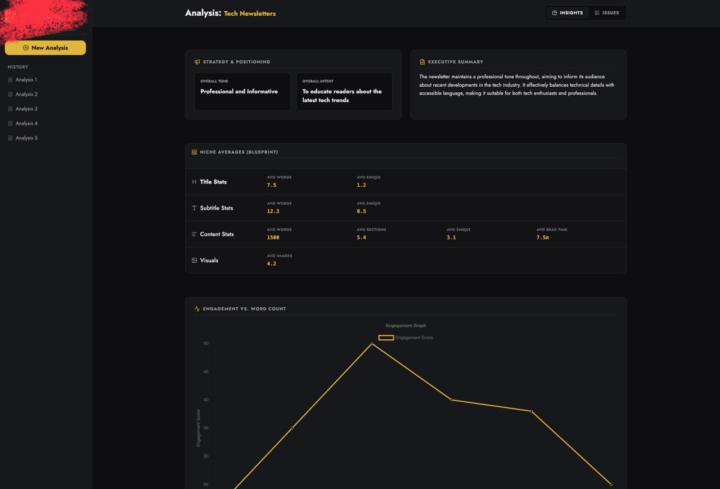
We’re in the final testing phase of our AI agent we’ve been building (MK1) — it analyzes entire newsletter ecosystems and produces competitor insights automatically.
My CTO has a strong philosophy: “Doesn’t matter how smart your backend is — if the UI doesn’t make people feel like they’re using something powerful, they won’t.” And honestly… he’s right. So before we push this out publicly, I wanted to get some honest feedback on the UI from founders, designers, newsletter operators, and devs who care about clean product experiences. Here are a few screens from the current build: (You can find 3 screenshots attached) 🔍 Quick context (non-technical explanation): MK1 basically takes multiple newsletter issues → breaks them down into structured insights → and shows patterns across the entire niche. The UI’s job is to make all of that complexity feel simple. Some things the UI needs to communicate clearly: - Tone + intent of each issue - Niche-wide benchmarks - Issue-level metrics - Structure breakdowns (titles, sections, visuals, CTAs, etc.) - Engagement patterns (vs word count, vs structure) - Individual issue summaries - Consistency markers across creators The backend is… not small.It’s a full distributed pipeline (scraping → TOON compression → issue-level LLM runs → aggregation), but none of that matters if the UI doesn’t let people understand the story instantly. 🧠 What I’m specifically looking for feedback on: 1. Does it feel intuitive at first glance? 2. Are the insights easy to digest, or does it feel “dashboard complicated”? 3. Which parts feel unnecessary or too heavy? 4. Do the cards/graphs help or distract? 5. Does this UI make you want to explore deeper? 6. If you ran a newsletter or content team, would this type of layout actually help you? We’re still tweaking visual hierarchy, spacing, and how much data to surface at once — so I’m open to brutal honesty. 💬 The bigger question (UI philosophy): Do you think products like this succeed because of UI,or despite it? Some founders believe “if the model is good, UI is secondary.”My CTO believes the UI is the major part of a product, and everything else is invisible unless the UI communicates it well.
1-30 of 10,550

skool.com/ai-automation-society
A community built to master no-code AI automations. Join to learn, discuss, and build the systems that will shape the future of work.
Leaderboard (30-day)
1

🔥
+2481
2

🔥
+1165
3
+1102
4

🔥
+1005
5
🔥
+797
Powered by