
Pinned

🔥
3d •
🏆 Weekly Wins Recap | June 27 – July 3
From $40K AI projects and first clients to custom CRMs, AI operating systems, and production-ready automations, another week inside AIS+ proved that consistent building keeps creating opportunities. 🚀 Standout Wins of the Week inside AIS+ 👉 @Kobe Shemesh closed a $40K upfront AI project after refining his Claude Code workflow, proving that small improvements in execution can create massive business results. 👉 @Galyn Fergerson landed her first client just 6 days into AIS+, turning a discovery call into a $750 AI OS project before even finishing the automation course. 👉 @Girish Mohan built an AI Scrum Master that now prioritizes his calendar, tasks, and deals automatically—helping him execute every day with more focus. 👉 William Rendall was promoted to AI Workstream Strategy Lead less than three months after joining AIS+, crediting the community for accelerating his growth. 👉 Diane McCracken celebrated her 100th Claude Code session at 68 years old, showing that curiosity and consistency matter far more than experience. ⸻ 🎥 Super Win Spotlight | @Ahmad Abd Alkarim Ahmad joined AIS+ with years of leadership experience but wanted a better way to turn ideas into action. Today, his custom AI Operating System helps him manage projects, analyze business problems, and support his team without slowing anyone down. His biggest lesson? Don't just watch. Build. Practice. Share what you learn. That's where the real return comes from. 🎥 Watch Ahmad's story 👇 ✨ Every week, members are turning ideas into systems, skills into businesses, and momentum into real opportunities. Step inside AI Automation Society Plus and start building assets, systems, and skills that compound 🚀

Pinned

💎
⭐
Jun 3 •
What do you get if you upgrade to AIS+?
Some of you have never heard of the AIS+ community. Others have but the part that trips you up is the actual difference between the two. Either way, this post will give you clarity. This free group is a bundle of quick resources pulled from my YouTube videos, plus a massive open community that anyone can join. It's a great place to get your bearings and see what's possible. But it's open to everyone, it can be noisy and overwhelming, and there's no path through it. You can get help from other members, but I rarely answer questions here. AIS+ is the opposite: - A step by step roadmap with a clear order, so you're never guessing what to do next - A much smaller community of people who are seriously committed to building and selling AI agents - I answer questions every day and run a weekly Q&A call where you can get direct access to me For the course material: The roadmap takes you from zero to building and selling AI agents, and the whole thing is built on the latest tech like Claude Code and Codex. We update it constantly. The old n8n material has been archived. It's still there if you want it, but it's no longer the focus, because the way you build today has moved on and the courses moved with it. Here's the actual roadmap inside, in order, with when each piece opens up: 1. Start Here (opens the moment you join). Gets you oriented. How the community works, the path ahead, and how to get help when you need it. 2. Build Your Portfolio (opens the moment you join). Why a portfolio matters, beginner level tutorials, and what types of projects to focus on. You end up with real work you can show a client. 3. Claude Code (opens the moment you join). This is now its own dedicated course. Build faster, turn ideas into working automations, and go deep on the tool serious builders are using right now. This takes you from beginner to advanced, step-by-step. 4. Get Your First Clients (opens after 30 days). Getting your first clients is hard, because you don’t have any case studies yet. So, we analyzed all of the success stories from our members and found they get their initial clients with two different techniques: warm outreach and Upwork. So, we teach both techniques in detail with exactly what to say, exactly how to position yourself when you have no proof.
Pinned
💎
⭐
10d •
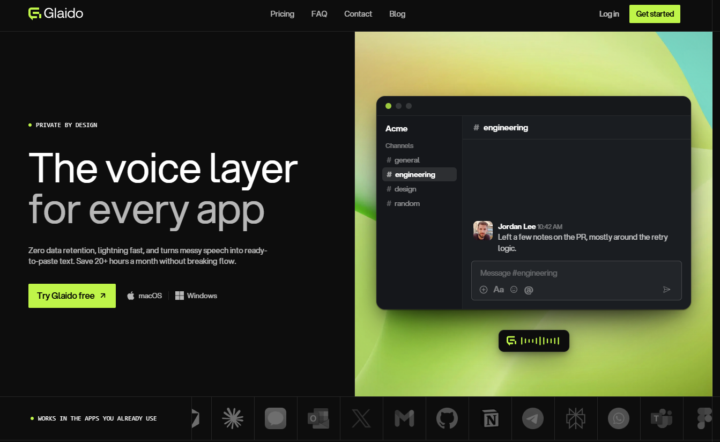
🎉LIMITED TIME try Glaido FREE, then 40% off.
I'm a co-founder of Glaido, building it with Jack Roberts, Dave Ebbelaar, and Jannis Moore. It's a voice tool built around two things: speed and privacy. Fastest on the market, completely private. It used to be Mac only. It's now on Windows too, so all of you can use it. You get 40% off your first 3 months ($20/mo → $12/mo) with this code: D5J6BIF8K4P Next 30 days only 👉 https://get.glaido.com/nate I switched from Wispr Flow a few months ago and it just felt better. If you're on Wispr, try Glaido free, use the code, and tell me if you feel the difference. If you want to switch back after, no hard feelings. Good to know - Mac + Windows - Snippets: insert any text instantly with one word - Dictionary: save your own words, import straight from Wispr Flow - Agentic Mode: manipulate any text on your screen with your voice - Webhooks coming to Agentic Mode soon (huge) - We action feedback almost immediately Give it a shot and drop your thoughts in the community.

3m •
5 Days of Fable: Church CRM
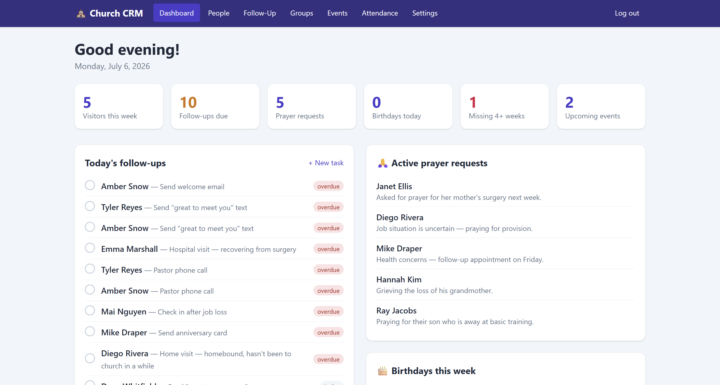
I've challenged myself to build something new with Fable 5 every day until July 7th. This project focused on 2 things that I am unfamiliar with: Church Online Technology and CRMs. I grew up in a small church all my life and even served on the tech team there. My main responsibilities were more about in-house technology. Things like showing lyrics or changing audio levels. I don't really know how a CRM would work in a church like mine. Its small and the pastor was able to visit with each person individually. But with a large church, that might be hard for a pastor to meet with every person every Sunday. But that doesn't mean that the pastor can't be present. This Church CRM focuses on tending to the needs of the church and recognizing patterns to allow the pastor to reach out and be involved beyond just Sundays. At this stage, it is just a pastor's dashboard, but there is plenty of room for expansion and some features are already outlined to easily work with other users. Core features: - When someone fills out a connect card, their information can be uploaded to the CRM - The CRM tracks things like attendance, important dates, and volunteers - Can create tasks to remind you to reach out - This CRM allows people to sign up for an event and volunteers - Members can fill out prayer cards for a Prayer Team - The ability to send messages to individuals, groups, or the whole congregation Just an idea I was messing around with. I don't really know the practical applications of it because I didn't grow up in a church that needed anything like this. If this is helpful for you or you have any advice for how to make a CRM work in a church setting, let me know.
0
0

52m •
A bit of confusion for me as a beginner
Good evening, everyone! I hope all is well. I'm a bit confused on where to start. So I started the lessons in AI Automation Society Plus, however, I seen some lessons on this page as well. I'm confused on where to start. I'm also new to the skool platform. Any help, please?
1-30 of 20,945

skool.com/ai-automation-society
Learn to get paid for AI solutions, regardless of your background.
Leaderboard (30-day)
1

🔥
+7795
2

+6630
3

🔥
+5920
4

🔥
+5638
5

🔥
+2103
Powered by