
Pinned

💎
⭐
2d •
🚀New Video: Claude Code for Non-Coders (6 Hour Course)
This is a complete beginner course on becoming AI native with Claude Code, no coding background required. I take you from your very first prompt all the way to building your own skills, sub-agents, a second brain, and automations that run on their own in the cloud. It's all real examples and step-by-step builds, so you can follow along and walk away with AI systems that actually do work for you. Feel free to skip around using the timestamps below to whatever piques your interest.
Pinned

🔥
3d •
🏆 Community Wins Recap | July 4 – July 10
From AI operating systems and first client deliveries to open-source tools, second brains, and personal AI assistants, this week inside AIS+ showed that the best products often start by solving your own problems first. 🚀 Standout Wins of the Week inside AIS+ 👉 @Miguel Alfonso Murillo closed 3 clients using the AIOS he built for his own business, sharing how his journey evolved from experimenting with ChatGPT to running his operations with AI. 👉 @James Joens delivered his first client project just 11 days into AIS+, saving his client $1,400 on a single deal and following it up with his first in-person cold outreach meeting. 👉 @Jenni Saarenpää built her own AI-powered Wealth Analyzer after realizing the tool she wanted didn't exist, creating a personal FIRE planning app with powerful financial modeling. 👉@Konstantinos Karamatzianis built and open-sourced Session Guardian, solving Claude Code session limits for himself before sharing it with the entire community. 👉 @Girish Mohan created an AI Treasurer to manage expenses for a 100-person family festival, turning a real-life headache into a practical automation. ⸻ 🎥 Super Win Spotlight | @Jacob West Jacob joined AIS+ looking to build a business, not just learn AI. Since then, he has: - Built the confidence to leave his job and go all in on entrepreneurship - Closed larger AI projects by applying real business fundamentals - Shifted from learning tools to building a scalable business around them His biggest takeaway? Skills matter. But confidence comes from building, taking action, and surrounding yourself with people already doing what you want to do. 🎥 Watch Jacob's story 👇 ✨ Every week, members turn personal projects into client work, ideas into systems, and momentum into real businesses.

Pinned
💎
⭐
Jun 3 •
What do you get if you upgrade to AIS+?
Some of you have never heard of the AIS+ community. Others have but the part that trips you up is the actual difference between the two. Either way, this post will give you clarity. This free group is a bundle of quick resources pulled from my YouTube videos, plus a massive open community that anyone can join. It's a great place to get your bearings and see what's possible. But it's open to everyone, it can be noisy and overwhelming, and there's no path through it. You can get help from other members, but I rarely answer questions here. AIS+ is the opposite: - A step by step roadmap with a clear order, so you're never guessing what to do next - A much smaller community of people who are seriously committed to building and selling AI agents - I answer questions every day and run a weekly Q&A call where you can get direct access to me For the course material: The roadmap takes you from zero to building and selling AI agents, and the whole thing is built on the latest tech like Claude Code and Codex. We update it constantly. The old n8n material has been archived. It's still there if you want it, but it's no longer the focus, because the way you build today has moved on and the courses moved with it. Here's the actual roadmap inside, in order, with when each piece opens up: 1. Start Here (opens the moment you join). Gets you oriented. How the community works, the path ahead, and how to get help when you need it. 2. Build Your Portfolio (opens the moment you join). Why a portfolio matters, beginner level tutorials, and what types of projects to focus on. You end up with real work you can show a client. 3. Claude Code (opens the moment you join). This is now its own dedicated course. Build faster, turn ideas into working automations, and go deep on the tool serious builders are using right now. This takes you from beginner to advanced, step-by-step. 4. Get Your First Clients (opens after 30 days). Getting your first clients is hard, because you don’t have any case studies yet. So, we analyzed all of the success stories from our members and found they get their initial clients with two different techniques: warm outreach and Upwork. So, we teach both techniques in detail with exactly what to say, exactly how to position yourself when you have no proof.

🔥
3h •
Unlocking Workforce Excellence: VR + AI Onboarding, Key Metrics & Scalable Implementation
Today 13th July, 2026, the convergence of virtual reality (VR) and artificial intelligence (AI) is reshaping workforce onboarding and operational excellence across industries, particularly in food and beverage (F&B). This newsletter explores three critical facets driving this transformation: the emerging standard of VR + AI onboarding, essential performance metrics that directly influence profit and loss (P&L), and pragmatic frameworks to integrate, pilot, and scale these technologies effectively within business operations. Executive Snapshot: Why VR + AI Are the Next Onboarding Standard Businesses adopting VR combined with AI for onboarding report transformative benefits, positioning this hybrid approach as the emerging industry standard. Pilot programs and vendor case studies demonstrate significant gains: time-to-competency can be accelerated with training durations cut by up to 50%, while early employee retention rates improve notably. This efficiency results from immersive, AI-driven personalized learning paths that continuously adapt to individual progress, maximizing engagement and skill acquisition speed. These insights mirror broader AI adoption trends, where 74% of frontline workers regularly use AI yet often lack structured strategies to leverage saved time effectively. Enterprises investing heavily in AI reveal measurable workforce improvements by aligning AI tools with strategic onboarding frameworks. VR + AI onboarding uniquely delivers this synergy by combining hands-on immersive experiences with AI analytics that tailor content dynamically, overcoming conventional training bottlenecks. For business owners, CEOs, product developers, and F&B specialists focused on elevating workforce readiness and retention, VR + AI offers a scalable and high-impact solution grounded in early success stories and consistent with the accelerating AI adoption wave shaping the future workforce (Business Insiders ).

🔥
24h •
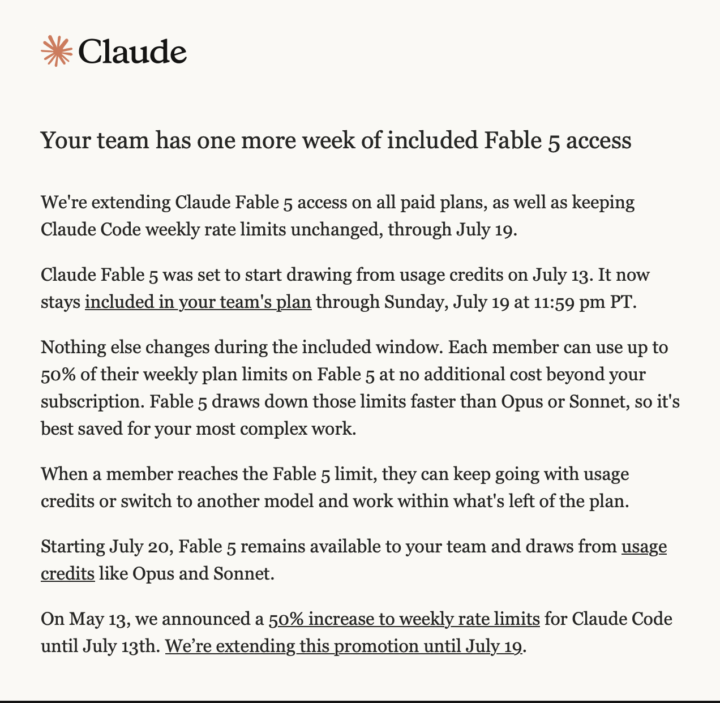
ANTHROPIC IS GETTING nervous? ONe more extra week FABLE 5
Your team has one more week of included Fable 5 access We're extending Claude Fable 5 access on all paid plans, as well as keeping Claude Code weekly rate limits unchanged, through July 19.
1-30 of 21,418

skool.com/ai-automation-society
Learn to get paid for AI solutions, regardless of your background.
Leaderboard (30-day)
1

🔥
+7660
2

🔥
+7406
3

+6713
4
🔥
+4559
5

🔥
+3604
Powered by