

Jun 2 •
Question about image generation and managing posts/scheduling
Two questions: 1) What is everyone using to manage content and posting online? I'm at the point where I have a lot of my infrastructure in place to create and develop content, I just need something to manage posting to all different platforms (LinkedIn, FB, Instagram, twitter, etc...) 2) How are you generating images and visuals for the posts on each platform?
1
0

May 8 •
Who do you learn AI from!?
AI progresses so rapidly, it's extremely easy to be inundated and overwhelmed with hundreds of routes. I've noticed a lot of AI information is more technical for people who are encouraged to start AI agencies or be more involved overall. For us running other businesses, we need to be up to speed and also disciplined with filtering what is applicable for us and only applying what buys back our time, makes our business more profitable and efficient. Are there any additional channels or resources that you recommend? To stay up to date, always learning and approving new use cases and the possibilities with AI in your business? I know a lot of things happen on X, which I don’t use. Most things I learn are from YouTube! Here are my top 4 channels I learn from. - Nate Herk | AI Automation - Jack Roberts - Openclaw Labs - Dan Martell ➡️ How about you guys!? Any recommendations or things you've learned to navigate this? 😁 @Michael Pansolini @Shawn Dwyer @Ramez Chedly @Aziz Akera @Mark Mynhier @Chloe Martinez


🍀
Mar 27 •
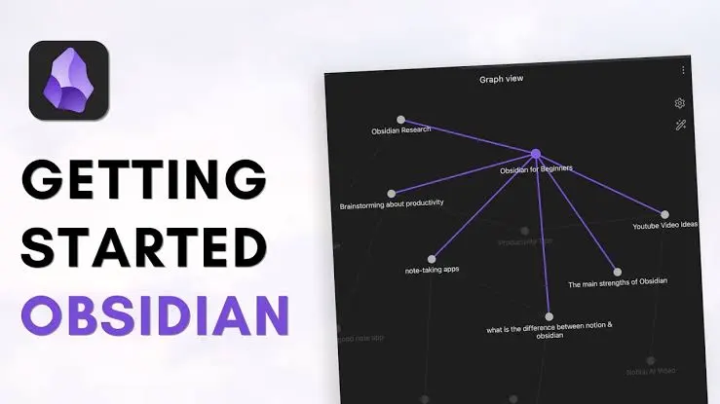
Browse Your AI's Brain with Obsidian
Just set this up and it's pretty cool. Your AI assistant stores everything in markdown files - daily logs, meeting transcripts, deal notes, long-term memory. But those files live on the server, so you never really see them unless you SSH in. The fix: sync everything to a GitHub repo, then open that repo as an Obsidian vault on your computer. Now I can browse everything R2 knows. Search across all my meeting notes. See the graph view of how topics connect. It auto-syncs every hour, so it's always current. Here's how it works: 1. Generate an SSH key on your server 2. Create a private GitHub repo 3. Add the SSH key as a deploy key (with write access) 4. Push your AI's memory and knowledge folders to the repo 5. Set up a cron job to sync changes every hour 6. Clone the repo to your computer 7. Open that folder as an Obsidian vault That's it. Now you have a local copy of your AI's entire knowledge base that stays in sync automatically. If you want the detailed step-by-step commands, I've got a doc for that - just ask.

Apr 19 •
11,000 APIs your agent can use right now
Dropping this here because it’s genuinely useful. Someone compiled 11,000+ ready-to-use APIs into one GitHub repo, organized by category — real estate, ecommerce, lead gen, AI agents, automation, jobs, news…. Link: https://github.com/cporter202/API-mega-list Now here’s how you can actually use it. Open your OpenClaw and send it this prompt: “I’m going to share a GitHub repo with you: https://github.com/cporter202/API-mega-list — it contains thousands of APIs across categories like real estate, ecommerce, lead generation, automation, and more. Based on everything you know about my business, my goals, and the workflows I deal with day to day, go through the categories and suggest 5 to 10 specific apps or automations you could build for me using these APIs. Be specific — tell me what the tool does, which API powers it, and what problem it solves for me.” Your agent already knows your context. Let it do the thinking. For me personally, I’m going straight for the Crexi scraper in the real estate section — going to use it to surface more deals without doing it manually. Drop below what ideas your OpenClaw comes back with, curious what people are building.
3
0

Apr 14 •
auto apply to jobs ai automation
built a chrome extension that applies to vacancies and tries to convert HR and decision makers at companies into offering me a position or becoming my AI automation client. using openrouter, free llms, my resume which gets modified per each job post so to better match key role, responsibilities and requirements.
2
0
1-25 of 25
skool.com/agenticai
OpenClaw One Click Install & Support group! We help you get set up in seconds and demo skills you'll ACTUALLY USE. Plus weekly live learning sessions!
Powered by