
Pinned

🍀
Mar 5 •
📌 START HERE — How to Get Your OpenClaw Bot Set Up
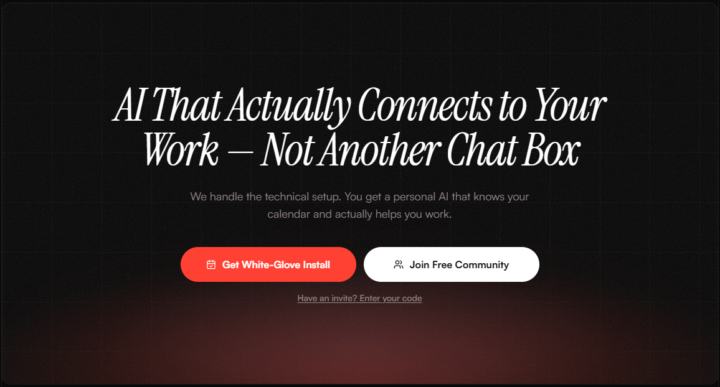
Hey Guys! If you are looking to get started with OpenClaw you have come to the right place! Step 1: Join our Free WhatsApp Group for in the moment updates on OpenClaw: WhatsApp Group Step 2: Install OpenClaw! 🆓 Option 1 — Do It Yourself (Free) Most people hit a wall when they get to the terminal. That's normal. The DIY path is real — but it's not for everyone. Plus you have no support when your bot inevitably breaks.... ⚙️ Option 2 — Hosted Subscription ($24.99/month) with one-click free install of your bot and live dashboard! Once your bot is live, this keeps it running and improving. You get: - Server hosting + management (we handle the tech, 24/7) - Automatic Backups of your Server in-case something breaks - Live weekly paid semi-private Q&As with the team - Multi-device setup on any hardware you want - 1-click skill installs - Dashboard Visualization of your Bots Files, Skills, Workflows and Subagents - Spin up multiple agents with the click of a button! - Access to the best AI models at the lowest cost — 10x the tokens for 1/3 the price (coming soon) This is ONLY $24.99/month. It covers our server costs and keeps your bot online without you touching a thing. 🚀 Option 3 — Done With You Install ($297 one-time + $24.99/month) Skip the DIY entirely. A team member jumps on a 1-hour call with you, configures your bot to your exact workflow, and hands it to you live and running. No terminal. No guessing. No wasted weekend.
Pinned
🍀
Feb 28 •
Welcome! JUST TALK TO IT!
3rd Skool Community 😅 Bear with us as we set things up. Announcements coming. For our Beta Testers: Start asking questions as they come up, we'll do our best to answer quickly. For our aspiring users, book some time with us to set up your Bot and kick things off at the incoming link (launching shortly).
Pinned
🍀
Mar 2 •
Within THE FIRST HOUR after Setup....
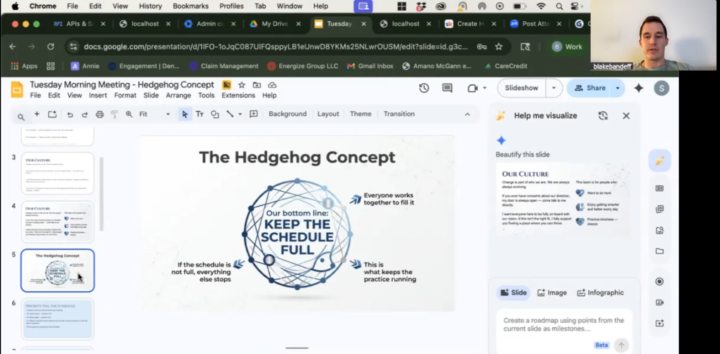
Within THE FIRST HOUR after Setup TODAY....@Blake Bandeff and @Reagan Thomson had already used OpenClaw to create a staff presentation they had been procrastinating on.... Blake opened a voice note and SPOKE to his bot Aria, prompting her with just stream-of-conscious for what he wanted to create and the key points he wanted inside that presentation.... and VOILA! OpenClaw opened a Google Slides deck and created the whole presentation for them in seconds.... You don't have to be a power user to see immediate benefit. OUR NEW SLOGAN THEREFORE IS: JUST TALK TO IT!
🍀
6d •
Fix your OpenClaw bot from Claude Code: connect your server with Tailscale
I opened my OpenClaw dashboard today and one of my bots was sitting at 98% disk and 98% CPU. It had been pinned there for five days. I'm not a server guy. Normally that's a support ticket and a lot of waiting. This time I put the server on Tailscale and pointed Claude Code at it. Claude Code logged in and found one runaway log file that had grown to 22 GB. It deleted the file, restarted the stuck logger, and added a guard so the same thing can't fill the disk again. Start to finish was about 30 minutes, and most of that was me pasting output back and forth before the connection was live. 🔧 The setup → Make a free Tailscale account and install Tailscale on your own computer → On your OpenClaw server, run: curl -fsSL https://tailscale.com/install.sh | sh && sudo tailscale up --ssh → Open the login link it prints and approve the server → In Claude Code, tell it to SSH into your server with "tailscale ssh" and give it the username and machine name No SSH keys to manage and no ports open to the internet. Only devices on your Tailscale account can get in. 🚀 What you can do once it's connected → Ask why your bot is slow or down, and let Claude Code go look → Have it run the fix while you watch → Install skills on your bot → Build new skills right on the server and test them there For me this is a game changer. "Why is my bot broken?" is now a question I ask in plain English, and I get the answer and the fix in the same conversation. ⚠️ Two things to know Claude Code gets real access to your server this way. Read what it plans to run before you approve it, the same way you'd check a contractor's work. If your disk is already full, the Tailscale install will fail. Free up some room first and run it again. Drop questions below and I'll help you get connected. 👇

19d •
AI assistant builders: what's your Mac mini / Mac Studio setup? Looking for real-world use cases before I buy
@Michael Pansolini Hey all, I'm a real estate GP with a full-time day job and a busy family. I'm building an AI "chief of staff" to handle task follow-ups, deal screening, email drafts and team check-ins, and I'd love to learn from people who've already done it. Where I'm at: - Private vault: Mac Studio M5 Max, 64GB, running local AI for sensitive business documents - Orchestrator: one cloud server running OpenClaw as a "CEO" agent that spins up helpers (builder, QA, ops) on demand - Dev work: Claude Code - Interface: Telegram / Discord - Security: vault fully segregated; servers can never connect into it What I'd love to hear: 1. Hardware: Mac mini vs. Mac Studio? How much RAM? Would you change anything? 2. Local vs. cloud AI: which local models are actually useful? Where do you still use Claude/GPT? 3. Daily use cases: what saves you the most time? 4. Creative or weird uses: one-off automations that surprised you 5. Segregation: how do you isolate your assistant from the rest of your infrastructure? 6. Multi-agent setups: org chart of agents vs. one agent with skills? What worked? 7. Lessons learned: what would you do differently? Easy reply template: Setup (hardware/RAM): Local models I use: Best daily use case: Most creative use: How I isolate it: Biggest lesson: I'll pull everything together into a summary and share it back with the group. Happy to share what I learn as I build too.
1-30 of 61
skool.com/agenticai
OpenClaw One Click Install & Support group! We help you get set up in seconds and demo skills you'll ACTUALLY USE. Plus weekly live learning sessions!
Leaderboard (30-day)
1
+3
Powered by