
Write something

🔥
17h •
Brands are investing more in AI-generated content than ever before.
Discover how to create professional AI videos, images, voiceovers, and UGC using premium tools like Seedance 2.0 and Kling 3.0. Plus, unlock unlimited access to keep creating without limits. Get started here
0
0


1d •
Proof That YouTube Automation Still Works in 2026.
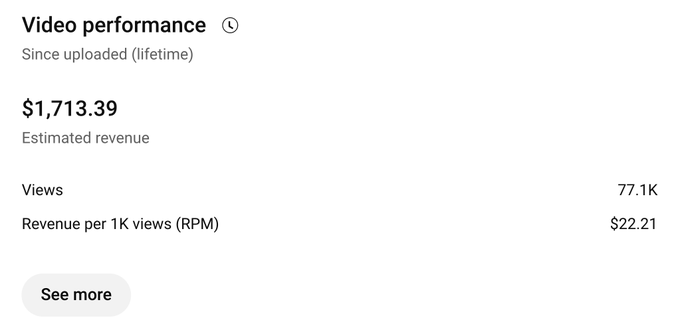
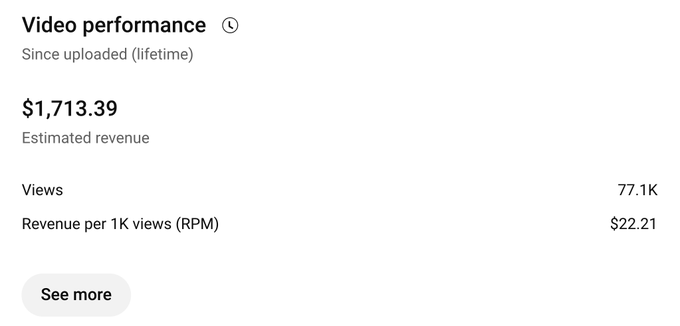
📊 Results: ✅ 77.1K Views ✅ $1,713.39 Revenue ✅ $22.21 RPM Most people focus on views alone. Smart creators focus on revenue. The right content strategy can generate significant income without showing your face on camera. If you want to learn the process, connect with other creators, and discover what's working right now, join us below. 📲 Join My Telegram Community Here:👉 https://tinyurl.com/YouTubesucc 💬 Have questions or want to connect directly? Kindly DM me on WhatsApp here: https://wa.link/fepj3u One video can change everything. The content you create today could reach thousands or even millions tomorrow.
2
0

1d •
Another Reminder that YouTube Can Change Your Financial Future
This video generated $1,713.39 from 77.1K views. Many people think you need millions of views to make money on YouTube. That's simply not true. The key is understanding: ✔️ High-paying niches ✔️ Strong audience retention ✔️ Effective content strategy ✔️ Consistency Your YouTube success story can start today. The best time to begin is now. Join my Telegram Community Here for Daily Tip Telegram Channel:👉 https://tinyurl.com/YouTubesucc Have questions or want to connect directly? Kindly DM me on WhatsApp here: https://wa.link/fepj3u Dreams remain dreams until you take action. Start your channel today, improve with every video and build the future you deserve.
1
0

🔥
2d •
Peptide brands are quietly hitting 8 figures with AI faces
Here's how the system works: → Pick the face people already trust. A doctor, trainer, grandma, or big sister. → Build that persona in AI. Same face, same voice, same story in every video. → Create content that educates, never sells. Low energy. Poor sleep. Slow recovery. The product isn't even mentioned. → Clone the voice and automate editing. Hooks, captions, and pacing. → Give every persona its own account and IP. One ban never affects the entire network. → Turn winning organic content into Meta ads and affiliate campaigns. A real UGC creator costs $300–$500 per video. Testing 10 hooks can cost $5,000+ and take weeks. With AI, you can test 1,000 hooks in the same timeframe and automatically scale the winners. Learn more here
0
0


2d •
gem
This is how I send unlimited cold emails for free. (get unlimited clients) https://www.skool.com/cold-email-accelerator-6406/classroom/92f12090?md=30c1dbfff90e40f0ae139a903492d986
0
0
1-30 of 235

skool.com/accelerants
Join Accelerants – Learn, build, and automate with AI Agents, No-Code, and Scalable Systems using expert guides and templates.
Leaderboard (30-day)
1

+2
2
🔥
+2
3
+1
4

+1
5

+1
Powered by