Activity
Mon
Wed
Fri
Sun
Jun
Jul
Aug
Sep
Oct
Nov
Dec
Jan
Feb
Mar
Apr
What is this?
Less
More
Memberships
AI Architects
5.1k members • Free
AI Automation Society
348k members • Free
10 contributions to AI Automation Society

Feb 10 •
New node: Aggregate by Field
Hi dear community, I released a new "Aggregate By Field" commmunity node which covers a huge missing piece in n8n. Take it for a spin: https://www.linkedin.com/posts/drupal_n8n-automation-nocode-activity-7425475556403757056-Xr-6
0 likes • Feb 10
I'd love it if you tried it out and told me what you think 🙏
Nov '25 •
.toJsonString()
I see @Nate Herk is using quite a lot of `.replace()` functions when sending a JSON request to an api. it may look like this: ``` "{{ $json.output .replace(/\r?\n|\r/g, ' ') .replace(/"/g, '') .replace(/[“”]/g, '') // removes curly double quotes }}" ``` Just wanted to let you know that in most cases, if not all, you can use the single (simple) function: `.toJsonString()` like this: ``` {{ $json.output.toJsonString() }} ``` Note that it also adds the outer quotes, so instead of, for example `"prompt": "{{ $json.output....}}"`, you should use `"prompt": {{ $json.output.toJsonString() }}`

💎
⭐
Aug '25 •
🚀New Video: I Built the Ultimate Army of Media Agents in n8n
In this video, I showcase the Ultimate Media AI Agent that combines powerful personal assistant features with advanced creative tools — and I’m giving it all away for free. This agent can manage emails, calendars, contacts, and Google Drive, while also creating and editing images, making and editing videos, turning images into videos, posting content across social media, scraping social platforms for research, and compiling results into Google Docs. It even has full web search capabilities. One of its best features is complete activity logging, so you can see every action it takes, whether successful or not, along with full input, output, and token usage details. Stick around until the end of the video, where I’ll share all the resources, templates, and workflows you need to set it up yourself. Google Doc Cost Breakdown & Setup Instructions Google Sheet Template
5 likes • Oct '25
Hi all, here's a version of the image edit tool with nano-banana as the image model: ``` { "nodes": [ { "parameters": { "workflowInputs": { "values": [ { "name": "image" }, { "name": "request" }, { "name": "chatID" }, { "name": "pictureID" } ] } }, "type": "n8n-nodes-base.executeWorkflowTrigger", "typeVersion": 1.1, "position": [ -1392, 256 ], "id": "386c8757-4d4b-437d-9fca-5b3adfca83fd", "name": "When Executed by Another Workflow" }, { "parameters": { "name": "={{ $('When Executed by Another Workflow').item.json.image }} (Edited).png", "driveId": { "__rl": true, "mode": "list", "value": "My Drive" }, "folderId": { "__rl": true, "value": "", "mode": "id" }, "options": {} }, "type": "n8n-nodes-base.googleDrive", "typeVersion": 3, "position": [ -80, 400 ], "id": "821a3dda-70bd-435f-ac67-f69ffc8774a5", "name": "Upload Image", "credentials": { "googleDriveOAuth2Api": { "id": "", "name": "Google Drive account" } } }, { "parameters": { "content": "# Edit Image\n", "height": 260, "width": 636, "color": 5 }, "type": "n8n-nodes-base.stickyNote", "typeVersion": 1, "position": [ -928, 176 ], "id": "7c04c332-1a70-487c-95c7-baf82daf1eea", "name": "Sticky Note1" }, { "parameters": { "content": "# Send Content", "height": 240, "width": 300, "color": 6 }, "type": "n8n-nodes-base.stickyNote", "typeVersion": 1, "position": [ -192, 64 ], "id": "1ed0c82a-1af5-4606-8c22-bce274fec4a2", "name": "Sticky Note7" }, { "parameters": { "content": "# Write to Drive", "height": 240, "width": 300, "color": 6 }, "type": "n8n-nodes-base.stickyNote", "typeVersion": 1, "position": [ -192, 320 ], "id": "aa22782b-32bd-416e-9676-38611fba5568", "name": "Sticky Note6" }, { "parameters": { "content": "# Trigger\n", "height": 260, "width": 260, "color": 7 }, "type": "n8n-nodes-base.stickyNote", "typeVersion": 1, "position": [ -1472, 176 ], "id": "5e0f11dc-4a04-4bd2-ac6b-bc8709a4dd7b", "name": "Sticky Note5", "disabled": true }, { "parameters": { "content": "# Download\n", "height": 260,
Jul '25 •
Deciding whether text can be extracted from a PDF or if OCR is required
Hi all, I'm scanning invoices and uploading them to Drive. When I try to use "Extract From File" the extracted text is meaningless, so I'd like to use an OCR service. Other than trying to understand whether or not the text is meaningful or not using text tools or AI, is there another, more simple way, to deciding if a PDF is extractable or not? (PS: I know I've seen a solution for this already but I can't find it...)
1 like • Jul '25
Thanks @David Potter ! Mistral is definitely a supreme OCR tool :-) I just got a working solution using ocr.space but I'm not thrilled with not being able to decide when I can or can not extract directly from PDF so right now I'm throwing everything to OCR which is not ideal. While the OCR manages to extract the right information, it's still an API call I'd like to reduce. Same goes for using an AI request. Here's my workfow: ``` { "nodes": [ { "parameters": { "operation": "download", "fileId": { "__rl": true, "value": "={{ $json.id }}", "mode": "id" }, "options": {} }, "type": "n8n-nodes-base.googleDrive", "typeVersion": 3, "position": [ 2340, 1345 ], "id": "8f080441-0a8a-4010-9fd3-48c4c13341ae", "name": "Download file", "credentials": { "googleDriveOAuth2Api": { "id": "q..dQ8T", "name": "Google Drive account" } } }, { "parameters": { "resource": "fileFolder", "filter": { "folderId": { "__rl": true, "value": "1LYOsRDJypGNsVsbLVkFugE89edxbv4_e", "mode": "list", "cachedResultName": "Scanned invoices", "cachedResultUrl": "..." } }, "options": {} }, "type": "n8n-nodes-base.googleDrive", "typeVersion": 3, "position": [ 2120, 1345 ], "id": "9aae01d3-f83b-41f6-9446-0b6c75342604", "name": "Search files and folders", "credentials": { "googleDriveOAuth2Api": { "id": "q0qM...Q8T", "name": "Google Drive account" } } }, { "parameters": { "method": "POST", "url": "https://api.ocr.space/parse/image", "authentication": "genericCredentialType", "genericAuthType": "httpHeaderAuth", "sendBody": true, "contentType": "multipart-form-data", "bodyParameters": { "parameters": [ { "parameterType": "formBinaryData", "name": "file", "inputDataFieldName": "data" }, { "name": "OCREngine", "value": "2" }, { "name": "detectOrientation", "value": "true" } ] }, "options": {} }, "id": "8a5c1b13-d1f5-4bd8-85ac-cb19b815af48", "name": "Analyze Image", "type": "n8n-nodes-base.httpRequest",
Jul '25 •
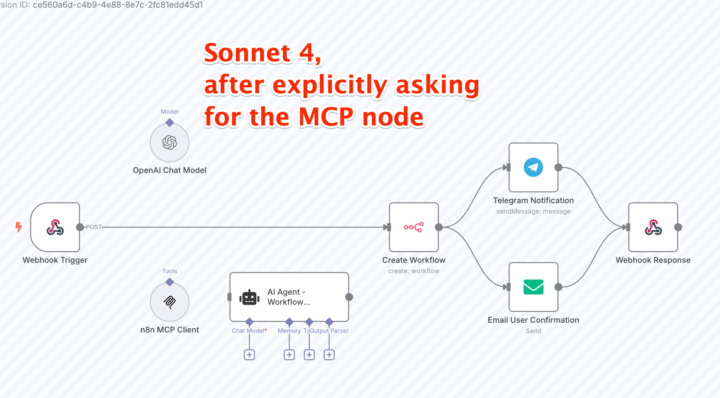
Testing out n8n-mcp
I took the wonderful n8n MCP https://github.com/czlonkowski/n8n-mcp for a test drive. Obviously, I didn't start with a "Hello world" but rather with a "build a world!" example. Fail fast, that's my moto ;-) I asked for a "workflow builder" workflow: - Get a webhook request where a users describes their desired automation - Use the above MCP to generate a workflow - Create the workflow on my server - Send notifications to mail and telegram Observations: - Surprisingly Sonnet gave better results than Opus (think mode activated). - Both models initially chose to use code nodes instead of the built-in MCP node - Sonnet used the core n8n node in order to create the desired workflow; Opus chose a code node. Asking for improvements, Sonnet added a un-connected MCP node, and Opus wasn't able to do so. I hoped this approach would give me better results than the approach @Nate Herk shared with us recently, but so far it's not really the case. Nevertheless, this is an exciting step forward. Within weeks from now we will probably all use an automation to bootstrap our workflows. Our job will be to be better at crafting prompts and in fixing and adapting the automated results to the specific use case and client. Has anyone else here tried it and got better results? Do you have a proven workflow you could share? ---- N.B. the *initial* prompt I used was: ``` Build a workflow that receives a request via a webhook and uses n8n-mcp (source: https://github.com/czlonkowski/n8n-mcp) to generate a n8n workflow and does the following things: * Create a workflow on my n8n instance * Sends a Telegram message notifying me that a user created a workflow * Send an email back to the user, congratulating them for creating the automation, with a link back to the workflow The webhook request will contain at least a user prompt with a description of the desired automation and an email to send the response back to.
1-10 of 10

@zohar-stolar-7706
Solutions architect with over 20 years in adapting tech solutions to clients in all sectors and industries.
Active 10h ago
Joined Mar 19, 2025
Powered by