Activity
Mon
Wed
Fri
Sun
Sep
Oct
Nov
Dec
Jan
Feb
Mar
Apr
May
Jun
Jul
Aug
What is this?
Less
More
UX Support Group
28 members • $49/month
12 contributions to UX Support Group

Mar 29 •
Measuring AI agent autonomy in practice (Anthropic Research)
https://www.anthropic.com/research/measuring-agent-autonomy 2 key takeaways that I think are super relevant to us: - Product developers should design for user oversight. - It's too early to mandate specific interaction patterns Thoughts?

0 likes • Apr 15
I agree that we should design for human oversight now. And also design for mitigating risks (error handling for agents). PS: Anthropic is giving me Google vibes (in terms of company culture and social presence)
Apr 10 •
Where to build in agentic world
https://youtu.be/ib2m9HVX7as?si=5K57_xzGECJr68IB In the world where every person has multiple AI agents, what do we build? Do we build?
0 likes • Apr 15
Cool breakdown of the 5 layers for AI. I think we need to start agent-centered design along with human-agent interaction. Also it seems that Figma can still be a player at the context layer, at least in terms of design system? Maybe FigJam has a more promising future since it hosts a lot of business context and ideas. One complaint about the vid: too many jargons

Feb 20 •
Pencil with Claude code - vs Figma
@Danny Setiawan check this out - have you seen pencil? Would love to do a test comparing it to stitch. https://youtu.be/DFcvz2kcR74?si=WYUwndzmT88EQX3g
0 likes • Mar 1
@Danny Setiawan curious about why you think Stitch will kill Figma...!
Feb 25 •
Git for designer course added
I'm seeing more and more mention of designers submitting PR on GitHub . This is becoming a requirement as our role is shifting to building and designing in code. So I decided to create a short simple course here (https://www.skool.com/ux-support-group-6932/classroom) so you can get familiar with it. Also, we just kicked off planning for the 2026 AixUX Summit. If you're involved, we'll be using GitHub and find opportunities to get agents involved, so you can get real-world practical experience. I'll be doing some workshops for the core team to help you get up-to-speed. If you're interested in getting involved in the Summit planning and production or interested in facilitating a session, please contact @Suyen Stevenson
0 likes • Mar 1
great! can't wait to get my hands on!
Feb 17 •
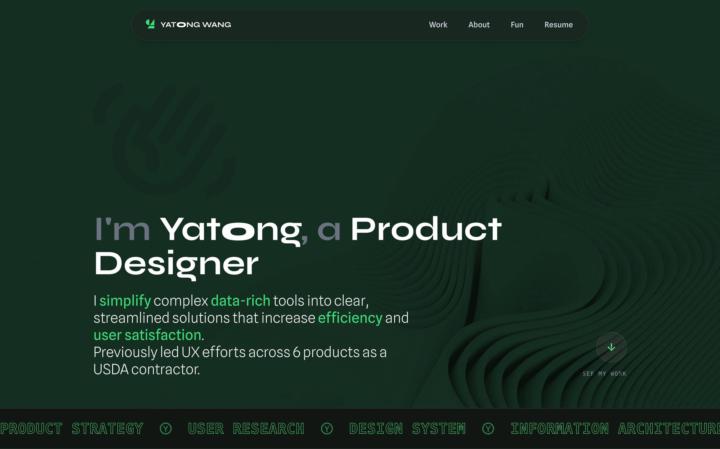
Sneak peek of my new portfolio site (WIP)
I'm in the process of rebuiding my portfolio using AI-powered design and coding workflows. I've completed the homepage and wanted to release it early as a build-in-public project: https://lab.yatongwang.com. ### Tools I Use - **Design:** Stitch with Google, Figma, Pencil - **Primary IDE:** Cursor - **Version Control:** GitHub - **Deployment:** Netlify (CI/CD from `main` branch) - **Coding & Engineering Guidance:** Claude, ChatGPT (for minor coding problem assistance, Git/GitHub best practices, repo architecture, version control workflows, etc.) Feel free to let me know what you think!
1-10 of 12
@yatong-wang-4678
Research-driven product designer for science, B2C, B2B, and nonprofit.
Active 125d ago
Joined Dec 5, 2025