Activity
Mon
Wed
Fri
Sun
Sep
Oct
Nov
Dec
Jan
Feb
Mar
Apr
May
Jun
Jul
Aug
What is this?
Less
More
Owned by Tony
A self-healing community helping you transform to become calmer, stronger & more energized 😊 through Qigong, Daoism, Reiki Training & Reiki Shares
Sketch Club
132 members • $19/month
Claude Code Club
8.2k members • $9/month
Inflameless Living
134 members • $500/month
💖 Love Yourself to Health 💖
105 members • Free
Daily Rituals Skool
12 members • Free
Midlife Revival:for Women 50+
49 members • Free
Enneagram: Living from Essence
117 members • Free
The Flame Keepers
182 members • Free
The Lifestyle Rewind Skool
582 members • $24/month
2 contributions to Skool Extensions 🧩

🔥
Apr 24 •
Panel System
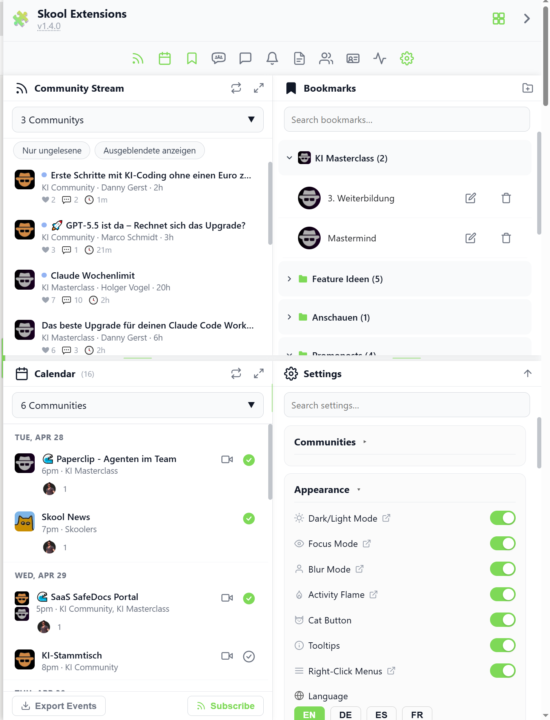
𝗣𝗮𝗻𝗲𝗹 𝗦𝘆𝘀𝘁𝗲𝗺 — 𝗨𝗽 𝘁𝗼 𝟭𝟮 𝗣𝗮𝗻𝗲𝗹𝘀 𝗦𝗶𝗱𝗲 𝗯𝘆 𝗦𝗶𝗱𝗲, 𝗘𝘅𝗮𝗰𝘁𝗹𝘆 𝗪𝗵𝗲𝗿𝗲 𝗬𝗼𝘂 𝗪𝗮𝗻𝘁 𝗧𝗵𝗲𝗺 Skool gives you one column and expects you to live inside it. The Panel System turns the whole right side of your browser into a second workspace — a unified sidebar where every toolkit panel (Bookmarks, Calendar, Stream, Members, Notifications, Chat, Pipeline, Course Overview, Workflows and more) can sit open at the same time, in the exact grid you design. Click any toolbar button to send its panel into the sidebar; click again to close it. The sidebar slides in on first use and stays visible while you browse. Eight grid modes decide how many panels share the space: Single (one full-height panel), Dbl-V (top/bottom split), Dbl-H (two side-by-side columns), Quad (2×2), Quad-H (4 columns), Hexa-H (6 columns), Octo (2 rows × 4 columns) and Hexa2 (2 rows × 6 columns) — up to twelve panels on screen at once on Hexa2. Arranging panels is drag-and-drop. Pick up any toolbar button and drop it into any empty grid cell; Shift-click an open panel to promote or move it; drag the divider between cells to rebalance the split. The layout survives reloads — the last grid you used, the panels you had open, and even the column widths are restored instantly on the next page load, without the slide-in animation (no more waiting for the bar to fly in after every refresh). Custom widths in single-column modes are remembered separately, so resizing in Single or Dbl-V sticks across mode switches. Layouts are named and saveable. Build a "Deep Work" preset with Notifications muted and only Bookmarks + Stream visible, a "Community Day" preset with Members + Pipeline + CRM, a "Fullscreen Dashboard" that stretches the sidebar across the entire viewport flush to both screen edges — then switch between them with a single click. Pin any individual panel with a 3-state pin cycle (unpinned → this tab → all tabs) so it stays put while you move around Skool. A "More" menu automatically groups overflow toolbar buttons when space gets tight, and an "Open panel links in new tab" toggle keeps the sidebar stable while you click through posts.

🔥
4 likes • Apr 24
i will check this out!
🔥
Apr 13 •
Activation needed after update
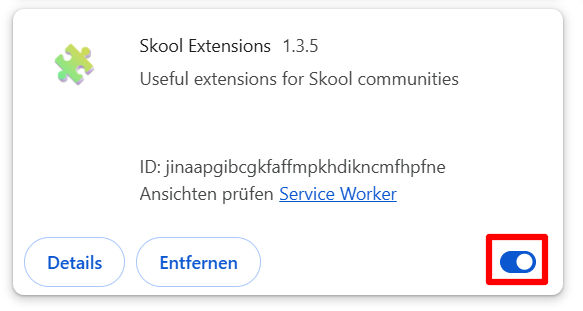
The URL of the backend server has changed in the new version. Unfortunately, this needs to be confirmed. Please reactivate the extension after the update at chrome://extensions/ and then click "activate". --- Die URL des Backend-Servers hat sich in der neuen Version geändert. Dies muss leider noch bestätigt werden. Bitte aktiviere die Erweiterung nach dem Update unter chrome://extensions/ erneut und klick anschließend auf „Aktivieren“.
🔥
3 likes • Apr 13
i think i did the update ect...but it is still not showing the usual details (ie rank ect)
🔥
2 likes • Apr 13
@Marco Berlin yes
1-2 of 2

🔥
@tony-sibbald-3222
Tony Sibbald | Support, practices, and guidance to help you feel calmer, clearer, and fully alive again 🌿
Active 4h ago
Joined Mar 19, 2026
Canada
Powered by