Activity
Mon
Wed
Fri
Sun
Aug
Sep
Oct
Nov
Dec
Jan
Feb
Mar
Apr
May
Jun
Jul
What is this?
Less
More
Owned by Silke
Dein persönlicher Raum für Austausch, Begegnung & Sichtbarkeit: Für Unternehmer & Vereine in Berlin und Brandenburg. 👉 Starte kostenlos. Komm' dazu❣️
Dein kostenfreier Begegnungsraum für Wohlfühlbotschafter. Gemeinsam statt allein wachsen, Gaben teilen, Ideen entwickeln und sichtbar werden.
Memberships
Skool Community (deutsch)
5.2k members • Free
7 contributions to Skool Extensions 🧩

🔥
Jun 2 •
Zurück zu unserer ursprünglich festgelegten Veranlagung
Human Design boomt seit einigen Jahren - doch viele wissen trotzdem nicht, wie mächtig dieses Tool sein kann. Viele kratzen einfach an der Oberfläche - wissen, welcher Typ sie sind, bzw. welches Profil sie haben - kennen vielleicht noch Strategie und Autorität - aber das wars dann auch schon. In unserer Community Human Design Deep Dive Mastery geht es um mehr - wir gehen tiefer - jede und jeder Einzelne für sich - und wir bestimmen selbst, wer wir letztendlich sein wollen. Aktuell haben wir einen Workshop laufen, wirklich bei den Basics zu beginnen - Schritt für Schritt tiefer zu gehen - deinem roten Faden folgen, um wieder zu dir selbst zurück zu finden. Momentan live - täglich werden neue Infos frei geschalten - später kann dann selbst nachgearbeitet werden. Wobei - wir haben zu jeder großen Thematik rund um Human Design einen eigenen Classroom - mittlerweile auch schon vielfältige Diskussionsbeiträge - und dadurch auch unterschiedliche Erfahrungsberichte der Mitglieder, die auch immer wieder zu neuen Erkenntnissen führen können. Für die, die Human Design noch nicht kennen - es ist ein Analysetool - vergleichbar mit Astrologie - aber doch ganz anders 🤭 Aber, glaube mir nichts - teste es selbst - schau dir den Einstiegsworkshop an - stelle deine Fragen - tausche dich mit Gleichgesinnten aus. Wir beschäftigen uns mit allen Ebenen unseres Seins - ganz ohne KI und vorgefertigte Schablonen, in die wir jemanden pressen - wir schauen auf die Summe aller Einzelteile jedes einzelnen Menschen - betrachten uns in unserer Gesamtheit - und sind uns dessen bewusst, dass jeder Mensch anders "tickt". Mich hat Human Design 2007 gefunden - und die Begeisterung dafür hat in den fast 20 Jahren nie nach gelassen. Es geht auch nicht nur um Selbsterkenntnis - oder auch private und persönliche WeiterEntWicklung - die Kenntnis der eigenen Veranlagung hilft auch im Businessbereich. Wenn dich irgend etwas davon anspricht, dann komm doch einfach rüber - Human Design Deep Dive Mastery - und beteilige dich an unserm gegenseitigen Erfahrungsaustausch - levle hoch - und tauche immer tiefer ein in die Materie 🥰

3 likes • Jun 2
Zitat: Aber glaube mir nichts, teste es selbst 🤫💃🤣 Und genau deshalb bin ich so gern in deiner Community 👌
2 likes • Jun 2
@ChrisTina Maywald Das glaube ich dir sofort 🤭🙈😁

🔥
May 24 •
500 Members 🥳
We’ve now reached 500 members in the community 🥳 That means almost 80% of all extension users are also joining the community to connect and exchange ideas. That’s amazing. Let’s keep the momentum going, have fun together, and make the extension even more popular. You really do have the chance here to help shape features and improvements for your everyday Skool experience. Many of your ideas have already become reality. Some more advanced ones are still part of the premium membership. Join the first live call for the extension this Thursday. I’ll also showcase a lot of premium features that many of you probably haven’t discovered yet. And brand new: I’ll introduce the Workflow Builder for Skool automations ☝🏼 —- Wir sind jetzt 500 Mitglieder hier in der Community 🥳 Das heißt fast 80% der Extension Nutzer kommen auch in die Community um sich auszutauschen. Das ist genial. Lasst uns hier weiter Gas geben und Spaß haben und die Extension so noch bekannter machen. Ihr habt es hier tatsächlich in der Hand eure individuellen Wünsche für euren Skoolalltag umsetzen zu lassen. Viele davon konnte ich bereits war werden lassen. Einige verstecken sich noch in der Premiummitgliedschaft. Sei am Donnerstag zum ersten Livecall der Extension dabei. Ich stelle auch viele Premiumfunktionen vor, die ihr bestimmt noch nicht kennt. Brandneu zeige ich euch den Workflow Builder für Skool Automatisierungen ☝🏼

6 likes • May 24
YES 💃
🔥
May 22 •
🐞 Issues or bugs
The range of functions has now become large and there can always be an error or unusual behavior in the extension. Use this post and report things that you notice. My goal is always to solve problems as quickly as possible. --- Der Funktionsumfang ist mittlerweile groß geworden und es kann immer mal zu einem Fehler oder einem ungewöhnlichen Verhalten in der Extension kommen. Nutzt diesen Post und meldet Sachen, die euch auffallen. Mein Ziel ist es immer schnellst möglich Probleme zu lösen.
9 likes • May 22
Ganz lieben Dank für dein Angebot. Best Support 🙏
🔥
May 21 •
Community Pins
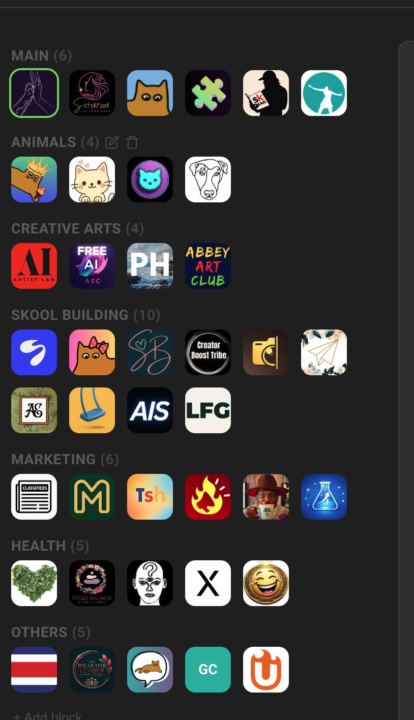
Replace Skool's left community switcher with a strip that holds every community you belong to, grouped into named blocks Skool's left sidebar only surfaces a handful of communities at a time — the rest sit behind a switcher dropdown you have to open every time. If you're active in a dozen or more, the ones you visit daily end up buried in a list you keep scrolling through. Community Pins replaces that switcher with a redesigned strip down the left edge that shows every community you belong to at once — your logos flow in rows across the space beside the page instead of one cramped column. Hover any community to see its name in a tooltip, and the one you're currently in is marked. Group your communities into named blocks. Add a block, head it "AI", "Clients", or whatever fits — each heading carries a live count of how many sit inside. A permanent "Pinned" block catches every community on its own: join a new one and it lands there, leave one and it drops out. Manage it all inline in the strip — "+ Block" adds one, the pencil renames a heading, and the trash icon removes a block (after a quick confirm) and drops its communities back into "Pinned". The "Pinned" block itself can be renamed but never deleted. Drag to organize. Reorder communities inside a block, pull one across to another block, or grab a block's heading to move whole blocks up and down. A custom mouse-driven drag tracks your cursor one-to-one, with no HTML5 ghost image or forbidden-drop flicker to get in the way. The strip scrolls quietly once the list grows long — a slim green scrollbar appears on hover and stays hidden otherwise, so the sidebar stays calm at rest. The whole arrangement is cloud-synced: lay your blocks out on one device and they show up the same on the next. Community Pins can be toggled in the Extension Settings under Appearance. --- Skools linken Community-Switcher durch einen Streifen ersetzen, der jede Community enthält, in der du bist, in benannten Blöcken organisiert Skools linke Sidebar zeigt immer nur eine Handvoll Communities auf einmal — der Rest steckt hinter einem Switcher-Dropdown, das du jedes Mal aufklappen musst. Wenn du in einem Dutzend oder mehr aktiv bist, sind die täglich besuchten in einer Liste vergraben, durch die du immer wieder scrollst.
8 likes • May 21
Merci 🎀
🔥
May 17 •
Global Leaderboard
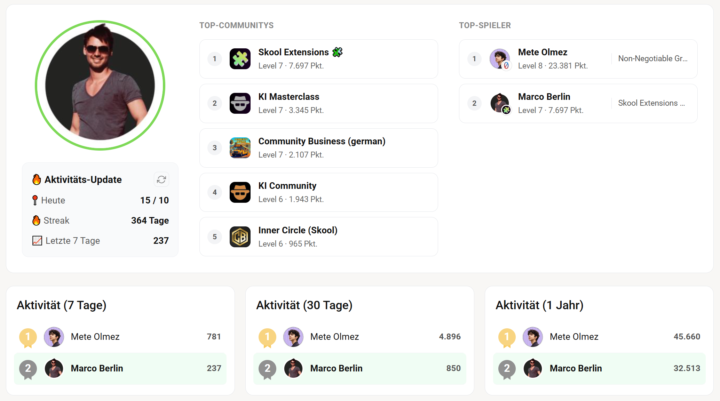
𝗚𝗹𝗼𝗯𝗮𝗹 𝗟𝗲𝗮𝗱𝗲𝗿𝗯𝗼𝗮𝗿𝗱 — 𝗖𝗿𝗼𝘀𝘀-𝗰𝗼𝗺𝗺𝘂𝗻𝗶𝘁𝘆 𝗮𝗰𝘁𝗶𝘃𝗶𝘁𝘆 𝗿𝗮𝗻𝗸𝗶𝗻𝗴 𝘄𝗶𝘁𝗵 𝗮𝗹𝗹 𝘆𝗼𝘂𝗿 𝗦𝗸𝗼𝗼𝗹 𝘄𝗼𝗿𝗹𝗱𝘀 𝗶𝗻 𝗼𝗻𝗲 𝗽𝗹𝗮𝗰𝗲 Skool's own leaderboard only shows where you stand inside one community. But if you're active across several at once, there's no single view that says "here's how active I've been overall this week." The Global Leaderboard adds exactly that: a new tab next to Skool's Leaderboards page (in the skool-extensions community) that ranks you against every other extension user who opted in. On the left you see your avatar and a live Activity Update card with three numbers: 📍 Today (points today vs. your daily goal), 🔥 Streak (consecutive days with activity — today is skipped while still zero, so your streak doesn't drop to 0 mid-day), and 📈 Last 7 days. Hover any line for a tooltip explaining what it counts. A small refresh button gives you an instant update — handy right after you post something and want to watch the streak tick up. Below it, three ranking columns show the top 10 extension users over 7 days, 30 days, and 1 year, with gold/silver/bronze medals on the podium and your own row pinned at the bottom in green if you didn't make the top 10. In the middle, Top Communities lists your five best Skool worlds by level and points. On the right, Top Players ranks the most successful extension users platform-wide by their single highest community score — each avatar carries a small badge with the community logo, so at a glance you see "this person hit Level 9 over in ki-business" without having to open anyone's profile. The sync runs once a day in the background and is fully opt-in. The first time you open the tab, a consent dialog asks for permission and lists exactly what gets shared (activity, top communities, name, avatar). After that, your row stays fresh on its own — no notifications, no nags. You can revoke consent any time, and a follow-up asks whether to keep or delete your server-side data. The tab then disappears instantly on all your devices. --- 𝗚𝗹𝗼𝗯𝗮𝗹𝗲𝘀 𝗟𝗲𝗮𝗱𝗲𝗿𝗯𝗼𝗮𝗿𝗱 — 𝗖𝗿𝗼𝘀𝘀-𝗖𝗼𝗺𝗺𝘂𝗻𝗶𝘁𝘆-𝗔𝗸𝘁𝗶𝘃𝗶𝘁𝗮̈𝘁𝘀𝗿𝗮𝗻𝗸𝗶𝗻𝗴 𝗺𝗶𝘁 𝗮𝗹𝗹 𝗱𝗲𝗶𝗻𝗲𝗻 𝗦𝗸𝗼𝗼𝗹-𝗪𝗲𝗹𝘁𝗲𝗻 𝗮𝗻 𝗲𝗶𝗻𝗲𝗺 𝗢𝗿𝘁
5 likes • May 17
Einfach nur WOW 👌
1-7 of 7

@silke-maier
Ich öffne Räume zum Wachsen & Teilen 🌸 UnternehmBAR (Berlin & BB) sowie das "Digitale Wohnzimmer" im Wandel. Fühl' dich Willkommen, so wie du bist❣️
Active 3h ago
Joined Apr 11, 2026
16321 Bernau bei Berlin
Powered by