Activity
Mon
Wed
Fri
Sun
Jun
Jul
Aug
Sep
Oct
Nov
Dec
Jan
Feb
Mar
Apr
May
What is this?
Less
More
Memberships
AI Automation Society
370.2k members • Free
3 contributions to AI Automation Society

💎
⭐
Mar '25 •
🚀New Video: How I Automated Faceless Shorts with AI in n8n (free template)
For a deeper discussion on taking this workflow to the next level, let's talk here. In this video, I walk through how I built an n8n workflow that generates faceless shorts on autopilot—from turning ideas into AI-generated images, converting those images into engaging videos, and adding the perfect sound effects to bring everything together. Whether you're looking to automate content creation or just curious about AI-powered video workflows, this video guide has you covered! Get the Google Sheet template here

1 like • May '25
@Ron Spencer sometimes when I run during the daytime, runway seems to be overloaded and the response is either incredibly slow or it fails. Maybe try running it during an off peak time.
3 likes • May '25
@Kamil Polak Hi Kamil, Happy to help. If you’re trying to map audio tracks to their corresponding descriptions in n8n, a few things need to be aligned: 1. Data structure — Are the audio files and descriptions coming in as arrays? If so, you’ll want to make sure both arrays are the same length and ordered correctly. 2. Item linking — If you’re pulling from two separate sources (e.g., one for audio, one for metadata), you’ll likely need to use the Merge node with a strategy like “Merge by Index” or “Merge by Key” if they share a common identifier. 3. Debug step-by-step — Use the Set and IF nodes to isolate each part of the data. It can help to manually test the mapping on a smaller data sample. If you’re comfortable sharing a screenshot of your current workflow or describing how the data is structured (e.g., where the audio comes from and how the descriptions are stored), I can walk you through the fix in more detail. Looking forward to getting this sorted with you. Best, Shawn
Apr '25 •
Best Practices for Handling Large File Transfers Outside of n8n?
Hey everyone, I’m looking for advice on best practices for moving files outside of n8n when working with large or numerous file operations. Here’s my situation: - I’m using n8n to automate creative workflows (generating and processing ~20+ image files at a time). - After generation, I need to download these images and upload them into Google Drive and then give them share access. - However, I’ve run into problems with memory overloads, binary data size limits, and slow or fragile file handling inside n8n itself. To workaround it, I’ve started executing Node.js scripts separately via Execute Command or HTTP Request nodes that move/download files outside of n8n — directly on the server. What I’m wondering is: - What’s the best practice for handling file downloads/uploads at scale outside of n8n but still connected to the automation? - Is it common to spin off lightweight external scripts (Node.js, bash, etc.)? - Are there better patterns or microservice designs to offload file operations cleanly? - How do people handle Google Drive uploads reliably without bogging down n8n memory? Ideally, I want the flow to stay fully automated, resilient, and low-memory. Appreciate any wisdom, architecture patterns, or lessons learned here! Thanks so much. 🙏 — Shawn
0 likes • May '25
@Hari Kumar Hey Hari — really appreciate you taking the time to respond. You nailed the core issue: n8n holding binary data in memory is what’s been causing bottlenecks for me, especially when processing 20+ images per batch. I’ve experimented with triggering Node.js scripts externally, and I’m now leaning toward setting up a lightweight microservice that handles all file movement and uploads to Google Drive, fully stream-based to avoid memory pressure. Your pointer about switching to N8N_DEFAULT_BINARY_DATA_MODE=filesystem is spot on — I’ll likely try that in tandem to keep the workflows stable while I decouple heavier tasks. Are there any patterns or tools you’ve used for building that kind of companion service? I’d love to hear more if you’ve gone down that path. Thanks again for the insight — super helpful. — Shawn
💎
⭐
Apr '25 •
How to Be an AIS+ Member for FREE
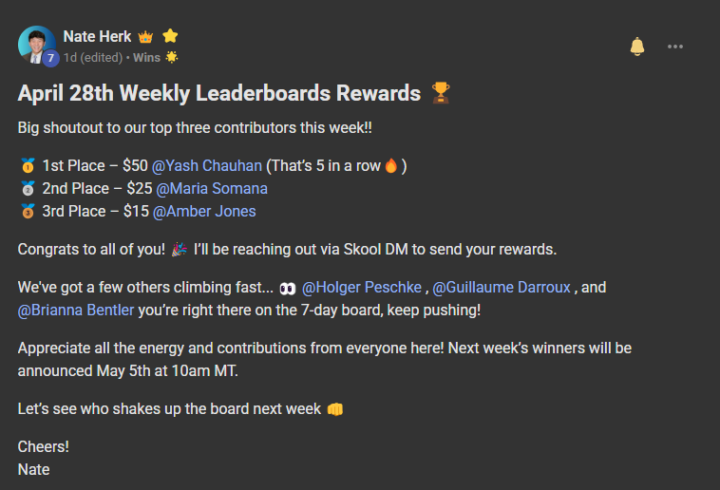
If you’ve been thinking about joining AI Automation Society Plus but the subscription cost has been holding you back, here’s something you should know. There are two ways you can become a member for FREE: 1) Weekly Rewards System - Every week, we reward the top 3 most engaged members in the community: 🥇 $50 for 1st 🥈 $25 for 2nd 🥉 $15 for 3rd - The leaderboard is based on how many likes your posts and comments receive. That means if you finish 1st just twice in a month, your membership is basically paid for—and then some. 2) Affiliate Program - For every person you invite to join AI Automation Society Plus, you earn 40% of their monthly membership for as long as they’re in the group. - Invite just three people and you could cover your own membership indefinitely—and even earn extra each month. So if the only thing holding you back is the ongoing cost, just know, you can earn your way in. You can be paid to participate. And once you're in, you get access to everything, including some brand-new courses dropping in a few weeks. The price is going up soon, so if you’ve been on the fence, now’s your best chance to lock it in. See you inside. Claim your spot here 👉 https://www.skool.com/ai-automation-society-plus/about
1 like • May '25
Love your content. Keep up the good work!
1-3 of 3
@shawn-behnam-4362
I am a business builder, investor, and strategist. He leads at Dermelect, manages Garden Capital Management and explores innovation in finance & tech.
Active 33d ago
Joined Mar 17, 2025
Powered by