Activity
Mon
Wed
Fri
Sun
Aug
Sep
Oct
Nov
Dec
Jan
Feb
Mar
Apr
May
Jun
Jul
What is this?
Less
More
Memberships
Apex AI Automation Academy
1.4k members • Free
AI Automation Society
425.9k members • Free
n8n KI Agenten
10.9k members • Free
12 contributions to AI Automation Society

May 13 •
Real-world experience with Android handheld POS + built-in thermal printer for restaurant automation?
Hey everyone, I’m building a restaurant automation system and I’m looking for real-world experience with Android handheld POS devices / all-in-one devices that have a built-in thermal printer. This is not about a simple chatbot or a theoretical setup. I’m trying to find the most reliable and low-maintenance hardware approach for real restaurant operations. Use case: Restaurant orders come in through WhatsApp and/or an AI phone agent. The order is then processed by an automation/backend. The restaurant staff should see the incoming order on a dedicated Android handheld POS device or Android tablet and then quickly: - accept the order - reject the order - select a preparation time, for example 20 / 30 / 45 minutes - trigger or receive an automatic kitchen ticket print - avoid duplicate printing on retries - keep the process simple enough for non-technical restaurant staff The goal is that the restaurant-side flow feels similar to the way delivery platforms handle incoming orders: the device alerts the staff, the staff accepts/rejects, selects the preparation time, and the kitchen ticket prints automatically. Important architecture point:I do not want the backend/n8n to print directly to a local printer IP inside the restaurant network. The device should act as a client. The architecture I’m considering is: backend / automation creates order → restaurant device receives or pulls the order → staff accepts/rejects and selects preparation time → backend creates print job with a dedupe key → device prints through native printer access / SDK / ESC/POS → device sends printed/failed acknowledgement back to the backend. Preferred technical direction: - cloud/server-side backend - device connects outward via HTTPS polling, WebSocket, push notification, MQTT, or similar - no router port forwarding - no VPN/tunnel dependency as the standard setup - no local public API on the tablet - no fragile local IP hacks - print jobs should be pulled or received safely by the device - print jobs need dedupe / acknowledgement logic - if the device restarts, it should recover cleanly - ideally kiosk mode or app pinning - ideally app auto-start after reboot - ideally printer status / paper-out / print failure detection
1 like • May 18
@Mofedul Alam Joy Thanks, this is very useful and exactly the kind of practical feedback I was looking for. A few follow-up questions before I buy a test device: 1. Have you personally used the SUNMI V2s in production, or is this based on general developer experience with SUNMI devices? 2. Which exact V2s configuration would you recommend?GMS or non-GMS, RAM/ROM, scanner/no scanner, Android version, receipt/label version? 3. For printer access: did you use the official SUNMI SDK, ESC/POS commands, or a wrapper/bridge? 4. When you say print success callbacks, does the SDK confirm that the ticket was actually printed, or only that the print command was accepted by the printer service? 5. Can the app reliably detect paper-out, printer error, overheating, and failed print jobs? 6. For dedupe: would you still keep the main print_jobs state in the backend and use device-level job_id storage only as an extra safety layer?My current thinking is: backend print_job state + device lock + local job_id cache + printed/failed callback. 7. Did you ever test reboot recovery? For example: order accepted → print job locked → device reboots before/while printing → app restarts → no duplicate ticket. 8. Do you have any SDK docs, GitHub sample, or bridge app you would recommend for SUNMI V2s? 9. Would you still choose SUNMI V2s over iMin M2/Swift if the use case is mainly order acceptance + prep time + kitchen ticket printing? Appreciate the help. I’m trying to avoid buying the wrong hardware before testing the real printer/app layer.
0 likes • May 18
@Ibrahim Bajwa Thanks, that makes sense. A WebSocket/polling hybrid is also what I was considering. My current thought is to keep the backend as the source of truth and let the restaurant device act only as a client: backend creates order → device receives/pulls it → staff accepts/rejects → backend creates print_job with dedupe key → device locks/pulls print_job → device prints locally → device sends printed/failed ack. Would you use WebSocket mainly for real-time order alerts and polling as the fallback/sync layer?Or would you rely on polling as the main mechanism and only use WebSocket/FCM to wake up the device? Also, have you implemented something like this with Android POS hardware before, or mostly backend/device communication patterns?

May 12 •
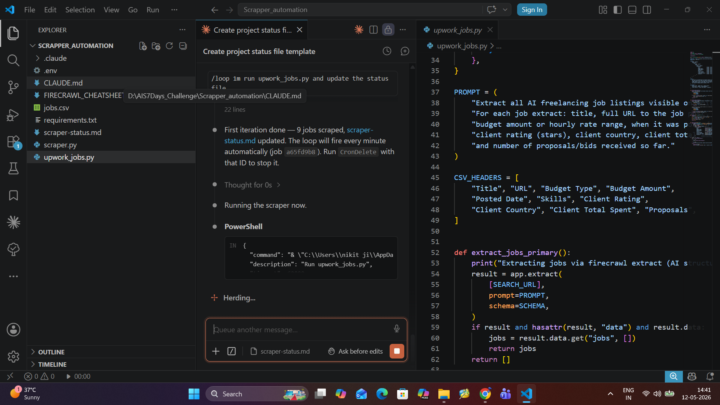
Day 6 : AIS#7DaysChallenge✅
I scheduled and optimized the automation workflows I previously built during this challenge. Sharing a few screenshots of the progress and implementation.
2 likes • May 13
Nice progress! I'm only about a year into automation myself, but I've learned that breaking complex workflows into smaller pieces and testing each one helps a lot. Keep it up!

May 13 •
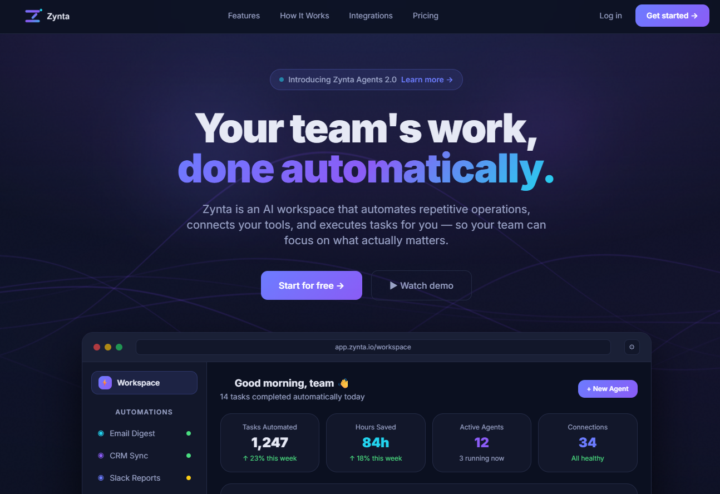
#AISChallenge - Day 5- Developed a landing page for AI Workspcace
AIS Challenge Day 5, I have designed something cool, a landing page designed and built with Claude code and front-end skill in VS Code. Just shipped my AI workspace landing page — built end-to-end with Claude Code in a single session. Live URL:Zynta — AI Workspace That Works For You One hack that made the biggest difference: Using a WebGL shader for the hero animation instead of a CSS gradient. One prompt, zero Three.js knowledge needed — Claude wrote the entire GLSL shader. The difference between "looks nice" and "looks like a real product" was that one animated background. Before/after: Started with a blank HTML file. Ended with a full dark-theme SaaS landing page — navbar, hero, features, pricing, testimonials, integrations grid, and footer. All in one sitting. #AISChallenge #claude #claudecode #skills #html #landingpage
3 likes • May 13
Nice work shipping a full landing page with Claude Code! I'm also learning to build marketing pages. It's impressive that you used a WebGL shader instead of a gradient; that makes it stand out. If you want to connect sign‑ups to a CRM, you can use n8n's HTTP/Webhook nodes to automate follow‑ups. Keep it up!

May 12 •
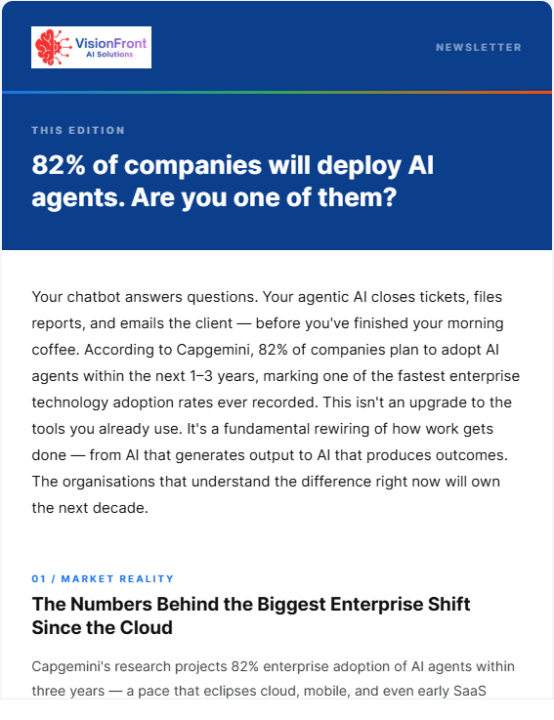
Day 1 #AIS Challenge
Just completed my first day of the challenge. This is my first time using Claude Code ever. Had fun learning it while building this Newsletter automation. I did go through a couple of iterations as the images didn't generate properly the first time. Didn't have time to create a transparent logo. In the next iteration, I will find out if claude code can edit images and logos based on my prompt. Overall, this was a great experience. Thanks, Nate, for making this so simple.
1 like • May 13
Great job on your first day! When I first tried Claude Code, sticking to simple templates helped. In n8n you can use an HTTP node to connect Claude and process outputs automatically. Keep experimenting and it will get smoother over time.

May 13 •
The blind leading the blind
I've realized that in this space it feels like the blind leading the blind. The post below from a Redditor, followed by a bunch of "helpful tips," makes me believe that most of the advice out there is not good. --- I've been building AI automation systems for months now. 6 working systems. Good engagement on Reddit. People ask for demos. But I haven't crossed the line from "looks cool" to "here's my money." --- Here are a few of the so called helpful tips: "Don't do Upwork or Fiverr, it's way too saturated now." "Reach out through platforms like LinkedIn, Instagram, email, etc." "Sorry to say but Upwork and Fiverr are a race to the bottom." If you have ever tried cold outreach, you know how hard it is. I've read plenty of stories of people being in this space for 6 months with zero results. It's more common than people think, it might even be the norm. So when I read comments like those, I roll my eyes because they're making it harder for people who are already struggling. I'm not saying don't do cold outreach. A lot of people make it work. But saying Upwork sucks is like saying don't go to Barcelona because there are too many tourists. Two things can be true at the same time. Yes, Upwork is competitive. But there are also clients there who will pay well. And people will always try to get the best price, whether that's on Upwork or LinkedIn. That's human nature. Upwork is actually easier in one important way. It solves the hardest problem, which is not knowing what to sell. The person going there already knows they have a problem and needs someone to fix it. That's where you come in. But it's not as simple as pitching and hoping for the best. You need to understand how to negotiate and close. That skill is far more valuable than knowing how to automate or use AI. Upwork works well for me. I have a system and get daily leads. Not every lead works out, but I'd rather pitch 10 times and miss 10 opportunities than not pitch at all. Because not pitching guarantees nothing will change.
1 like • May 13
I feel this too sometimes. As someone who's just starting out, I've found it best to build small projects and share results rather than rely solely on online advice. That way you learn what works and can demonstrate real outcomes.
1-10 of 12

@sebastiano-sola-5102
Verlierer geben auf wenn sie scheitern, Gewinner scheitern bis sie Erfolg haben!
Active 5d ago
Joined Mar 24, 2026
Powered by