Activity
Mon
Wed
Fri
Sun
Mar
Apr
May
Jun
Jul
Aug
Sep
Oct
Nov
Dec
Jan
Feb
What is this?
Less
More
Memberships
Learn Microsoft Fabric
15.4k members • Free
Fabric Dojo 织物
349 members • $67/month
6 contributions to Learn Microsoft Fabric

Dec '24 •
Data warehouse query timeouts
Hi My basic data warehouse with relatively small data set suddenly stopped returning any query I attempt. It had been running fine since I created it two weeks ago and then suddenly on the 26th it stopped responding to queries. I will run a simple select statement and it will spin for 15 minutes before I give up and cancel it. I cannot access the query activities screen or the query insights. This is on an F2 capacity. I found something about "sleeping" queries and I did find that I have a 50+ sleeping queries but it won't let me kill them. Any advice as to where to dig into this?
Dec '24 •
Access @item().name from within nested switch
Hi, I’m running a pipeline that uses the Get Metadata activity to retrieve a list of child items (file names) from a directory. The pipeline then processes these items in a ForEach activity, which contains a nested Switch activity. The Switch chooses cases based on a pipeline parameter and attempts to perform a Copy Data action. However, when I try to reference @item().name directly in the Source field for the file location within the Copy Data action, it fails to populate. To work around this, I’ve had success using a Set Variable activity to assign @item().name to a variable beforehand and then referencing that variable in the Copy Data action. What is the best practice for implementing a clean and efficient Copy Data flow in scenarios like this?
0
0
Dec '24 •
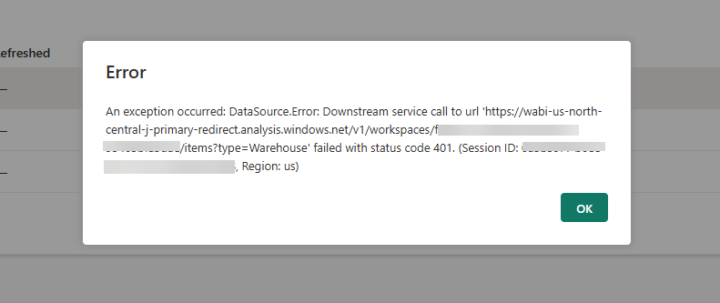
Data flow won't connect to Data Warehouse
Hi, I'm trying to configure a data flow that sources from a data warehouse that I also created. This is within a client's fabric tenant and workspace. For some reason I receive a 401 error when I try to connect to the dw. I'm also unable to use the file upload option coincidentally. What might I be missing? I'm an external user, with fabric admin role and admin on the workspace.
Dec '24 •
Granting admin access to external users
Hi, I'm trying to determine how to grain access to a client's Fabric workspace. I have PPU Power BI license myself and the client has an F2 capacity license. I can access their tenant and see a workspace they created; however, it will not allow me create any content within the workspace. From what I've read we have configured the user and sharing settings within the workspace etc. What am I missing? Is it due to my own fabric tenant being a free trial? UPDATE: It appears to have been an issue with the workspace not having yet been assigned the PPU capacity license that my client had purchased. We did that and I'm now able to create content.
3
0
Aug '24 •
tables missing in sql endpoint view/mode
Hi I've uploaded local csv files into a lakehouse and then I was able to use the Load to Tables > New Table option to create respective tables under the dbo tree; however, I'm not able to locate/see the tables when I navigate to the SQL Analytics Endpoint and expand the Schemas > dbo > Tables tree structure. I've tried to refresh the tree and I know the parque files exist in the lakehouse. What am I missing here? It's a trial instance of fabric.
3 likes • Aug '24
Sort of solved, not clear on the why. Apparently if you check the "Lakehouse schemas (Public Preview)" option when creating your Lakehouse it results in this bug/issue I'm describing.
1-6 of 6

Active 96d ago
Joined Aug 2, 2024
Powered by