Activity
Mon
Wed
Fri
Sun
Sep
Oct
Nov
Dec
Jan
Feb
Mar
Apr
May
Jun
Jul
Aug
What is this?
Less
More
Owned by Sandy
Caregivers to embrace self-care as essential, not selfish. Using essential oils, prayer & practical 2-minute routines to bring peacefulness and calm.
The AI Shoppe
785 members • Free
Glowing Mystic Hub
64 members • Free
Resiliency Reset
42 members • Free
Qigong & Self Mastery
369 members • Free
The Prayer Room
165 members • Free
Quietly Ambitious Business
893 members • Free
Summit Speaker Hub
42 members • Free
The Inner Shift Collective
31 members • Free
Evolved Health
269 members • Free
10 contributions to Skool Extensions 🧩

🔥
Mar 13 •
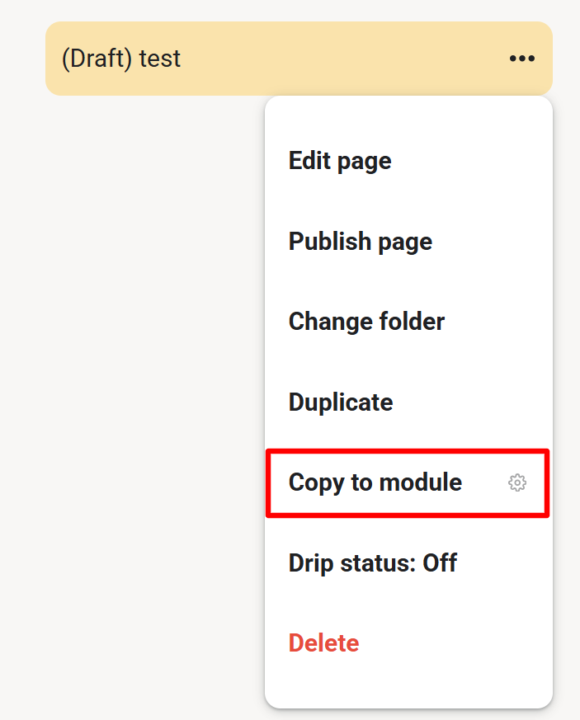
Copy to Module (VIP Feature 💎)
𝗖𝗼𝗽𝘆 𝘁𝗼 𝗠𝗼𝗱𝘂𝗹𝗲 — 𝗗𝘂𝗽𝗹𝗶𝗰𝗮𝘁𝗲 𝗟𝗲𝘀𝘀𝗼𝗻𝘀 𝗔𝗰𝗿𝗼𝘀𝘀 𝗠𝗼𝗱𝘂𝗹𝗲𝘀 As a community admin, sometimes you need the same lesson in multiple modules — for a "Best Of" collection, restructuring your course, or making content available in different contexts. Copy to Module lets you duplicate any lesson (including its video) into another module with just a few clicks. Open any lesson's 3-dot menu and select "Copy to module". A dialog appears where you choose the target module from a dropdown. Click "Copy" and the extension handles the rest — duplicating the page content, preserving the video, and placing it in your chosen module. Once done, you're automatically redirected to the new copy. No more manually recreating lessons or losing video associations when reorganizing your course content. --- 𝗜𝗻 𝗠𝗼𝗱𝘂𝗹 𝗸𝗼𝗽𝗶𝗲𝗿𝗲𝗻 — 𝗟𝗲𝗸𝘁𝗶𝗼𝗻𝗲𝗻 𝘇𝘄𝗶𝘀𝗰𝗵𝗲𝗻 𝗠𝗼𝗱𝘂𝗹𝗲𝗻 𝗱𝘂𝗽𝗹𝗶𝘇𝗶𝗲𝗿𝗲𝗻 Als Community-Admin brauchst du manchmal die gleiche Lektion in mehreren Modulen — für eine "Best Of"-Sammlung, eine Kurs-Umstrukturierung oder um Inhalte in verschiedenen Kontexten verfügbar zu machen. Copy to Module lässt dich jede Lektion (inklusive Video) mit wenigen Klicks in ein anderes Modul duplizieren. Öffne das 3-Punkte-Menü einer beliebigen Lektion und wähle "In Modul kopieren". Ein Dialog erscheint, in dem du das Zielmodul aus einem Dropdown wählst. Klick auf "Kopieren" und die Extension erledigt den Rest — dupliziert den Seiteninhalt, behält das Video bei und platziert alles in deinem gewählten Modul. Anschließend wirst du automatisch zur neuen Kopie weitergeleitet. Kein manuelles Neuerstellen von Lektionen mehr und kein Verlust von Video-Verknüpfungen beim Reorganisieren deiner Kursinhalte.

🔥
1 like • 9d
@Rayna Scott me too!
🔥
Mar 30 •
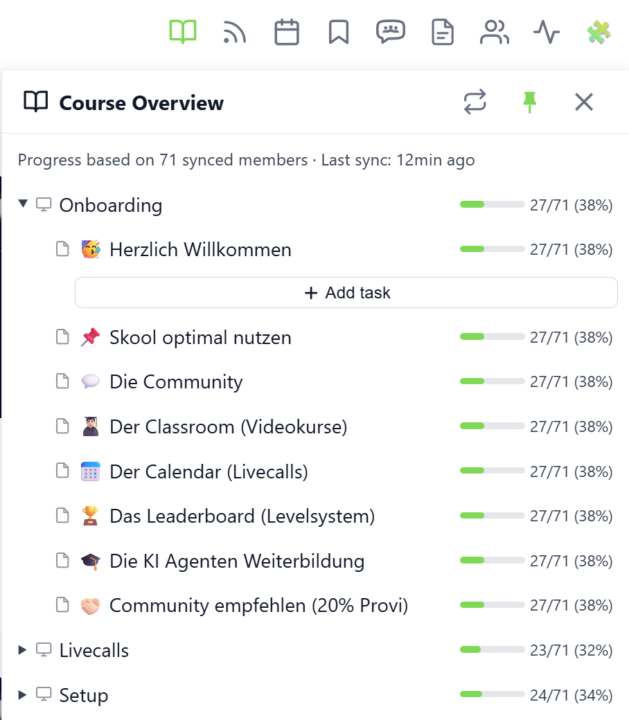
Course Overview (Premium Feature 👑)
𝗖𝗼𝘂𝗿𝘀𝗲 𝗢𝘃𝗲𝗿𝘃𝗶𝗲𝘄 — 𝗬𝗼𝘂𝗿 𝗘𝗻𝘁𝗶𝗿𝗲 𝗖𝗹𝗮𝘀𝘀𝗿𝗼𝗼𝗺 𝗦𝘁𝗿𝘂𝗰𝘁𝘂𝗿𝗲 𝗮𝘁 𝗮 𝗚𝗹𝗮𝗻𝗰𝗲 Managing a Skool classroom with multiple modules, folders, and pages means a lot of clicking and scrolling to understand the full picture. Course Overview adds a dedicated sidebar panel that shows your complete course structure as an expandable tree — every module, every folder, every page — without leaving the page you're on. Click the book icon in your toolbar to open the panel. Each module shows as a collapsible row with a folder icon for subfolders and page icons for individual lessons. Click any module to expand it and reveal its nested content, loaded directly from Skool's data. The tree remembers which modules you've expanded, so your view stays consistent as you navigate. The real power comes from the completion stats. If you've synced your members' course progress, each module displays a green progress bar showing what percentage of your members have started it. Hover over the bar to see member names, or click it to open a popup with the full list — complete with avatars, tags, and pipeline status. A note at the bottom shows how many synced members the percentages are based on. Hit the refresh button to reload the course structure or update completion stats. The panel respects the 24-hour sync cooldown and shows when the next sync is available. You can pin the panel to keep it open while you browse, resize it by dragging the left edge, or close it when you're done. Course Overview is available for admins and owners only, and works on any page within your community. The feature can be toggled in the Toolkit Settings under the Admin section. --- 𝗞𝘂𝗿𝘀ü𝗯𝗲𝗿𝘀𝗶𝗰𝗵𝘁 — 𝗗𝗲𝗶𝗻𝗲 𝗴𝗲𝘀𝗮𝗺𝘁𝗲 𝗖𝗹𝗮𝘀𝘀𝗿𝗼𝗼𝗺-𝗦𝘁𝗿𝘂𝗸𝘁𝘂𝗿 𝗮𝘂𝗳 𝗲𝗶𝗻𝗲𝗻 𝗕𝗹𝗶𝗰𝗸 Eine Skool-Classroom mit mehreren Modulen, Ordnern und Seiten zu verwalten bedeutet viel Klicken und Scrollen, um das Gesamtbild zu verstehen. Die Kursübersicht fügt ein eigenes Sidebar-Panel hinzu, das deine komplette Kursstruktur als aufklappbaren Baum zeigt — jedes Modul, jeden Ordner, jede Seite — ohne die aktuelle Seite zu verlassen.
🔥
1 like • 9d
@Rayna Scott me too!
🔥
18d •
Background Changer (from level 3)
𝗕𝗮𝗰𝗸𝗴𝗿𝗼𝘂𝗻𝗱 — 𝗥𝗲𝗽𝗹𝗮𝗰𝗲 𝘁𝗵𝗲 𝗦𝗸𝗼𝗼𝗹 𝗽𝗮𝗴𝗲 𝗯𝗮𝗰𝗸𝗴𝗿𝗼𝘂𝗻𝗱 𝘄𝗶𝘁𝗵 𝗮 𝗴𝗿𝗮𝗱𝗶𝗲𝗻𝘁, 𝘆𝗼𝘂𝗿 𝗼𝘄𝗻 𝗶𝗺𝗮𝗴𝗲 𝗼𝗿 𝗮 𝗱𝗮𝗶𝗹𝘆 𝗽𝗵𝗼𝘁𝗼 Skool ships one page background, and it is the same for everyone. The Background feature replaces it with something you pick: thirteen ready-made gradients and mesh blends (Aurora, Sunset, Ocean, Midnight, Candy, Mint and more), a two-colour gradient you mix yourself with a free angle, an image you upload, or a photo that changes every single day. Four daily-photo sources are available: Bing Daily, Windows Spotlight, Wikimedia Picture of the Day and NASA's Astronomy Picture of the Day. Each fetches a fresh image once a day, so the page looks different every morning without you touching a setting. Preview thumbnails load for all sources up front — including the ones you have not selected — so you see the actual picture before choosing. The feature unlocks with your level in the Skool Extensions community. Level 3 opens the Background itself along with all gradients, your own colours and your own image. The daily-photo sources follow: Bing and Spotlight at level 4, Wikimedia and NASA at level 5. Locked tiles stay visible with a grey wash and a level badge — click the badge and you land on the community leaderboard, where you can see your standing and what the next level takes. Two sliders control how the page sits on top of the image. Transparent cards sets how much of the background shows through Skool's cards and panels, and Blurred controls how soft the photo behind them gets. Both update live while you drag, and dark mode keeps its own slightly stronger opacity so the balance between the two modes survives a single slider. On photo backgrounds, readability is handled for you: the text colour is chosen by real WCAG contrast against the image rather than a rough brightness guess, and text sitting directly on the background — native header links, the pin strip footer — gets a fine outline so it stays legible over busy areas. Gradients and mesh blends are left alone; they do not need it.

🔥
6 likes • 17d
This is very cool! Thank you!
🔥
2 likes • 15d
@Kimberly Armatys I'll have to work on that.
🔥
Jun 29 •
🎉 We Just Hit 1,000 Users
🎉 1,000+ Extension Users! What started as a small project is now being used by more than 1,000 people. A huge 𝘁𝗵𝗮𝗻𝗸 𝘆𝗼𝘂 to everyone who has installed the extension, shared feedback, reported bugs, suggested new features, and supported the project along the way. Your feedback has had a direct impact on its development. And this is only the beginning. There are many more features, improvements, and ideas on the roadmap, and I'm excited to continue building them together with you. Thank you for using the extension and being part of this journey. Here's to the next 1,000! --- 🎉 Über 1.000 Extension-Nutzer! Was als kleines Projekt begann, wird inzwischen von über 𝟭.𝟬𝟬𝟬 𝗡𝘂𝘁𝘇𝗲𝗿𝗻 verwendet. Ein riesiges 𝗗𝗮𝗻𝗸𝗲𝘀𝗰𝗵𝗼̈𝗻 an alle, die die Extension installiert, Feedback gegeben, Bugs gemeldet, neue Features vorgeschlagen oder das Projekt unterstützt haben. Eure Rückmeldungen haben die Entwicklung maßgeblich beeinflusst. Und das ist erst der Anfang. Es warten noch viele neue Features, Verbesserungen und Ideen darauf, umgesetzt zu werden. Und ich freue mich darauf, diesen Weg gemeinsam mit euch weiterzugehen. Danke, dass ihr die Extension nutzt und Teil dieser Reise seid. Auf die nächsten 1.000!

🔥
7 likes • Jun 29
Congratulations! 🎉 Here’s to the next 1000!
🔥
Jun 19 •
🔥 Moderator #2 Found!
Looks like @Kimberly Armatys won't be alone for long. I've now found a second moderator for the community! Please give a warm welcome to @Kristine Alise 👇🏼 Together, they'll help create more engagement, discussions, ideas, and activities to make this community even better. I'm excited to see what we'll build together and what will emerge from this community in the months ahead. 🚀

🔥
4 likes • Jun 20
Welcome @Kristine Alise
1-10 of 10

🔥
@sandy-robb-1971
Certified Aromatherapist devoted to uplifting caregivers through faith‑based self‑care with essential oils.
Online now
Joined Apr 19, 2026
Powered by