Activity
Mon
Wed
Fri
Sun
Mar
Apr
May
Jun
Jul
Aug
Sep
Oct
Nov
Dec
Jan
Feb
What is this?
Less
More
Memberships
Learn Microsoft Fabric
15.4k members • Free
21 contributions to Learn Microsoft Fabric

15d •
How are your data engineers positioned within the business?
Quick question for the group: How are your data engineers positioned within the business? In our proposed model, IT is responsible for extracting and landing source data into Bronze (raw/delta) in a Fabric Lakehouse, while data engineers sit closer to the business and own Silver and Gold transformations, including semantic/analytical modelling. Keen to hear how others have structured this in practice and what’s worked (or not).

2 likes • 14d
@Chris Adams We have exactly same framework. Personally we were able to do lot of things as we are the owners from Silver onwards. Downside is, IT / platform team should be equipped with understanding of data just enough so they can ensure whatever is getting ingested is correct.
22d •
Fabric Access Model Urgent Help
I am currently working on access model for the silver layer and gold layer for the business. For silver layer we are planning to simply grant access at lakehouse and then at object level. For gold layer it gets more complicated as we are planning OL, CLS and RLS. While working from lakehouse security, I realized it says Microsoft Onelake Security (preview). Now it concerns me that is it still in preview or can I go ahead and implement it across UAT and then on PROD? I need quick help on this as I am already 70% in it. For RLS, I am planning to enable RLS from onelake security at platform level and then create user_access table which will give me more control.
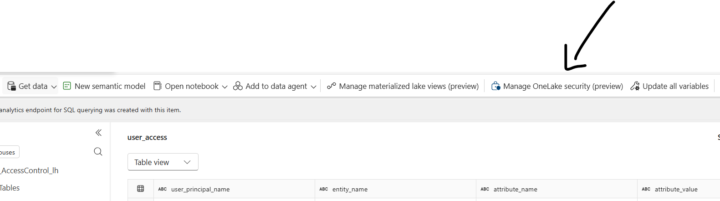
0 likes • 18d
@Will Needham thanks for this. So can you recommend what approach shall I take it or how shall i set this up? I am keen for object level, column level and row level. Because this will also affect semantic model security (I guess!)
0 likes • 18d
@Will Needham Thanks for the heads up. Just as in interest, how are people going live / in PROD with Fabric without security features for OLS / CLS / RLS? I will play around with SQL End point to see its behaviour and I will update the architecture team about Q1 2026 .
Jan 13 •
Accdb(Access database data) in Lakehouse
Hi Everyone a quick question has anyone worked with accdb data in lakehouse in fabric. How where you able to extract this data into tables.
1 like • 26d
@Nneka Akpoviri I personally have not see access db option to bring the data directly. Have you checked DF has any options? Otherwise you can bring it to the storage account first and then you are open to use that in various options e.g. Fabric
Jan 12 •
Reuse Fabric Code Cross Worksapce
I have silver layer fabric workspace which has numerous notebooks under folder called "common". e.g one of the notebook is called Env_Config which basically identifies environment and then depending on environment, it does some basic variables configuration. Another notebook is called "shared functions" , a central notebook with all UDF. Now I am at the stage where I am working on gold layer where I need similar code to identify the environment and other basic configuration and shared functions. I am creating similar notebooks in gold because my understanding is, it is sounding like duplication but it is controlled duplication and seems fabric pattern. Am I right with above approach or are their any other alternatives or suggestions to avoid it?

Jan 5 •
Variable Libraries in Pipelines
Is it just me, or is managing variables in Microsoft Fabric pipelines a bit of a manual task right now? Currently, if we use Environment Variable Libraries, we have to manually "pull in" or define every single variable in the pipeline before we can actually use them. For example, if I am working on a ETL pipeline, I have to manually add: - Finance_DataFlowId - Finance_DestinationWorkspaceId - Finance_LakehouseId - Finance_LakehouseSQLEndpoint Now, imagine doing this for IT, Operations, and HR departments too. If I have 10 variables per department, my pipeline setup becomes very long and repetitive. What I’m thinking is - wouldn’t it be much more efficient if we could pull these dynamically? 💡 Ideally, I should be able to create a string dynamically (e.g., [DeptName]_DataFlowId) and have the pipeline fetch that specific value directly from the library at runtime. No more manual mapping for every single variable. Just one dynamic activity to fetch what we need based on the department or section we are processing. This would make ETL pipelines so much cleaner and easier to scale! What are your thoughts? Are you guys also facing this, or have you found a clever workaround using dynamic expressions?
1 like • Jan 9
@Vikas Khairnar I also think if you are planning to use pipeline approach to run the jobs then yes we have limited choice. But to avoid this, I am designing all the jobs in notebook which is helping me pass the config values directly in multiple areas. e.g. dynamically pickup the workspace id and lakehouse id then invoke that code based on that.
1-10 of 21