Activity
Mon
Wed
Fri
Sun
Jul
Aug
Sep
Oct
Nov
Dec
Jan
Feb
Mar
Apr
May
Jun
What is this?
Less
More
Memberships
AI Automations by Jimi
421 members • $47/month
Imperium Academy™
66.1k members • Free
Business Builders Club
8k members • $33/month
Free Skool Course
70.8k members • Free
AI Automation Society
406.5k members • Free
AI Money Lab
82.9k members • Free
AI Automation Agency Hub
325.5k members • Free
AI Automation Base
801 members • Free
AI Automation (A-Z)
159.3k members • Free
50 contributions to AI Automation Society

1d •
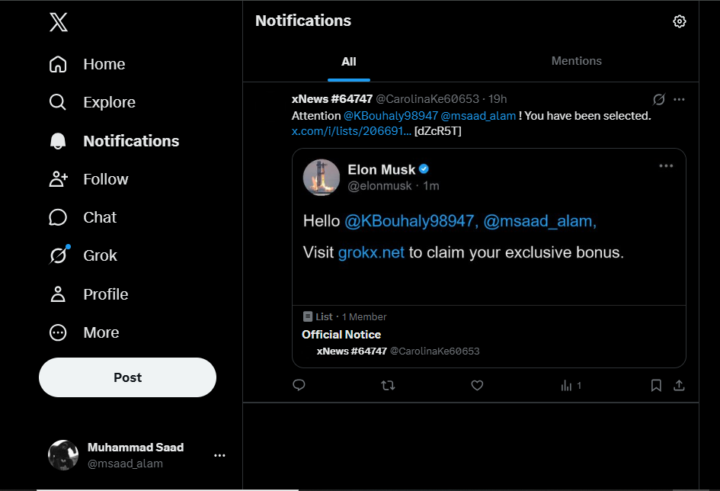
I have a unknown notification on X
Hey there friends, could any of you tell what this is, I dont know, its completely random, I saw it when I opened X today. The list url that is mentioned is this: https://x.com/i/lists/2066910929678107054 This is the account that mentioned me https://x.com/CarolinaKe60653 could anyone please tell me what this is and what should I do?
0 likes • 1d
@David Potter Thank you so much David, I appreciate it, but their website appears not to be of spam, the grokx.net. What is it?
1 like • 1d
@Shihab Sakif ok
12d •
I Replaced My Gmail Automation with a Free GitHub + AI Workflow 🚀
Over the last few days, I built an AI-powered Gmail assistant that runs entirely on GitHub Actions. The goal was simple: 📧 Let AI organize my inbox automatically, generate replies when needed, and keep everything structured without me constantly checking emails. What it does: ✅ Reads new unread emails ✅ Uses AI to understand the sender, subject, and email content ✅ Automatically applies labels ✅ Creates draft replies for emails that need a response ✅ Runs 24/7 in the cloud ✅ No VPS ✅ No server ✅ No Docker ✅ No monthly automation subscription The labels it uses: 📌 To Respond — Emails that genuinely need my reply 🤝 Collaboration — Partnerships, sponsorships, interviews, guest posts, affiliate opportunities, etc. 📅 Meeting — Scheduling, calls, consultations, and calendar-related emails 📢 Marketing — Newsletters, product updates, launches, and promotional content ❄️ Cold Email — Sales pitches, SEO offers, agency outreach, and unsolicited business emails 🔔 Notification — Security alerts, verification codes, account activity, receipts, and automated system emails ⚠️ Review Manually — Unclear emails, contracts, legal matters, invoices, or anything AI isn't confident about 🤖 AI Processed — Marks emails already handled by the workflow ✍️ AI Draft Created — Marks emails where the AI generated a draft reply The stack is surprisingly simple: • Python • Gmail API • Gemini API • GitHub Actions That's it. I actually expected this project to be much harder. Most of the work wasn't coding—it was figuring out Gmail OAuth, refining prompts, testing edge cases, and teaching the AI exactly how I wanted my inbox organized. Once that was done, the workflow became very straightforward and surprisingly reliable. The best part? It runs completely on GitHub Actions using GitHub's free minutes, so there are essentially no ongoing hosting costs for most personal use cases. If you'd like to build this for yourself, send me a DM on X (@msaad_alam) or if you dont have X send me a DM here on Skool or an email at contact@dnnengineer.com.
0 likes • 12d
@Victor Storm Thanks a lot
0 likes • 12d
@Ana Grace Thanks a lot, I really appreciate it
Jan 9 •
🚀 Built an AI Gmail Agent in n8n (Auto-Triage + Drafts Replies to Save Hours Daily)
Hey everyone 👋 I’m sharing a free, open-source AI email agent workflow I built in n8n for Gmail users — my very first workflow that I made entirely myself, without using any templates. 🔗 GitHub: https://github.com/m-saad125/ 🔗AI Agent: https://github.com/m-saad125/n8n-email-ai-agent What this workflow does This n8n workflow acts as an AI-powered email triage assistant: - 📥 Monitors incoming Gmail emails - 🧠 Uses an AI agent to classify each email into exactly one label - 🏷️ Automatically applies the correct Gmail label - ✍️ Drafts AI-generated replies only when a response is required - 🔄 Supports multiple AI models (easy to switch) Default labels (fully customizable) - To respond - FYI - Comment - Notification - Meeting Update - Awaiting reply - Collab Request - Marketing - Cold Email ⚠️ You must create these labels in Gmail first — or update the system prompt to use your own. Why I built this This workflow is for people and businesses who receive a large number of emails every day and don’t have time to read and respond to each one manually. - Inbox overload wastes hours daily - Some businesses even hire people just to manage email - Reading, sorting, and drafting replies takes real focus and time With this workflow, you simply activate it once, and the AI handles the triage and drafting automatically. You only review and send the important responses — everything else is organized for you. Bonus workflow 🎁 I also included a bonus n8n workflow in the same repository that automatically creates Gmail labels for you. - Useful if you have many labels and don’t want to create them manually - Just copy the provided Google Sheet - Paste it into the Google Sheets node - You can edit or rename labels easily before running it Built for learning and real use - Clean AI agent prompting - Strict classification logic - Easy to extend with Slack, Notion, or webhooks
1 like • 28d
@Josh Day How did you got the file? Do you have it
1 like • 25d
@Muskan Ahlawat Ok thanks Muskan

Apr 24 •
Which Agent or Desktop app like Claude for General use - Win 11
i'm just looking to rename files, create folders, reply to my youtube comments, looking for the best and affordable agent sitting on my window 11 doing task remotely.. Keeping up with all the recent news is challenging! I’ve heard about Open Claw, Henry? Gemma 4? New Kimi!? Agent Zero, and all the new models we can run for free, we're going crazy! 😯.... I have an old RTX 3090 with 24GB and 64GB RAM on Win 11... What can we run with that setup? any strong suggestion for a content creator, not for coding, but social media agent helper? 😆
1 like • Apr 25
@Aly Zya Do you want to pay for it or do you want a free option?
Apr 19 •
OpenCode!!?? Is it real
Hey everyone I just found a tool called opnecode just like Claude code. I want to know that is it real and just like Claude code and the best part is its completely free and open source. There are almost every model and the limits are pretty generous(that's what i heard in the video I saw). Anyway I would like @Nate Herk to check it and try it and make a video on it. I want to know if its worth using and installing or not. (This is the first post I wrote in my own words and I don't know if the english i used is okay or not. Usually i use ChatGPT to write my posts, anyway I just saw it and thought you guys can tell me what it is. As my laptop's storage is almost full I can't install and check it)
1 like • Apr 19
@Frank van Bokhorst Hmm you are right
1 like • Apr 19
@Aussie Mr Cyber Thanks for the info. Really helpful
1-10 of 50

@saad-alam-7606
I am a Web Developer and an n8n automation engineer.
Active 3h ago
Joined Oct 31, 2025
Pakistan
Powered by