Activity
Mon
Wed
Fri
Sun
Jun
Jul
Aug
Sep
Oct
Nov
Dec
Jan
Feb
Mar
Apr
May
What is this?
Less
More
Owned by Rob
Daily Startup Ideas You Can Launch in 24 Hours! Marketing Plans, Tutorials, PRD's, AI Prompts and Cloneable GitHub Repos to Vibe Code Apps Instantly.
Memberships
AI Automation Society
356k members • Free
Openclaw Founders
848 members • Free
AI for Special Needs (AISN)™
214 members • Free
AI Accelerator
18.5k members • Free
Business Ideas
893 members • Free
7 contributions to AI Daily Startup Ideas

Feb 19 •
Figma stock jumps 15% as company sees AI monetization accelerating growth
Figma shares surged 15% in extended trading on Wednesday after the design software maker reported robust results and quarterly guidance than Wall Street had predicted. Here’s how the company did in comparison with LSEG consensus: - Earnings per share: 8 cents adjusted vs. 7 cents expected - Revenue: $303.8 million vs. $293.15 million expected Figma’s revenue grew 40% year over year in the fourth quarter, according to a statement. The company had a net loss of $226.6 million, or 44 cents per share, compared with net income of $33.1 million, or 15 cents per share, in the fourth quarter of 2024. Management called for $315 million to $317 million in first-quarter revenue, which implies 38% growth. Analysts polled by LSEG were expecting $292 million. For 2026, Figma sees $100 million to $110 million in adjusted operating income on $1.366 billion to $1.374 billion in revenue, which would suggest 30% revenue growth. The LSEG revenue consensus was $1.29 billion. Lately, investors have become more concerned that generative artificial intelligence products could weaken the growth prospects of software companies. As of Wednesday’s close, Figma shares were down about 35% year to date, while the iShares Expanded Tech-Software Sector Exchange-Traded Fund has slipped 22%. The S&P 500 index has gained almost 1% in the same period. Customers are sticking around and spending more. Figma’s net dollar retention from clients contributing at least $10,000 in annualized revenue increased to 136% from 131% in the third quarter, outdoing internal expectations, Praveer Melwani, the company’s finance chief, said on a conference call with analysts. “If you look at software, not only is it not going away. There’s going to be way more of it than ever before,” Figma’s co-founder and CEO, Dylan Field, said in a Wednesday interview. But he said the market is “potentially increasingly competitive.”
0
0

Feb 19 •
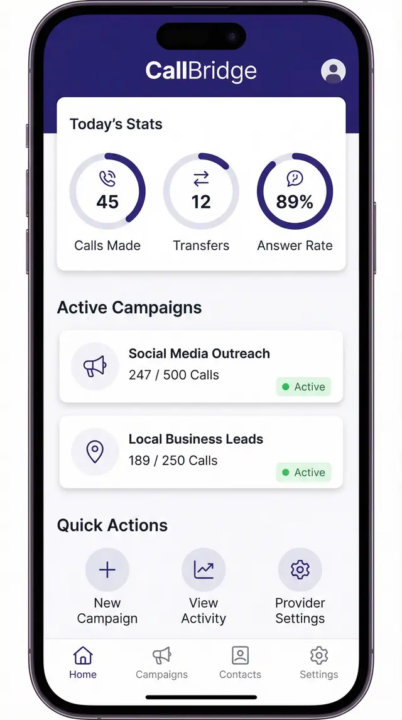
CallBridge – AI Outbound Sales Automation for Business Calls
ClipForge is a unified AI video creation platform that empowers creators to generate professional videos using the latest models from Google Veo, OpenAI Sora, ByteDance Seedance, and Kling AI—all in one place. ClipForge solves the fragmented AI video landscape. Instead of juggling multiple dashboards, API keys, and workflows, creators get a single Next.js application with prompt-to-video generation, built-in video editing, and optional autopilot automation. See Full Details with Project Plans: https://www.provibesai.com/post/5ffd9c43-8946-48b3-952f-0830f3f05efc Key Features - Multi-Model Generation: Choose from Google Veo (high fidelity, native audio), OpenAI Sora (cinematic, physics), ByteDance Seedance (multimodal, long-form), or Kling (cost-effective, storyboard). Each model has distinct strengths; users can compare outputs side-by-side. - Unified Video Editor: Remotion-powered editor displays generated clips back-to-back. Load clips from Supabase Storage via signed URLs. Trim, reorder, and render final MP4 exports. - Autopilot Automation: Schedule video creation on autopilot. Set prompts, model, and schedule (interval, daily, weekly, or cron). The system generates clips automatically and adds them to projects—perfect for recurring content needs. - Transparent Cost Display: See per-second pricing before generation. Support for user-owned API keys or app-managed credits via Stripe. Who It's For: Content creators, marketers, indie filmmakers, and agencies who need AI-generated video without the complexity of managing four separate provider dashboards.
0
0
Feb 12 •
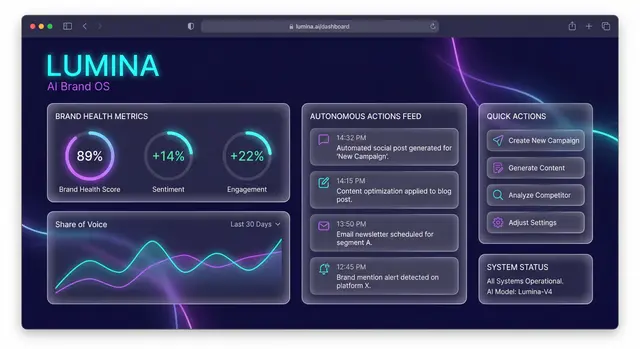
Lumina - The Autonomous Brand OS: Scaling Beyond Human Limits
Here is today's application idea from Pro Vibes AI. You can find full details and a step by step application outline by going to: https://www.provibesai.com/post/928d8195-601f-4a44-82d4-d5587643ebbc Lumina is an AI-first operating system for digital brands that scales your presence beyond human limits. Built for solopreneurs, creators, and small direct-to-consumer (D2C) brands, Lumina acts as your artificial CMO: it monitors global trends, creates on-brand content, and adapts your strategy in real time—so you can focus on your product while your brand runs on autopilot. Purpose Traditional brand tools force you to manually plan content, chase trends, and keep a consistent voice across channels. Lumina flips that model: it continuously watches market pulse, competitor moves, and audience sentiment, then proposes and executes a coherent brand strategy. The result is a single command center where your brand's health, reach, and creative output are visible at a glance—and where AI handles the heavy lifting of content creation and strategy adjustment. Whether you're launching a new brand or scaling an existing one, Lumina delivers autonomous brand management, content creation, and social media automation so you stay relevant without the daily grind. The app answers a critical need: professional, consistent brand presence and data-driven marketing decisions without hiring a full team or spending hours each week on manual tasks. Key Features Market Pulse Monitoring — Autonomous monitoring of global trends, viral content, and competitor shifts. Lumina keeps your brand aligned with what's working now, so you can capitalize on opportunities and avoid stale messaging. The system tracks signals across social platforms and the broader web, surfacing actionable insights so you're always one step ahead. Autonomous Asset Engine — Generates cross-platform creative assets—social posts, ad creatives, and visual content—that adhere to a consistent brand voice and guidelines. No more starting from a blank canvas or juggling multiple tools. Output is tailored to each channel (e.g., Instagram, Twitter, Meta) while maintaining a unified brand identity.
0
0
Feb 12 •
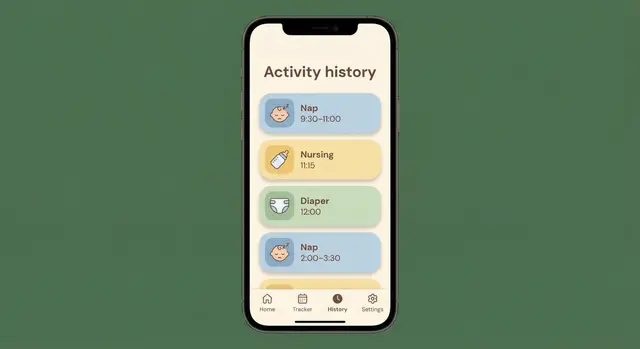
Baby Sleep Tracker – Parent-Focused Sleep & Schedule App
Here is today's Application Startup idea that you can start coding using the power of AI. Baby Sleep Tracker is a comprehensive baby sleep tracking application designed to help parents understand and improve their baby's sleep patterns. It serves as a central hub for logging daily activities (sleep, feedings, diapers, notes), generating age-appropriate sleep schedules, and analyzing trends through clear analytics. The app combines a warm, modern interface with science-backed tools so parents can build consistent routines and reduce guesswork. Key Features - Activity Tracker: Log naps and nighttime sleep (start, end, duration), nursing or formula feedings with amounts and times, diaper changes (wet, dirty, or both), and custom notes (tummy time, baths). Full activity history with edit and delete. All data persists in the database. - Personalized Sleep Schedule: Onboarding captures the baby's age, current sleep habits, and wake times. The app generates a daily schedule with suggested nap and bedtimes based on biologically appropriate wake windows. Schedules auto-update when the baby's birth date is set, with notifications for upcoming changes so parents can approve or customize. - Sounds and Guides Library: Audio player with white noise, lullabies, and nature sounds; loop and sleep timers for naps and nighttime. Sleep guides and articles tagged by age and topic, with step-by-step sleep training and tips for a sleep-friendly environment. - Analytics Dashboard: Graphs and charts for total sleep per day, night wakings, feeding duration and frequency. Responsive design for mobile viewing. - Multi-Caregiver Sharing: Invite partners, nannies, or grandparents via email. Set access (View Only, Edit, or Full). Data syncs in real time across devices. - Multiple Baby Profiles: Create and switch between profiles; each has name, age/date of birth, and photo. Who It's For New parents and caregivers who want one place to track sleep and routines, understand patterns, and follow evidence-based schedules. The app is built for daily use on web and mobile with a friendly, reassuring tone.
0
0
Jul '25 •
ServiceLocal: Local Service Booking Application - Detailed Briefing
ServiceLocal is a comprehensive, mobile-first booking and service management platform designed to address the critical pain points faced by local home service businesses. Targeting a global market projected to exceed $1 trillion by 2025, ServiceLocal empowers individual service providers across diverse sectors (HVAC, plumbing, cleaning, beauty, landscaping, etc.) with their own branded online presence. The platform aims to streamline scheduling, payments, and customer communication, offering a robust feature set, a modern technology stack, and a competitive monetization strategy focused on subscriptions and transaction fees. Its core value proposition lies in providing "their own booking platform, avoiding the complexity of double-sided marketplaces and accelerating monetization." 1. Application Overview and Business Opportunity ServiceLocal is positioned as a critical tool for the rapidly expanding local home services industry. The platform provides a "branded, mobile-first experience" for businesses to manage their operations efficiently. 1.1 Business Opportunity and Market Analysis The market for local home services is substantial and growing, with projections indicating it will "surpass $1 trillion globally by 2025." This growth is accompanied by a "strong consumer preference for mobile booking solutions." Key pain points identified in market research (from Reddit, Twitter, and Upwork) include: - Manual scheduling inefficiencies: Service providers struggle with unoptimized booking processes. - Limited online presence and booking capabilities: Many local businesses lack the digital infrastructure for online appointments. - Payment collection challenges: Difficulties in managing and processing payments. - Poor customer communication and follow-up: Inconsistent or inefficient communication with clients. ServiceLocal directly tackles these issues by offering a dedicated platform for businesses, rather than relying on complex marketplaces. This approach is intended to accelerate monetization for businesses by giving them direct control over their operations and customer relationships.
0
0

1-7 of 7
@rob-gelhausen-8466
I am an AI entrepreneur with the goal of helping people achieve their dreams, learn new skills and launch incredible startup businesses.
Active 74d ago
Joined Jul 3, 2025