Activity
Mon
Wed
Fri
Sun
Jul
Aug
Sep
Oct
Nov
Dec
Jan
Feb
Mar
Apr
May
What is this?
Less
More
Memberships
AI Automation Society Plus
3.7k members • $99/month
AI Automation Society
382.9k members • Free
Agentic Academy
1.4k members • $37/month
Chase AI+
1.3k members • $98/month
12 contributions to AI Automation Society

12h •
Most Operational Problems Are Smaller Than People Think
I’ve been working heavily around AI automation and operational systems lately, mainly focusing on ways businesses can reduce repetitive tasks, improve efficiency, and simplify workflows without making processes overly complicated. One thing I’ve learned pretty quickly ,The biggest improvements usually don’t come from the “craziest” AI setups. They come from fixing small bottlenecks that waste time every single day. Things like: - delayed follow-ups - scattered information - repetitive admin work - inconsistent communication - manual task handling Even small workflow automations can make a massive difference when they’re implemented correctly. I’m here to learn, connect, share ideas, and see what other people are building in the AI automation space. Curious, what’s one automation or workflow you’ve implemented that actually delivered real results?😗

2 likes • 12h
The best result I’ve had so far was automating a client billing / employee payroll report I run every two weeks. It used to take about 4 hours manually. I set it up to run on a schedule, tested it against old reports first so it could fail safely, and now it takes me about 30 minutes to review. The biggest lesson was that boring repeated workflows are usually better targets than the ones that actually get me excited, lol.
12h •
The Filter I’m Using for AI Overwhelm
Nate’s post about AI overwhelm hit because I’ve been having this issue all year. Now I try to filter anything that comes my way: 1. Do I only need to know this exists? ⤷ If yes, save it somewhere and move on. 2. Does this solve a problem I actually have right now? ⤷ If yes, it might be worth testing. ⤷ If no, save it and move on until I need it. 3. Can I point to a real workflow I already do repeatedly where this would save time or improve the output? ⤷ If yes, I experiment to see if I can turn it into, or incorporate it into, a skill/plugin. ⤷ If no, move on. The thing that made this click for me was a payroll/client billing report I run every two weeks. Manually it took me about 4 hours. I set up an agent to run it on a schedule, tested it against old reports first so it could fail safely, and now I mostly just review the output. So now, instead of checking what is new daily, I check weekly, and it really helps me stay organized. AI has stopped being a time sink and is now just a really useful tool. I go to my favorite sites/pages/channels once a week and check in to see what is new. And guess what... I’ll probably automate that next. Curious how other people are deciding what’s worth testing vs. what they just save for later.

💎
⭐
12h •
If you've ever felt "AI Overwhelm", please read this.
Every single person following AI right now is overwhelmed. Including me. I make videos about this stuff for a living and I still feel the pressure. New model drops. New framework. New feature update. It feels like every single day. But after hearing a ton of you guys bring up "AI overwhelm" week after week, I realized this: → There's a HUGE difference between knowing the "what" and knowing the "how." Staying aware does not mean testing everything. Most new tools and features only need the "what." You see the title. You understand what it does. You move on. The "how" is reserved for the stuff that solves a problem you actually have right now. So when something new drops, I ask myself one question: Does this solve a specific pain point I'm currently dealing with? If yes, I test it in a real scenario. I test it against something that actually matters to me. If no, I save the link. I mentally file it away. And I keep walking. Because here's the thing. Your north star is probably very different from mine. Part of my job is to experiment, form opinions, and share what I think is useful. So naturally I test a lot of stuff. But if your north star is building a business or getting better at your craft, then every shiny new tool might just be a distraction. The number one mistake I see people make is they try to learn everything. They watch every video. They test every tool. They jump to the next thing before the last thing even had a chance to work. And if I've contributed to your overwhelm with my daily uploads, I apologize. hehe. But a lot of people think that this ties directly into how you measure your day. Productivity is not how many hours you worked. It's how many meaningful outputs you created that actually moved the needle towards your north star. Someone can work 12 hours one day and feel insanely productive, but they were just watching tutorials and playing around with new tools. Meanwhile someone else sits down for 5 hours, ships the one thing that actually matters, and makes more progress.
3 likes • 12h
This is exactly the filter I’ve learned to start using recently. I used to treat every new tool like something I needed to understand deeply, but that just turns into another form of procrastination. Now I try to separate “I should know this exists” from “this solves a problem I actually have right now.” The second category is much smaller. For me, the useful test is whether I can point to a real workflow I already do repeatedly. If I can’t, I bank the information somewhere and move on. Otherwise I end up collecting tools instead of shipping anything.

20h •
Day 3/ 7 day challenge.
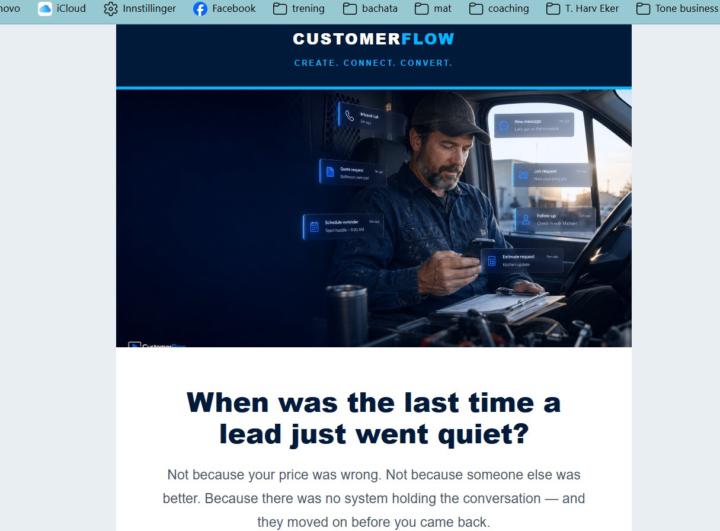
I built an emaildesigner and I managed to make it into a command, that is new and exciting. I changed the colorings to get the design more layered and pop more. i still want to work on the sales scripts, but I will come back to that. I learnt to move on. When I have learnt more, which I do every step here, it is easier to get the output I want.
1 like • 12h
Learning to move on is such a massive deal. In my experience, progress comes from setting myself (or my team members/agents) up to fail safely so that lessons can be learned and processes can be improved before the real launch. I struggle to avoid over-polishing it (my mantra is basically "it doesn't have to get done, it just has to be perfect"), but if I can avoid that instinct then I'm better focused and able to come back after a few more reps and I can see if the system is actually doing what I want. Turning it into a command is a solid step too. Once something becomes repeatable, it gets a lot easier to improve it instead of rebuilding from scratch every time. From a sales perspective (feel free to ignore if you're not looking for feedback), that is a great opening question. Getting people to think is the first step in getting them to engaged. Instead of following up with the "not because..." bit, I would make another suggestion. What you have now is how people really talk, but after you've got the reader's attention, it is time to lead with value. Tell them that you'll solve their problem, and the rest follows naturally from there. Good luck!

18h •
Built an AI System for Real Estate Businesses
Most real estate businesses still manage leads manually through: - WhatsApp - calls - spreadsheets - scattered CRMs Which usually leads to:❌ missed follow-ups❌ cold leads❌ slow responses❌ messy operations So I built an AI-powered system called EstateFlow AI to automate the workflow. What it does: ✅ AI analyzes incoming enquiries automatically ✅ Extracts: - budget - location - urgency - buyer intent ✅ AI-generated follow-up messages ✅ AI chatbot trained on live property data ✅ Voice AI assistant for customer enquiries ✅ Automated lead pipeline tracking ✅ Tenant + maintenance management ✅ Automated reminders for: - follow-ups - rent due - site visits ✅ Real-time analytics dashboard Main focus was combining:AI agents + automation + business workflows into one system. Still improving the automations, but the MVP is already live. Live :https://estateflowapp.vercel.app/ Would love feedback from other AI builders here 👇 Also open to building custom AI workflow systems for businesses/agencies.
2 likes • 12h
I have a friend who is a real estate agent, and I was just thinking about how useful this would be for him. Missed follow-ups, slow responses, scattered lead info, and no clean handoff between tools can easily create a lot of avoidable admin pain. I'm curious, how are you scoring your urgency and buyer intent for the agent?
1-10 of 12

@rich-gittings-1931
I run a nonprofit law firm called North Carolina Legal Services. I'm using AI to improve workflows/automations and help keep costs down.
Online now
Joined May 15, 2026
Powered by