Activity
Mon
Wed
Fri
Sun
Jul
Aug
Sep
Oct
Nov
Dec
Jan
Feb
Mar
Apr
May
Jun
What is this?
Less
More
Memberships
AI Automation Society Plus
3.8k members • $99/month
AI Agents Lab
2.4k members • Free
AI Systems for Human Content
2.6k members • Free
AI Automation Vault
17.1k members • Free
ambITious AI
2.6k members • Free
AI Income Lab
2.9k members • $29/month
AI Automation Base
364 members • Free
Vibe Code 2 Profit
195 members • Free
LiveKit Dashboard (AI Voice)
48 members • Free
26 contributions to AI Bits and Pieces

Mar 21 •
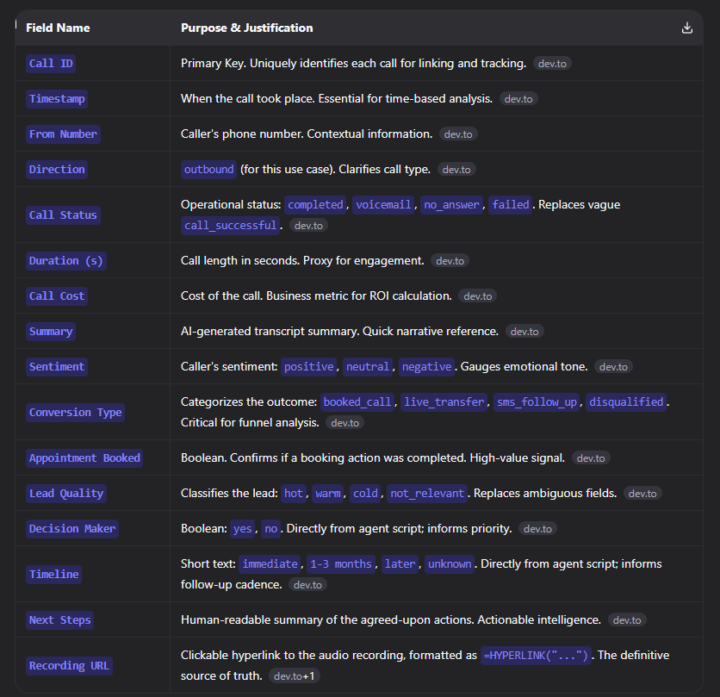
Sharing my notes on Retell AI Post-Call Analysis 📄
I know a lot of us are working on voice agents and trying to figure out the best way to analyze our calls. I spent some time researching and organizing my thoughts on this (Well using AI to do that), and I created a step-by-step guide (AI Again) on setting up a clean, useful Google Sheet for tracking lead outcomes. It’s just a collection of what worked for me ( AI gave me a whole blog so I thought I should share it) , written in a simple way. If you’re looking for a starting point or just want to compare notes, you’re welcome to use it! Hope it brings some value to your day. 😊
1 like • Mar 21
@Michael Wacht thank you
Feb 16 •
I feel like a kid in a candy store right now 🍬
Every day I’m learning, building, breaking things, fixing them, and realizing how much is actually possible. I don’t come from tech. I come from manual labor. I used to use Basic systems. Now I build them. Websites. Automations. Voice agents. Ideas that I never it was possible for me to create I’m not making money yet. But I’m building something more valuable first: capability. I can feel it all compounding 📈Every small win stacks. Every day I show up, I become someone my past self wouldn’t recognize. Now my focus is simple: less noise, more execution. One thing at a time. I’m enjoying the journey. And even when it feels like time is running out… I know I’m finally moving in the right direction.

1 like • Feb 18
@Michael Wacht You're completely right

🔥
Feb 17 •
🌀 The Quick Quip — Small Daily AI Wins Add Up
🌀 You don’t need to binge AI — you need to practice it. ✨ Why This Quip Matters Many people treat AI like a crash diet or bootcamp — intense for a day or two, then gone. The real power of AI isn’t in the big sprint; it’s in consistent, daily use. Small experiments, brief daily reps, and intentional practice build fluency over time. One better prompt. One practical use case. One improvement a day. That’s what turns AI from a tool into a capability. Consistent habits beat frantic pushes every time. 📹 Real Story of the Week — Video Insight 👉 https://youtu.be/c7zp3w-QX9U Advice for Programming Beginners: How to Get Started with AI Agents — a video by Lex Freidman and Peter Steinberger (creator of OpenClaw) on YouTube. In this video, Peter breaks down how beginners should approach AI: not by trying to master everything fast, but by building foundational habits first — start small, learn a bit each day, and integrate AI agents gradually into your workflows. Rather than aiming for perfection, the video emphasizes experimentation, iteration, and practical application as the keys to progress. Pro Tip: Consistent daily practice matters more than occasional deep dives.
1 like • Feb 18
@Michael Wacht I love it thank you 🔥👊🏾 That makes me feel better
🔥
Feb 12 •
🎉 500 Member Milestone — WOW! 🎉
We just crossed the 500-member mark here at AI Bits & Pieces. Wow! When I started this community, I simply felt that AI was becoming something bigger than tools or trends. It felt like true a shift in the way we would interact with technology — and I wanted to create a place where people could learn, explore, and apply it in a thoughtful way. What makes this milestone meaningful isn’t just the number. It’s the people. We have members who are: - Just beginning their AI journey - Deepening their prompting fluency - Building real systems and automations - Applying AI inside established businesses That range matters. It creates perspective. It creates better conversations. It creates learning in both directions. To everyone who has contributed, asked questions, shared insight, encouraged others, or quietly followed along — thank you. Your presence shapes this space. We’re going to continue refining the classroom, adding live sessions, and building clearer paths for each stage of the AI journey. I’m grateful you’re here. Thank you, @Michael Wacht
1 like • Feb 12
[attachment]
Jan 30 •
Week 4: The Power of Showing Up (Even When It’s Messy) 💪🎥
Every week, I sit down to document my progress not because I have everything figured out, but because I don’t. ✍️This week, I messed up. I trimmed my recording, And last the main transcription Luckily before that managed to download the original video. 😅 It wasn’t perfect the description is off but the essence is still there. And that’s what matters. 🌱 This is the reality of building something new: you’re not aiming for flawless execution; you’re building the muscle of consistency. 💥 Every time you show up, even when it’s imperfect, you strengthen your ability to keep moving forward. 🚀 In this week’s recording, I tested one of my AI voice systems. 🤖 It wasn’t smooth (Or I'm maybe just being hard on myself 😩) I wasn’t even sure it was connected. But I tried anyway. The AI answered calls, booked appointments, and responded naturally. It wasn’t replacing a human; it was amplifying what a human team could do removing repetitive tasks so we can focus on the creative, meaningful parts. 💡 That’s the bigger lesson. Technology isn’t here to take away human potential it’s here to magnify it. The AI handled the details; I handled the direction. Together, we moved closer to better workflow and better work. ⚙️✨ And that’s what this journal is really about: learning in motion. Week after week, mistake after mistake, win after win the point isn’t perfection. It’s momentum. 🔁 Next week is Week 5. 🚀 We’ll push again, experiment again, and refine again. Progress doesn’t always look like success. Sometimes it just looks like showing up, pressing “record,” and giving it one more shot. 🎬🔥 Let’s keep going. 🙌

0 likes • Jan 30
@Clayton Raney good and you?
0 likes • Jan 31
@Clayton Raney Let's keep growing
1-10 of 26

@reynoso-anubis-8987
I'm 38 years old, a proud parent of three amazing kids. I was born and raised in Saint Martin, and now I live in the Netherlands.
Active 16h ago
Joined Sep 16, 2025
Powered by