Activity
Mon
Wed
Fri
Sun
Sep
Oct
Nov
Dec
Jan
Feb
Mar
Apr
May
Jun
Jul
Aug
What is this?
Less
More
Owned by Rayna
Gentle tools, grounding, and warm support for introverts, empaths, sensitive souls, and creatives. 💛✨
Manifestation Mastery
227 members • $9/month
🎙️Skool Summit Stage🎙️
981 members • Free
Soul Aligned Summits
50 members • Free
Skool Scale Camp
5.8k members • Free
SkoolKit | Skool CRM Toolkit
451 members • $2/month
The Live Event Studio
642 members • $99/year
Tech Mastery For Entrepreneurs
646 members • Free
Fix Your Funk
296 members • $9/month
Untamed Queen Academy 👑
80 members • Free
8 contributions to Skool Extensions 🧩

🔥
8d •
Advanced Lightbox
𝗔𝗱𝘃𝗮𝗻𝗰𝗲𝗱 𝗟𝗶𝗴𝗵𝘁𝗯𝗼𝘅 — 𝗘𝘃𝗲𝗿𝘆 𝗶𝗺𝗮𝗴𝗲 𝗶𝗻 𝘁𝗵𝗲 𝗽𝗼𝘀𝘁, 𝗼𝗻𝗲 𝗰𝗹𝗶𝗰𝗸 𝗮𝘄𝗮𝘆 Click an image in a post and Skool shows you that one image, alone. A post with six photos means closing the preview and clicking the next tile, six times over. This feature grows Skool's own preview a thumbnail strip along the bottom: every image and video of the post side by side, videos marked with a play badge, the one you are looking at highlighted. A click jumps straight to it. Images zoom now. The wheel zooms towards the pointer, so the detail you are aiming at stays under the cursor instead of drifting off screen; a double-click goes to 2.5x and back; and while you are zoomed in, dragging moves the crop around. A small control pill sits above the image with a minus, the current level and a plus — and the level itself is a button that takes you back to 100%. Dragging an unzoomed image sideways flips to the next or previous medium, the same way you would swipe through photos on a phone. Pull far enough and it changes; let go too early and the image springs back, so a stray drag never costs you your place. The same strip and the same zoom work in the extension's own gallery — the one that opens from a chat image or a group chat. Both lightboxes behave alike, so there is nothing to relearn depending on where you clicked. Advanced Lightbox is free for everyone. --- 𝗔𝗱𝘃𝗮𝗻𝗰𝗲𝗱 𝗟𝗶𝗴𝗵𝘁𝗯𝗼𝘅 — 𝗝𝗲𝗱𝗲𝘀 𝗕𝗶𝗹𝗱 𝗱𝗲𝘀 𝗕𝗲𝗶𝘁𝗿𝗮𝗴𝘀 𝗲𝗶𝗻𝗲𝗻 𝗞𝗹𝗶𝗰𝗸 𝗲𝗻𝘁𝗳𝗲𝗿𝗻𝘁 Klick ein Bild in einem Beitrag an, und Skool zeigt dir genau dieses eine. Bei einem Beitrag mit sechs Fotos heißt das: schließen, nächste Kachel anklicken, sechsmal. Dieses Feature gibt Skools eigener Vorschau eine Vorschaubild-Leiste am unteren Rand: alle Bilder und Videos des Beitrags nebeneinander, Videos mit Play-Plakette, das gerade gezeigte hervorgehoben. Ein Klick springt direkt dorthin. Bilder lassen sich jetzt zoomen. Das Mausrad zoomt auf den Zeiger zu — das Detail, das du anvisierst, bleibt also unter dem Cursor, statt aus dem Bild zu wandern; ein Doppelklick geht auf 2,5x und wieder zurück; und solange du herangezoomt bist, verschiebt Ziehen den Ausschnitt. Über dem Bild sitzt eine kleine Bedienpille mit Minus, aktueller Stufe und Plus — und die Stufe selbst ist der Knopf zurück auf 100 %.


🔥
6 likes • 8d
@Kimberly Armatys Thanks so much! 💕
🔥
Mar 30 •
Course Overview (Premium Feature 👑)
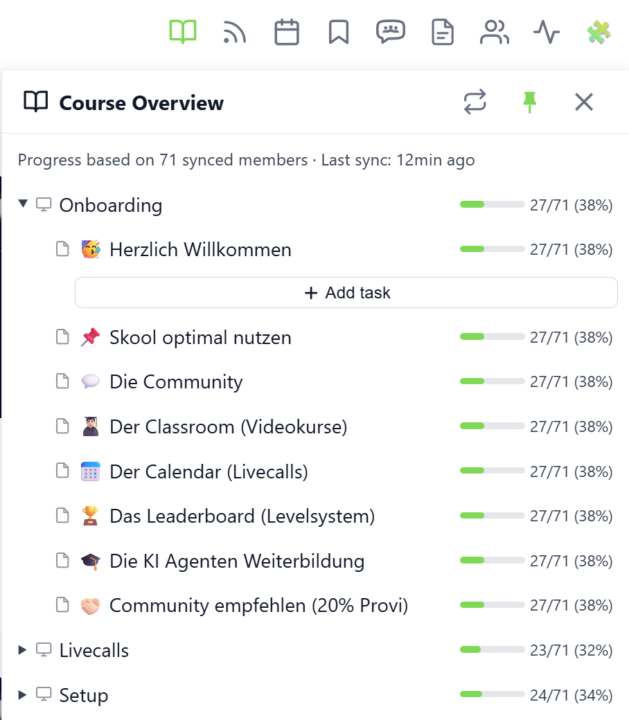
𝗖𝗼𝘂𝗿𝘀𝗲 𝗢𝘃𝗲𝗿𝘃𝗶𝗲𝘄 — 𝗬𝗼𝘂𝗿 𝗘𝗻𝘁𝗶𝗿𝗲 𝗖𝗹𝗮𝘀𝘀𝗿𝗼𝗼𝗺 𝗦𝘁𝗿𝘂𝗰𝘁𝘂𝗿𝗲 𝗮𝘁 𝗮 𝗚𝗹𝗮𝗻𝗰𝗲 Managing a Skool classroom with multiple modules, folders, and pages means a lot of clicking and scrolling to understand the full picture. Course Overview adds a dedicated sidebar panel that shows your complete course structure as an expandable tree — every module, every folder, every page — without leaving the page you're on. Click the book icon in your toolbar to open the panel. Each module shows as a collapsible row with a folder icon for subfolders and page icons for individual lessons. Click any module to expand it and reveal its nested content, loaded directly from Skool's data. The tree remembers which modules you've expanded, so your view stays consistent as you navigate. The real power comes from the completion stats. If you've synced your members' course progress, each module displays a green progress bar showing what percentage of your members have started it. Hover over the bar to see member names, or click it to open a popup with the full list — complete with avatars, tags, and pipeline status. A note at the bottom shows how many synced members the percentages are based on. Hit the refresh button to reload the course structure or update completion stats. The panel respects the 24-hour sync cooldown and shows when the next sync is available. You can pin the panel to keep it open while you browse, resize it by dragging the left edge, or close it when you're done. Course Overview is available for admins and owners only, and works on any page within your community. The feature can be toggled in the Toolkit Settings under the Admin section. --- 𝗞𝘂𝗿𝘀ü𝗯𝗲𝗿𝘀𝗶𝗰𝗵𝘁 — 𝗗𝗲𝗶𝗻𝗲 𝗴𝗲𝘀𝗮𝗺𝘁𝗲 𝗖𝗹𝗮𝘀𝘀𝗿𝗼𝗼𝗺-𝗦𝘁𝗿𝘂𝗸𝘁𝘂𝗿 𝗮𝘂𝗳 𝗲𝗶𝗻𝗲𝗻 𝗕𝗹𝗶𝗰𝗸 Eine Skool-Classroom mit mehreren Modulen, Ordnern und Seiten zu verwalten bedeutet viel Klicken und Scrollen, um das Gesamtbild zu verstehen. Die Kursübersicht fügt ein eigenes Sidebar-Panel hinzu, das deine komplette Kursstruktur als aufklappbaren Baum zeigt — jedes Modul, jeden Ordner, jede Seite — ohne die aktuelle Seite zu verlassen.
🔥
2 likes • 10d
@Kimberly Armatys Nice! I am on Standard, though. 🧩
🔥
Mar 13 •
Copy to Module (VIP Feature 💎)
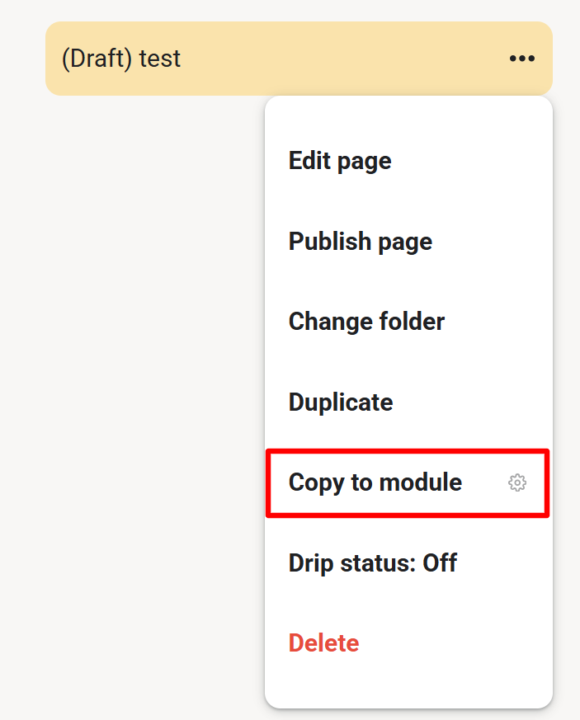
𝗖𝗼𝗽𝘆 𝘁𝗼 𝗠𝗼𝗱𝘂𝗹𝗲 — 𝗗𝘂𝗽𝗹𝗶𝗰𝗮𝘁𝗲 𝗟𝗲𝘀𝘀𝗼𝗻𝘀 𝗔𝗰𝗿𝗼𝘀𝘀 𝗠𝗼𝗱𝘂𝗹𝗲𝘀 As a community admin, sometimes you need the same lesson in multiple modules — for a "Best Of" collection, restructuring your course, or making content available in different contexts. Copy to Module lets you duplicate any lesson (including its video) into another module with just a few clicks. Open any lesson's 3-dot menu and select "Copy to module". A dialog appears where you choose the target module from a dropdown. Click "Copy" and the extension handles the rest — duplicating the page content, preserving the video, and placing it in your chosen module. Once done, you're automatically redirected to the new copy. No more manually recreating lessons or losing video associations when reorganizing your course content. --- 𝗜𝗻 𝗠𝗼𝗱𝘂𝗹 𝗸𝗼𝗽𝗶𝗲𝗿𝗲𝗻 — 𝗟𝗲𝗸𝘁𝗶𝗼𝗻𝗲𝗻 𝘇𝘄𝗶𝘀𝗰𝗵𝗲𝗻 𝗠𝗼𝗱𝘂𝗹𝗲𝗻 𝗱𝘂𝗽𝗹𝗶𝘇𝗶𝗲𝗿𝗲𝗻 Als Community-Admin brauchst du manchmal die gleiche Lektion in mehreren Modulen — für eine "Best Of"-Sammlung, eine Kurs-Umstrukturierung oder um Inhalte in verschiedenen Kontexten verfügbar zu machen. Copy to Module lässt dich jede Lektion (inklusive Video) mit wenigen Klicks in ein anderes Modul duplizieren. Öffne das 3-Punkte-Menü einer beliebigen Lektion und wähle "In Modul kopieren". Ein Dialog erscheint, in dem du das Zielmodul aus einem Dropdown wählst. Klick auf "Kopieren" und die Extension erledigt den Rest — dupliziert den Seiteninhalt, behält das Video bei und platziert alles in deinem gewählten Modul. Anschließend wirst du automatisch zur neuen Kopie weitergeleitet. Kein manuelles Neuerstellen von Lektionen mehr und kein Verlust von Video-Verknüpfungen beim Reorganisieren deiner Kursinhalte.
🔥
3 likes • 10d
@Kimberly Armatys Looks awesome! Says this is a VIP feature, though. I think I am on the Standard tier.
🔥
Jun 19 •
🔥 Moderator #2 Found!
Looks like @Kimberly Armatys won't be alone for long. I've now found a second moderator for the community! Please give a warm welcome to @Kristine Alise 👇🏼 Together, they'll help create more engagement, discussions, ideas, and activities to make this community even better. I'm excited to see what we'll build together and what will emerge from this community in the months ahead. 🚀

🔥
2 likes • Jun 23
Welcome @Kristine Alise
🔥
1 like • Jul 7
@Kristine Alise
🔥
Mar 10 •
🧩 Skool Extensions starting
skool-extensions.com I’m officially releasing my Skool Extensions! 🥳 Install the extension, give me your feedback and ideas, and spread the word! --- Hiermit veröffentliche ich offiziell meine Skool Chrome Extension 🥳 Installier dir die Extension, geb mir Feedback und Ideen und erzählt es weiter.

🔥
5 likes • Jul 5
@Wendy Lee-Chu Welcome! So glad you decided to join.
1-8 of 8

🔥
@rayna-scott
Helping introverts, empaths, and creatives find calm, clarity, and their next step. 💛 Join "Glowing Mystic Hub" below. 👇🏼
Active 1h ago
Joined Mar 24, 2026
INFJ
Vancouver, BC Canada
Powered by