Activity
Mon
Wed
Fri
Sun
Jan
Feb
Mar
Apr
May
Jun
Jul
Aug
Sep
Oct
Nov
What is this?
Less
More
Memberships
Pay Per Call Academy
1k members • Free
Local Sites Pro
389 members • Free
11 contributions to Pay Per Call Academy


0 likes • Jun 16
yes

Jun 13 •
Dynadot $7 Unlimited .com Domains
If anyone needs to stock up on domains. "We want to celebrate this huge milestone with a flash sale. Register all the .COM domains you desire for only $7! Promo code: LUCKY7COM Offer expires 6/17/2025 23:59 UTC." Source https://x.com/Dynadot/status/1932517094769188884 Register here https://www.dynadot.com/domain/com
0 likes • Jun 13
Trusted?

Jun 13 •
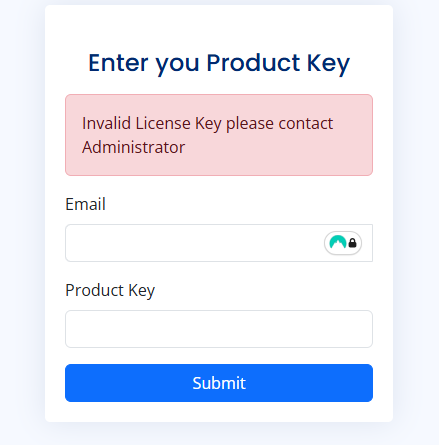
Anyone Else Facing Login Issues with FB Tools After Restart?
When I shut down my computer and start it again, I follow these steps: Step 1: I open the tool (black box interface). Step 2: I visit http://127.0.0.1:8005/login/ Step 3: I enter my correct email and password, but I keep getting a "wrong login access" error.I’ve tried multiple times with the correct credentials, but the issue persists. As a result, I go back to http://127.0.0.1:8005 and register again — but doing so causes me to lose all my previous work.
0 likes • Jun 13
Yes same here
Jun 12 •
How to Install the FB Comment Tool
Hi, We made a much easier way to get the FB Comment Tool up and running on your PC. I will not work on Windows 7. After you receive your email with your license key and password, please follow these steps: 1) Download this exe file: https://drive.google.com/file/d/16R8uNCVx-I5aLAGccNhEowISUwIXCW3M/view?usp=sharing 2) After downloading, run the file. A black box will open with nothing inside. 3) Then open a browser and go to http://127.0.0.1:8005/ 4) You will be prompted to put in your email and license key. 5) Next enter your name and password that we provided in the email. 6) Login ---------------------------------------------------------------------------------------------------------------------------------------------------------------------- The Customer Portal is a desktop application (.exe file) that customers install on their machines. After installation, customers receive an activation key from the admin to access the portal. - Once activated, customers can: - Add and manage Facebook user accounts. - Define search keywords and associate comments with each keyword. - Search Keywords: Define keywords that are used by the Facebook scraper to identify relevant posts. - Comments: Manage and assign comments associated with specific search keywords. - Facebook Users: Add and manage Facebook accounts used to log in and post comments on keyword-related posts. - Activity Logs: Track all activities performed by the system, including screenshots of the posts where comments have been made. - Automation via Scraper -Our automated scraper leverages the Facebook accounts, search keywords, and associated comments provided by the customer to: - Search for relevant Facebook posts based on the defined keywords. - Automatically post the assigned comments on the matched posts using the configured Facebook accounts.
1 like • Jun 12
Any alternative for mac users ☹️☹️
1 like • Jun 12
@Oliver Sk thanks 🙏
Jun 11 •
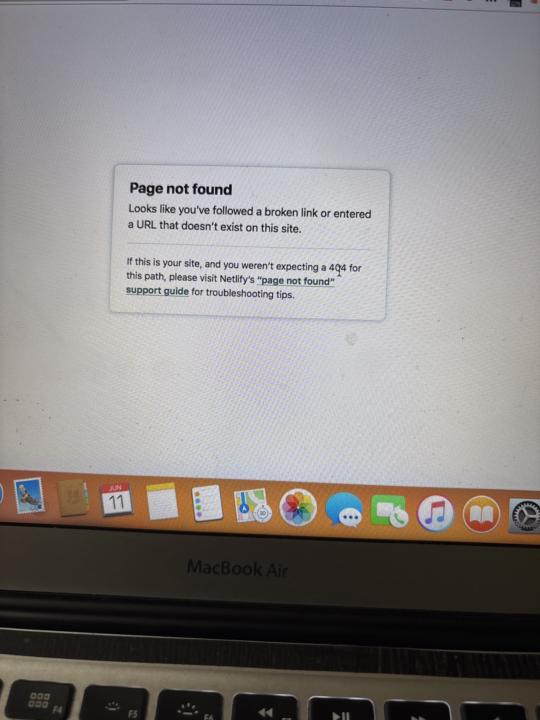
Netlify error
I uploaded my script on netlify through manual. After manual deploy when I click on url it was getting this error someone please help me
0 likes • Jun 12
Okay let me try now
0 likes • Jun 12
@Gitesh Singla thanks bro it’s working now
1-10 of 11

Active 12h ago
Joined Oct 27, 2025
Powered by