Activity
Mon
Wed
Fri
Sun
Nov
Dec
Jan
Feb
Mar
Apr
May
Jun
Jul
Aug
Sep
Oct
What is this?
Less
More
Owned by Peter
Creators Hub — Build • Learn • Earn Build a clean brand and launch a digital product
InsideOut School: Learn plant-based living with classes, cooking demos, evidence-based lessons, and weekly Q&As. Friendly, local, practical.
AI Automation Society
473.6k
Free
NextGen AI
64.2k
Free
AI Workshop Lite
70.5k
Free
PURE ENERGY CHEFS
43
Free
Skool Course
36.6k
1.0
$29/m
AI Video Bootcamp
29.7k
4.9
$9/m
AI Profits
29k
4.3
Free
Template Skool
3.6k
5.0
$39/m
Creatives On The Go
246
Free
58 contributions to Creators-hub
Sep 20 •
SOMETHING FREE FOR THE PHOTOGRAPHERS AND CREATORS
While the new training is being created, here’s something you can try now. I built the Photographers’ Clipboard as a practical planning and production tool for photographers and creators. It brings your notes, moodboards, checklists, weather, available light and AI-assisted shoot preparation together in one working place. The idea is to make planning a shoot clearer and stop important details from disappearing through messages, scraps of paper and six different apps. You can try the complete Photographer’s Clipboard free for 48 hours. You don’t need to enter any card details. Start your free trial here: https://photographers-clipboard.vercel.app/ You can also read more about it here: https://www.petertrainerphotography.com/photography-resources/ If you test it, please tell me what you find useful, what is confusing and what you think it still needs. Real feedback from working photographers and creators is far more valuable than me guessing. Have a look and let me know what you think.
0
0

Sep 20 •
WELCOME TO THE CREATORS HUB
We’ve just had another six or seven people join, so first of all, thank you and welcome. You’ll notice there aren’t many videos in the classroom yet. Please bear with me because there’s a lot coming. The community is free at the moment because I want to build it around what people genuinely need. I’d rather hear from you first than fill it with hours of material nobody asked for. I’ve worked across photography, video, graphic design, branding, websites and creative business for decades. AI has changed how I now use many of those skills, and I’ll be sharing practical ways to use it without all the usual hype. Some of the subjects coming include: - Using AI for real creative work - Canva and Adobe Photoshop - Graphic design and branding - Web design and building your own website - Photography, video and content creation - The tools worth using and the ones not worth paying for - Turning creative skills into something that can earn an income I’ve recently finished rebuilding my Peter Trainer Photography website. Have a look because it will give you a much better idea of who I am, what I’ve done and the different areas I work across: https://www.petertrainerphotography.com/ The main idea behind this community is simple: learn and earn. When the community eventually becomes paid, the people supporting it during this founding stage will be offered a special Founders price. Once you take up that price, it will stay the same while your membership remains active. I’m also working on the referral side. Once that is properly established, members will be able to recommend the community and earn a commission when someone joins through them. You’ll be able to learn something useful and potentially earn while helping the community grow. For now, please jump into the conversation and introduce yourself. Tell me what you do, what you’d most like to learn and what is currently holding you back. Your answers will help decide which videos and training I create first.
0
0

Mar 16 •
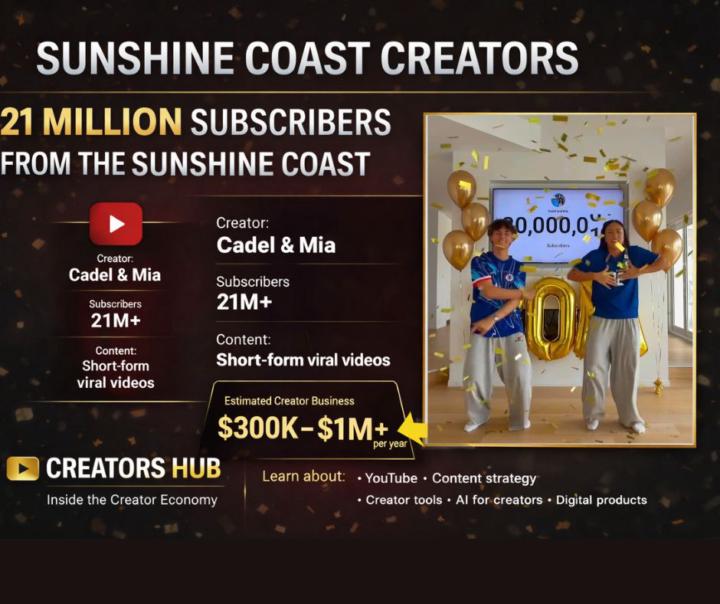
YOUTUBE CREATOR PROFILE SERIES Who Are Cadel & Mia?
Episode 1 – The Viral Couple From Australia: Cadel & Mia For the first creator profile in this new series, I wanted to start close to home. Right here in Australia. Over the past few years a young creator couple — Cadel Ryan and Mia Van Haarlem — have built one of the fastest growing social media audiences in the country. Their YouTube channel: https://www.youtube.com/@CadelandMia At the time of writing this, the channel has tens of millions of subscribers and billions of views, placing them among the most watched creator channels in Australia. What makes their story even more fascinating is how quickly their audience grew. Who Are Cadel & Mia? Cadel Ryan is an Australian creator who originally gained attention through short-form viral videos and dance clips. He was born November 16, 2006, meaning he was still very young when his online audience began growing rapidly. Mia Van Haarlem is also a dancer and social media creator who built a following through dance and lifestyle videos before the couple channel launched. Eventually the two began appearing in videos together and discovered something important: Couple content performs extremely well online. How Their Channel Started Like many modern creators, their growth didn’t start on YouTube alone. Their content developed through platforms such as: TikTok • Instagram • short-form video apps When they began posting similar content to YouTube Shorts, their growth accelerated dramatically. Their Content Style Most of their videos are short. Usually between 10 and 30 seconds. But the format is deliberate. Their videos typically follow a pattern: 1️⃣ A relatable situation 2️⃣ A funny or emotional moment 3️⃣ A reaction or dance 4️⃣ A looping ending This structure works extremely well with modern algorithms. Many of their clips reach millions of views, and some have reached tens of millions. Why Their Story Is Interesting What makes channels like this fascinating is that they represent a completely new type of media.
0
0
Mar 10 •
Ever wondered how people are actually making money online today?
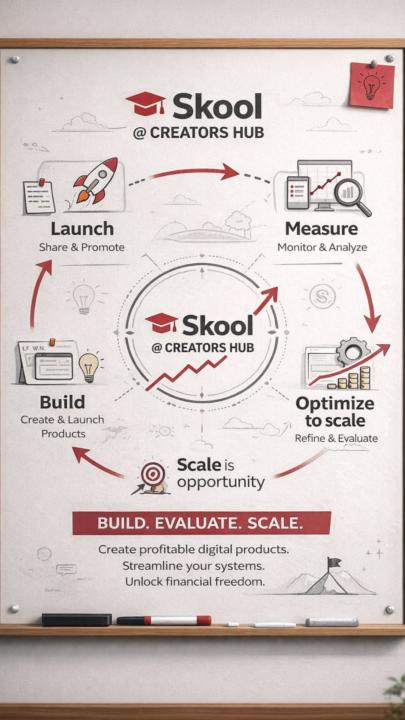
Ever wondered how people are actually making money online today? Not by guessing. Not by chasing the next shiny object. But by learning, building, and sharing what they discover. That’s exactly what I’ve been doing inside Creators Hub on SKOOL. At first I was the guy sitting there thinking… “How do people even do this stuff?” Now I’m creating images, building ideas, learning AI tools, and sharing the journey while earning along the way. And the best part? You don’t need to be a tech genius. You just need curiosity and the willingness to learn. Inside the community you’ll discover things like: • how to use AI tools to create content • how to turn ideas into digital products • how to build an online brand • how creators are monetising their knowledge • and how sharing what you learn can become income What started as learning has quickly become something much bigger. A place for creators. A place for ideas. A place to grow. If you’re curious about what’s possible online right now, come take a look. 👇 Creators Hub at SKOOL (Insert link here) You might be surprised what you can build when you start learning the right things.
1
0

Jan 17 •
🚀 CREATORS HUB 2026 — START BEFORE YOU’RE READY
END OF FEBRUARY WE START. And right now, it’s free to join. If you’ve ever thought about: – selling digital products – Etsy – printables – print on demand – building a simple brand – or creating income online without overcomplicating everything This is where it begins. I’ve spent years doing this the hard way — overbuilding, overthinking, chasing perfection instead of progress. The truth? Simple works. Inside Creators Hub, we’re starting exactly where most people should: • clean branding (not busy, not flashy) • simple logos + colour choices • one clear product • one clear landing page I’ve already built what I call my number one landing page — not because it’s fancy, but because it works. That’s the mindset we’re teaching. 🧠 TOOLS (NO FLUFF) If you’re new, you don’t need 10 subscriptions. Most people will use: • Canva (free to start, paid when ready) • ChatGPT (my AI is named Echo) Canva alone replaces what used to cost $50–$100+ per month across multiple platforms. Design, layouts, brand kits, mockups — all in one place. AI helps with structure, clarity, and ideas — especially powerful for visual thinkers and dyslexic minds like mine. 📅 WHAT’S HAPPENING IN FEBRUARY As the videos go up, the value increases — and the price will increase too. Right now: ✔️ join free ✔️ get access early ✔️ grow with the platform We’ll cover: – Etsy foundations – digital products – printables – print on demand – Shopify (later) – and how to build without burning out This isn’t “get rich quick.” This is get started properly. If you’re brand new, all you need is: 📱 a phone (minimum) 📲 an iPad or 💻 laptop (recommended) 🧠 the decision to begin Join now, learn while it’s free, and build momentum before February kicks off. 👇 Link in comments
0
0
1-10 of 58
@peter-trainer-3658
Professional photographer, cinema photographer, designer @petertrainerphotography Instagram
Active 11h ago
Joined Aug 24, 2025
Noosa Heads